Introduction
A white-label driver app for last-mile delivery is a pre-built, brandable mobile application that lets delivery businesses manage task assignment, navigation, and proof of delivery under their own name, without building the technology from scratch. Last-mile delivery businesses are caught between two competing pressures: customers who expect real-time tracking and precise delivery windows, and the operational reality of driver turnover, rising fuel costs, and thin margins.
According to McKinsey, average parcel delivery speed accelerated by 40% between 2020 and 2023, yet on-time reliability remains a persistent concern. Separately, a FreightWaves survey found 67% of last-mile drivers had changed jobs within two years — a churn rate that makes driver-facing technology a direct retention issue, not just an operational one.
Building a proprietary driver app takes 6–12+ months and substantial engineering resources. Generic off-the-shelf apps offer none of the brand control or workflow flexibility operations teams actually need. White-label driver apps thread that needle: launch in weeks under your own brand, with full control over the workflows that matter to your operation.
This guide covers:
- What a white-label driver app is and how it fits into last-mile operations
- The features that separate adequate from genuinely useful
- A practical build vs. buy vs. white-label comparison
- Why the routing engine is the most important decision you'll make
- How to actually launch one
Key Takeaways
- A white-label driver app is a pre-built, brandable mobile application for managing driver-side last-mile operations
- Five capabilities are non-negotiable: dynamic task assignment, constraint-aware navigation, proof of delivery, real-time communication, and ETA broadcasting
- White-label outperforms both custom builds (too slow, too costly) and off-the-shelf tools (no brand control, poor operational fit)
- The routing engine underneath the app determines fuel costs, on-time rates, and stops per shift — choose carefully
- Most implementations launch in 4–8 weeks with the right integrations planned upfront
What Is a White-Label Driver App for Last-Mile Delivery?
A white-label driver app is a pre-built, customizable mobile application that businesses brand as their own to manage driver-side delivery operations. It handles task assignment, turn-by-turn navigation, proof of delivery capture, and real-time status updates: all without requiring the business to build that technology from scratch. This is also the category of tool people mean when they search for the best software for last mile delivery management, since the driver app is the operational core that dispatcher dashboards and tracking portals connect to.
What It Is (and Isn't)
This guide focuses on the operational, driver-facing side of last-mile logistics — not consumer ordering apps, marketplace storefronts, or aggregator platforms. A white-label driver app is the tool your drivers use on shift. Drivers use it on shift — customers never see it.
Where It Fits in the Delivery Stack
The driver app doesn't operate in isolation. It connects to:
- A dispatcher dashboard — where operations teams assign jobs, monitor routes, and handle exceptions
- A customer-facing tracking portal — where end customers receive ETA updates and delivery confirmations
- Backend systems — TMS, WMS, or fleet telematics platforms that feed orders and vehicle data into the app
Together, these form a complete delivery orchestration layer that runs under your brand, not a third party's.
Why Last-Mile Businesses Are Choosing White-Label Driver Apps
The Core Tension
Building a driver app in-house gives full control — but at serious cost. BCG research found that nearly half of global C-suite executives reported more than 30% of technology development projects came in over budget and late. For a 6–12 month build, that risk compounds quickly.
Each approach carries a distinct trade-off:
- Build in-house: Full control, but 6–12 month timelines with high over-budget risk
- Generic off-the-shelf: Faster to deploy, but no brand ownership, limited customization, and data flowing to a third-party platform
- White-label: Speed-to-market without surrendering brand control or operational data
Brand and Data Ownership
With a white-label solution, every driver interaction happens under your company's name. All operational data — delivery performance, driver behavior, route efficiency — stays within your systems, not a vendor's.
That data directly informs dispatch decisions, driver coaching, and SLA negotiations with customers. Routing it through a third-party platform means handing away a competitive asset.
The Scalability Argument
The global last-mile delivery market was estimated at $167 billion in 2025 and is projected to reach $348 billion by 2033, growing at roughly 10% annually. As delivery volumes scale, per-API-call pricing on off-the-shelf tools compounds fast. White-label apps configured with per-vehicle or per-order pricing absorb growth without costs spiraling unpredictably.
Must-Have Features in a White-Label Last-Mile Driver App
Not all driver apps are built the same. These are the features that actually move operational metrics.
Dynamic Task and Route Management
Drivers need jobs assigned dynamically based on their current location, vehicle type, and available shift time. Static route sheets printed at the start of a shift don't account for:
- Failed delivery attempts that need to be re-slotted
- New orders added mid-route
- Re-routes caused by traffic or road closures
The app should handle real-time re-sequencing automatically, pushing updated task lists to the driver without requiring dispatcher intervention for every change.
Constraint-Aware Turn-by-Turn Navigation
Consumer GPS apps (Google Maps, Apple Maps) find the fastest single path for a single vehicle. They have no awareness of your truck's weight, height restrictions, or the fact that a particular loading dock closes at 3 p.m.
Enterprise navigation for last-mile delivery needs to account for:
- Vehicle weight limits and low-clearance bridges
- Time windows per stop
- Access hours for commercial zones
- Road type restrictions
The US government's GPS.gov resource explicitly notes that consumer GPS devices do not warn drivers of restricted roads or low bridges — and federal penalties for failing to obey posted route restrictions can reach $11,000 per violation for companies.
NextBillion.ai's Navigation SDK handles truck-aware routing that accounts for vehicle dimensions, cargo type, and commercial road restrictions. It integrates into driver-facing applications on Android, iOS, and Flutter without requiring a separate navigation layer.
Proof of Delivery (POD) Capture
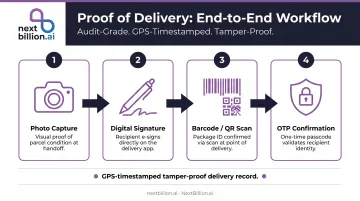
POD is the audit trail that protects both the business and the driver. A complete POD workflow includes:
- Photo capture at the door
- Digital signature collection
- Barcode or QR code scanning
- OTP confirmation for high-value deliveries
This reduces liability disputes, gives customers verifiable delivery records, and protects drivers from false claims. POD data tied to a GPS timestamp and delivery event creates a tamper-proof record.
Real-Time Two-Way Communication
Drivers encounter exceptions constantly — wrong addresses, locked gates, customers not home. They need to communicate with dispatchers without switching to personal devices.
In-app messaging or calling solves this and creates something else worth noting: a communication log tied to each specific delivery event. Over time, that log surfaces patterns — certain addresses always have access issues, certain time windows consistently fail — giving dispatchers concrete data to act on, not just driver complaints.
Live Status Updates and ETA Broadcasting
The app should automatically push status updates — en route, arriving, delivered — upstream to dispatchers and downstream to customers. Accurate ETAs reduce inbound "where's my package" calls and support SLA compliance.
NextBillion.ai's Live Tracking API provides real-time location accuracy up to 1 meter, with configurable geofence-based alerts that trigger status events automatically as drivers approach or leave delivery points.
Driver Performance and Earnings Visibility
According to a Scandit/Opinium survey of 1,200+ delivery drivers, 25% of last-mile drivers choose employers based on the scanning and tracking tools provided. This matters for operators asking how to become a last mile delivery driver or which courier app pays best, since the tools a company provides shape both a driver's efficiency and take-home earnings. Drivers who can see their completed tasks, earnings, and performance metrics in-app show measurably better retention and accountability.
For operations dealing with high turnover, deprioritizing this feature in favor of dispatcher-facing tools directly undermines the retention numbers that make everything else work.
Build In-House, Buy Off-the-Shelf, or White-Label?
The Three-Way Comparison
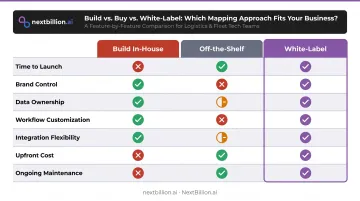
| Factor | Build In-House | Off-the-Shelf | White-Label |
|---|---|---|---|
| Time to launch | 6–12+ months | Days | 4–8 weeks |
| Brand control | Full | None | Full |
| Data ownership | Full | Limited/none | Full |
| Workflow customization | Full | Limited | High |
| Integration flexibility | Full | Limited | High |
| Upfront cost | High | Low | Medium |
| Ongoing maintenance | Your team | Vendor | Vendor |
The Hidden Costs of Building From Scratch
Businesses consistently underestimate what a custom driver app actually costs over three years:
- Ongoing infrastructure and server costs
- Map data licensing (Google Maps alone charges $25–$30 per 1,000 route optimization events after free tier)
- OS updates and security patches
- Engineering time diverted from core product work
- Rebuilding when OS APIs change
That list compounds quickly. Most engineering teams don't price in the rebuild cycles that come every 18–24 months when iOS or Android deprecates an API.
When White-Label Is the Right Choice
White-label makes sense when you need to:
- Launch a branded driver app in weeks, not quarters
- Own your operational data and customer relationships
- Scale delivery volumes without per-transaction fees eating into margins as order counts grow
- Integrate with your existing TMS, WMS, or telematics stack
The Risk of Off-the-Shelf for Growing Operations
White-label solves the customization problem — but it's worth understanding what the alternative actually costs you. Generic apps lock you into a vendor's roadmap, block enforcement of company-specific delivery rules, and rarely connect cleanly with fleet telematics platforms like Samsara, Geotab, or Motive. At 50 drivers that's manageable. At 500, you're either paying for workarounds or rebuilding anyway.
How the Routing Engine Makes or Breaks Your White-Label Driver App
The routing engine is the operational core of any driver app. Brand it however you want — if the routing is poor, driver hours, fuel costs, and on-time rates all suffer.
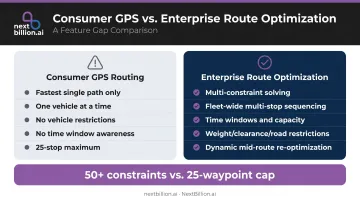
Consumer-Grade vs. Enterprise-Grade Routing
The gap is wider than most buyers expect.
Consumer GPS routing:
- Finds the fastest single path
- Optimizes for one vehicle at a time
- No vehicle-type restrictions
- No time window awareness
- 25-stop maximum (Google Maps Routes API limit)
Enterprise route optimization:
- Solves for dozens of simultaneous constraints
- Multi-stop sequencing across entire fleets
- Time windows, vehicle capacity, driver hours-of-service
- Weight limits, bridge clearances, road type restrictions
- Dynamic re-optimization mid-route
NextBillion.ai's Route Optimization API supports 50+ hard and soft constraints and a distance matrix up to 5,000 × 5,000 — compared to the 25-waypoint cap on Google's Routes API. For a fleet of 100 drivers with 30 stops each, that's the difference between true fleet-wide optimization and a rough approximation.
Dynamic Re-Optimization at Scale
Routes don't survive first contact with reality unchanged. Failed delivery attempts, new orders, road closures — the routing engine needs to handle mid-route changes in real time, not just at the start of a shift.
NextBillion.ai's platform handles this without pausing operations:
- Inserts new stops into ongoing routes with minimal re-optimization
- Re-sequences remaining stops after failed delivery attempts
- Processes up to 10,000 stops in a single API request
One customer manages 2,000 trips per day on the platform — generating close to 800,000 distance matrix calls per month.
Integration Bidirectionality
The routing engine embedded in a white-label driver app needs to talk to the rest of your stack in both directions:
- Inbound: Vehicle location from telematics, new orders from TMS/OMS
- Outbound: Optimized routes to driver apps, ETA updates to customer portals, completion events to dispatch dashboards
NextBillion.ai's Route Dispatch API handles this automatically: it pushes optimized routes to driver applications and fleet management systems, eliminating the manual handoff between operations and field. Native integrations with Geotab, Samsara, and Motive are included.
Steps to Launch a White-Label Driver App for Last-Mile Delivery
Implementation Phases
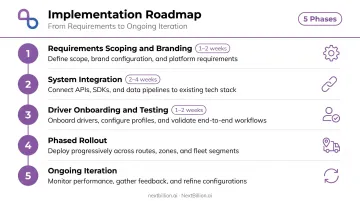
Most white-label deployments follow this sequence:
- Requirements scoping and branding configuration (1–2 weeks) — document delivery workflows, define custom rules, configure branding
- Integration with dispatch systems and telematics (2–4 weeks) — connect TMS/OMS for order ingestion, telematics for vehicle location, earnings systems for driver compensation
- Driver onboarding and testing (1–2 weeks) — sandbox testing with real routes, dispatcher training on exception handling
- Phased rollout — start with one zone or vehicle type before full deployment
- Ongoing iteration — feedback loop between drivers and operations to surface usability issues
NextBillion.ai's APIs can be tested and pushed to production in as little as one sprint cycle (roughly two weeks), with 24×7 hands-on support from solutions engineers available throughout every integration phase.
Integration Points to Plan Before Launch
Map these integration dependencies before the project kicks off:
- TMS or OMS — order ingestion and route triggers
- Fleet telematics — real-time vehicle location (Samsara, Geotab, Motive)
- Driver compensation systems — earnings and task completion data
- Customer notification systems — ETA and delivery status broadcasting
Post-Launch Operational Checklist
Once deployed, operational discipline determines whether the rollout holds. Run through these before expanding to full fleet coverage:
- Train drivers on POD workflows before day one — not during
- Establish KPI baselines: on-time rate, delivery attempts per hour, failed delivery rate
- Set up dispatcher protocols for exception handling
- Create a formal feedback channel for drivers to report app usability issues
- Review first-week data before expanding rollout
Frequently Asked Questions
How much does a white-label driver app cost?
White-label driver app costs vary by pricing model and customization scope. Licensing models typically range from a few hundred to several thousand dollars per month depending on fleet size. Custom integrations, telematics connections, and ongoing support add to the total — evaluate cost over a 3-year horizon, not just the monthly fee.
Who delivers last-mile delivery?
Last-mile delivery is carried out by company-owned driver fleets, gig or contracted drivers, regional courier networks, or hybrid models. The white-label driver app serves as the operational layer for whichever model a business runs. Regardless of model, drivers operating under a business's authority may fall under FMCSA hours-of-service and DOT rules, so the app should support duty-status logging and compliance checks alongside dispatch.
What features should a white-label driver app include for last-mile delivery?
The non-negotiables are dynamic task assignment, constraint-aware turn-by-turn navigation, proof of delivery capture (photo, signature, or OTP), real-time dispatcher communication, and live ETA broadcasting. Driver performance and earnings visibility are often overlooked but directly affect retention.
How long does it take to launch a white-label driver app?
Most white-label driver apps can be configured and launched in 4–8 weeks. The range depends primarily on how many integrations need to be built — a straightforward TMS connection is faster than connecting telematics, OMS, and a customer notification system at once.
Can a white-label driver app integrate with existing fleet management tools?
Yes. Well-built white-label driver apps support integration with fleet telematics platforms including Samsara, Geotab, and Motive, enabling real-time location accuracy and bidirectional route updates between the driver app and fleet dashboards. Beyond telematics, look for open APIs that connect to your TMS, OMS, and mapping or routing engine, since siloed integrations create data gaps that show up as missed ETAs and inaccurate proof-of-delivery records downstream.
What's the difference between a white-label driver app and a fully custom-built solution?
A white-label app uses a pre-built framework configured and branded for your business, cutting build time from months to weeks at a fraction of the cost. A custom-built solution is developed from scratch for complete control but requires significantly more time, budget, and long-term engineering investment, plus ongoing maintenance your team owns entirely.
What is the best software for last mile delivery management?
There is no single best platform for every business — the right choice depends on fleet size, delivery density, and existing tech stack. Look for software that combines route optimization, real-time tracking, proof of delivery, and driver communication in one system, with APIs to connect your TMS, OMS, and telematics. A white-label driver app paired with a routing engine covers most last-mile management needs without building from scratch.
How to become a last mile delivery driver?
Requirements vary by employer and vehicle type. Most companies require a valid driver's license, a clean driving record, and minimum age requirements set by the employer or state. Driving a commercial vehicle above certain weight thresholds may require a CDL under FMCSA rules. Independent contractor roles with courier or gig platforms typically require passing a background check and providing your own vehicle and insurance.