Demand for private infrastructure is growing. Gartner forecasts worldwide public cloud spending at $723 billion in 2025 and projects that 90% of organizations will adopt hybrid cloud through 2027 — meaning on-premise Kubernetes isn't the exception anymore. Compliance mandates (HIPAA, FedRAMP, PCI-DSS), data sovereignty requirements, and latency-sensitive workloads are all driving enterprises toward private infrastructure.
The challenge: there are 65 certified Kubernetes distributions listed on CNCF's conformance page, and most were designed with cloud environments in mind. Air-gapped networks, bare metal provisioning, and hardware lifecycle management are afterthoughts for many. This guide focuses on the distributions actually built — or well-suited — for on-premise realities.
Key Takeaways
- On-premise K8s removes cloud abstractions — teams own the control plane, etcd quorum, cert rotation, and hardware failure recovery
- Top distributions for on-prem: RKE2, Red Hat OpenShift, k0s, kubeadm/Kubespray, and K3s — each suited to different team sizes and security postures
- Key selection criteria: bare metal support, air-gapped install capability, security hardening (FIPS 140-2, DISA STIG), and bundled production add-ons
- On-prem clusters require explicit choices for load balancing (MetalLB), persistent storage (Rook/Ceph, Longhorn), and certificate management
What Makes On-Premise Kubernetes Deployments Unique
Cloud-managed Kubernetes abstracts away significant complexity. Move on-prem, and that complexity lands directly on your platform team. Yes, Kubernetes remains relevant for on-prem deployments going forward — hybrid and regulated environments still need a consistent orchestration layer, and on-prem clusters can be run locally on a single machine or lab hardware for testing before scaling to production nodes.
The Operational Burden Shift
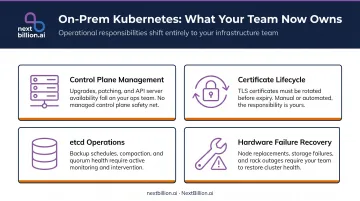
On your own hardware, you're responsible for:
- Control plane management — HA node topology (stacked or external etcd), quorum maintenance, and recovery when control-plane nodes fail
- Certificate lifecycle — kubeadm-managed certificates require explicit renewal; teams must track expirations and handle upgrade-time renewal behavior
- etcd operations — backups, compaction, and disaster recovery become team responsibilities, not cloud provider defaults
- Hardware failure recovery — no managed node pools to automatically replace failed machines
Add-Ons You Must Explicitly Choose
Cloud distributions bundle or abstract away components that on-prem clusters require as separate installation decisions:
| Component | On-Prem Tooling Options |
|---|---|
| Bare-metal load balancer | MetalLB, PureLB |
| Persistent storage | Rook/Ceph, Longhorn |
| TLS certificate management | cert-manager |
| CNI networking | Calico, Cilium, Flannel, Canal |
A 2024 arXiv paper comparing on-prem deployment options classifies these as "essential additional tools" — production requirements every team must address, regardless of which distribution they choose.
Security Requirements Specific to On-Prem
Three compliance requirements come up in virtually every on-prem deployment:
- Air-gapped installs — networks with no public internet access require all container images and binaries to be pre-downloaded and hosted internally
- FIPS 140-2 — federal and regulated environments require cryptographic modules validated under NIST standards
- DISA STIG — U.S. government deployments typically require distribution-level STIG compliance, not post-install hardening
Best Kubernetes Distributions for On-Premise Environments
The distributions below were evaluated on bare metal deployment capability, default security posture, production readiness out of the box, and enterprise support maturity — not cloud-centric features.
RKE2 (Rancher Government Solutions / SUSE)
RKE2 is purpose-built for security-critical and compliance-heavy on-prem environments. It tracks upstream Kubernetes closely, carries official DISA STIG certification (NIST Checklist ID 1040, published November 2022), and is the default choice for U.S. federal agencies deploying on private infrastructure.
What makes it stand out for on-prem:
- Built-in secrets encryption at rest (AES-CBC key generated automatically)
- FIPS 140-2 compliant binaries available out of the box
- Documented air-gapped installation path
- Bundled CNI options: Canal, Cilium, Calico, Flannel (with Multus as secondary)
- CIS Kubernetes Benchmark compliance from day one — no post-install hardening required
- Bundled Nginx ingress controller
| Attribute | Details |
|---|---|
| Best For | Security-critical, regulated, or U.S. government on-prem environments requiring FIPS and DISA STIG compliance |
| Key On-Prem Features | Air-gapped install, AES-CBC secrets encryption, etcd HA, bundled CNI options, DISA STIG certified |
| Licensing | Open source (Apache 2.0); enterprise support via SUSE Rancher subscription |
Red Hat OpenShift
OpenShift is less a Kubernetes distribution and more a full platform product. It supports bare metal IPI (Installer Provisioned Infrastructure) via BMC protocols including IPMI and Redfish — meaning it can provision and configure physical servers without manual OS installation.
What makes it stand out for on-prem:
- Node OS lifecycle managed via RHCOS (Red Hat Enterprise Linux CoreOS) and Ignition/MachineConfig — immutable, reproducible server configurations
- Pre-configured monitoring stack based on Prometheus and Alertmanager (read-only Grafana included)
- Built-in container registry via the Image Registry Operator
- CI/CD via OpenShift Pipelines (Tekton-based) and GitOps via Argo CD
- Persistent storage through OpenShift Data Foundation (Rook-Ceph based)
- HA required by default: three control-plane nodes minimum for production
Note: OKD is the free community upstream of OpenShift, based on Fedora CoreOS rather than RHCOS.
| Attribute | Details |
|---|---|
| Best For | Large enterprises needing a full platform — not just K8s — on-prem with long-term vendor support |
| Key On-Prem Features | Bare metal IPI, RHCOS node lifecycle, bundled monitoring/registry/CI-CD/storage, HA by default |
| Licensing | Commercial subscription (Red Hat); OKD is the free community upstream |
k0s (Mirantis)
k0s is a CNCF-certified, single-binary Kubernetes distribution from Mirantis with zero host OS dependencies beyond the kernel. It installs on x86_64, aarch64, and armv7l architectures without requiring a specific Linux distribution or pre-installed components.
What makes it stand out for on-prem:
- Single binary eliminates the dependency conflicts common in bare metal deployments
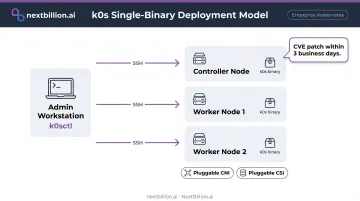
- k0sctl handles declarative cluster bootstrapping and upgrades over SSH — similar to Kubespray but significantly simpler
- Mirantis patches high-severity CVEs within three business days of upstream patch release
- MKE 4 (Mirantis Kubernetes Engine) is built on k0s, giving it a clear enterprise platform path
- Modular: CNI and CSI are pluggable, no forced opinions
| Attribute | Details |
|---|---|
| Best For | Teams wanting lightweight, declarative, reproducible on-prem clusters without heavy operational tooling |
| Key On-Prem Features | Single binary, k0sctl SSH-based lifecycle management, modular CNI/CSI, multi-arch support, rapid CVE SLA |
| Licensing | Open source (Apache 2.0); enterprise support via Mirantis subscription |
kubeadm + Kubespray
kubeadm is the official Kubernetes bootstrapping tool — intentionally un-opinionated. It initializes control-plane nodes, generates certificates, and joins workers. Everything else (CNI, storage, ingress, monitoring) is the administrator's explicit choice. Kubespray layers Ansible automation on top, enabling declarative, idempotent deployments across large node counts. Because kubeadm and Kubespray run on general-purpose Linux distributions, the underlying OS choice — RHEL, Ubuntu, or Debian — matters more here than with opinionated distributions that ship their own node OS.
What makes it stand out for on-prem:
- Zero vendor lock-in — every component is hand-selected
- Kubespray supports Flatcar, Debian, Ubuntu 22.04/24.04, CentOS Stream/RHEL 9/10, and Fedora 39
- Idempotent Ansible playbooks are safe to re-run — reliable for large bare metal refresh cycles
- Organizations integrating with proprietary hardware or existing on-prem tooling benefit most from full component control
The tradeoff is direct: this path demands deep Kubernetes internals knowledge. Teams must own CNI selection, HA etcd configuration, ingress setup, storage provisioning, and observability — none of it comes pre-wired.
| Attribute | Details |
|---|---|
| Best For | Experienced teams needing full control over every cluster component, or organizations building custom internal platforms |
| Key On-Prem Features | Official CNCF tooling, Ansible-driven declarative deployment, broad Linux distro support, pluggable CNI/CSI |
| Licensing | Fully open source (Apache 2.0); community-maintained, no commercial support |
K3s (Rancher / SUSE)
K3s packages all Kubernetes components into a single binary under 100 MB. It removes in-tree cloud provider integrations, uses SQLite as its default datastore (replacing etcd), and ships with Flannel, CoreDNS, Traefik ingress, and a local-path storage provisioner pre-bundled.
What makes it stand out for on-prem:
- Minimal resource requirements: server nodes need 2 cores and 2 GB RAM; agent nodes run on 512 MB RAM
- Operational from a single install command — fastest path to a running cluster
- ARM support makes it viable for IoT gateways, single-board computers, and edge hardware
- Suitable for remote offices, dev labs, and resource-constrained sites
Important caveat: SQLite is the default for single-server deployments only. Multi-node HA requires switching to embedded etcd or an external datastore (MySQL, PostgreSQL). Don't run SQLite in production HA configurations.
| Attribute | Details |
|---|---|
| Best For | Edge deployments, resource-constrained bare metal, development labs, or remote office on-prem environments |
| Key On-Prem Features | Sub-100 MB binary, bundled Flannel/CoreDNS/Traefik, SQLite or etcd backend, ARM support, minimal resource footprint |
| Licensing | Open source (Apache 2.0); enterprise support via SUSE Rancher subscription |
How to Choose the Right On-Premise Kubernetes Distribution
The most common mistake teams make: evaluating Kubernetes distributions on cloud-centric feature sets. AWS VPC CNI integration and managed node group support are irrelevant to on-prem decisions. The criteria that matter are specific to your hardware, security requirements, and team capacity.
Evaluation Criteria That Actually Matter On-Prem
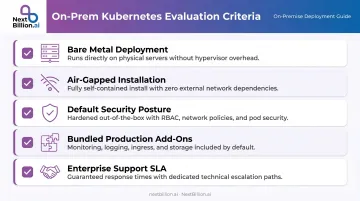
- Bare metal deployment capability: does it support your hardware provisioning model?
- Air-gapped installation: RKE2 and OpenShift have documented paths; others require manual preparation
- Default security posture: CIS benchmarks, FIPS 140-2, and DISA STIG compliance built in vs. requiring post-install hardening
- Bundled production add-ons: what ships with the distribution vs. what your team must integrate and maintain separately
- Enterprise support SLA: community-only (kubeadm) vs. vendor-backed (OpenShift, RKE2, k0s)
Match Distribution to Team Expertise
Once you've mapped your compliance and hardware requirements, the next filter is your team's operational capacity.
Opinionated distributions reduce integration labor but carry higher licensing costs and less flexibility:
- OpenShift and RKE2 are the right fit for teams that want vendor accountability, pre-hardened configurations, and compliance documentation without building it themselves
- k0s offers a minimal footprint with Mirantis backing and a clear upgrade path via MKE 4 — a practical middle ground between full vendor lock-in and DIY
- kubeadm/Kubespray maximizes control but offloads all integration labor to your platform team; only viable for teams with strong Kubernetes operations maturity
Map Your Missing Components Before Choosing
Knowing your team's capability tells you what kind of distribution fits. What it doesn't tell you is what you'll still need to build out after installation.
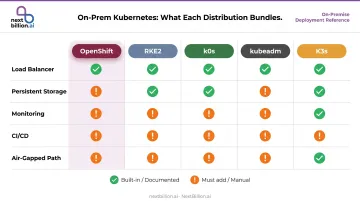
Before committing to a distribution, inventory what's not bundled. Gaps translate directly into additional integration effort and ongoing maintenance:
| Need | OpenShift | RKE2 | k0s | kubeadm | K3s |
|---|---|---|---|---|---|
| Load balancer | Built-in | Must add MetalLB | Must add MetalLB | Must add MetalLB | Must add MetalLB |
| Persistent storage | ODF (Rook-Ceph) | Must add | Must add | Must add | Local path only |
| Monitoring | Prometheus/Grafana | Must add | Must add | Must add | Must add |
| CI/CD | Pipelines/GitOps | Must add | Must add | Must add | Must add |
| Air-gapped path | Documented | Documented | Manual | Manual | Manual |
Conclusion
No single distribution wins across all on-prem scenarios. RKE2 and OpenShift lead for regulated, compliance-driven environments where FIPS and DISA STIG matter. k0s and kubeadm/Kubespray serve teams that prioritize flexibility and component control. K3s is the right answer for edge, remote office, and resource-constrained sites.
Before committing to any distribution, build a readiness checklist: map your compliance requirements, inventory missing production components (storage, load balancer, monitoring), validate air-gapped install capability, and confirm long-term support SLAs. Test in a lab before production rollout — the distributions behave very differently at installation time.
For logistics, fleet management, and field service teams running route optimization and fleet dispatch workloads on private infrastructure, NextBillion.ai's mapping and routing platform supports on-premise deployment via Kubernetes. All routing queries, user data, and logs stay behind your firewall.
The platform is SOC 2 Type II, ISO/IEC 27001, and GDPR certified, and deploys via Helm charts across any Kubernetes environment — including self-managed bare metal clusters. If your operation requires enterprise-grade location intelligence without routing sensitive data through the cloud, see how NextBillion.ai deploys in your Kubernetes environment.
Frequently Asked Questions
What is the best Kubernetes distribution for on-premise?
There's no single best option. RKE2 suits security-critical and regulated environments best; OpenShift fits teams that need a full enterprise platform; k0s works well for lightweight and flexible deployments; and kubeadm/Kubespray gives maximum DIY control. The right choice depends on your compliance requirements, team's operational expertise, and which production components you're prepared to manage independently.
Is K3s better than K8s?
K3s is a lightweight, CNCF-compliant distribution of Kubernetes, not a replacement for it. It performs well in resource-constrained or edge on-prem environments where full Kubernetes is impractical, including fleet gateways or edge routing nodes that process location data close to the vehicle. For large-scale production clusters with complex HA storage and networking requirements, such as those running fleet-optimization or mapping APIs, kubeadm or RKE2 is the more appropriate choice.
What is the difference between K3s and RKE2?
Both come from SUSE/Rancher but serve different use cases. K3s is optimized for lightweight, edge, and single-node deployments using a sub-100 MB binary with SQLite as the default datastore. RKE2 is a heavier, security-hardened distribution targeting enterprise and government environments, with FIPS 140-2 compliance, DISA STIG certification, and full HA etcd support included by default.
Can Kubernetes be deployed on bare metal without a cloud provider?
Yes. kubeadm, RKE2, K3s, and OpenShift all support bare metal deployment. Teams must manually handle components that cloud providers normally abstract — including a bare-metal load balancer (MetalLB), persistent storage (Rook/Ceph or Longhorn), and external DNS. This matters for logistics and fleet operators who keep routing and mapping workloads on-prem for data residency or DOT-related compliance reasons, where distribution choice and add-on planning carry more weight than in managed cloud contexts.
What additional tools are needed to make an on-prem Kubernetes cluster production-ready?
The core stack includes: a CNI plugin (Calico, Cilium, or Flannel), a bare-metal load balancer (MetalLB or PureLB), persistent storage via CSI drivers (Rook/Ceph or Longhorn), TLS certificate management (cert-manager), and monitoring (Prometheus + Grafana). OpenShift and RKE2 bundle several of these; kubeadm requires all to be installed and configured manually.
What does air-gapped Kubernetes deployment mean?
Air-gapped deployment means running a cluster with no public internet access — all container images, binaries, and dependencies must be pre-downloaded and served from an internal registry. RKE2 and OpenShift both offer documented air-gapped installation paths, making them the go-to options for classified government or high-security on-prem environments.
Can Kubernetes be run locally for testing before an on-prem rollout?
Yes. Tools like k3d, minikube, and kind let engineers run a single-node or multi-node cluster on a laptop or workstation to validate manifests, CNI configs, and Helm charts before deploying to production hardware. This is standard practice for teams building routing or fleet-management services on-prem, since it catches configuration errors early without needing physical servers or a full lab environment.
Is Kubernetes still relevant in 2026?
Yes. Kubernetes remains the standard for container orchestration across cloud and on-prem environments. For US logistics, fleet, and mapping providers running routing engines or optimization APIs on-premise, Kubernetes still provides the scheduling, scaling, and self-healing capabilities needed to keep services available. Newer lightweight distributions and edge-focused tooling have expanded where it can run, not replaced the need for it in production infrastructure.