Introduction
Managing attendance for field crews has never fit neatly into a traditional punch clock. When employees are scattered across job sites, driving between locations, or working without reliable cell service, the paper timesheet and the office terminal both fall apart. For US employers, this isn't just an operational headache — it's a wage-and-hour exposure issue. The Fair Labor Standards Act requires accurate records of hours worked, and location-verified time data gives employers a defensible record if a wage claim or audit ever comes up.
The consequences aren't trivial. Nucleus Research found that three out of four companies experience losses from buddy punching, with payroll errors averaging 1.2% of total payroll — a figure that compounds quickly as headcount grows. For construction firms, home service operators, and logistics companies running dozens or hundreds of field workers, that's real money leaving through a preventable gap.
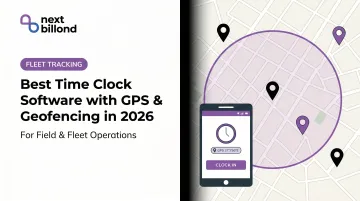
GPS-enabled geofencing time clock software closes that gap. Instead of trusting employees to self-report their hours, these tools tie every clock-in to a verified physical location — giving managers a clean audit trail, payroll accurate data, and workers a faster punch experience.
This guide covers the five best options in 2026, how to evaluate them honestly, and what to look for when geofencing needs to fit into a broader operational stack — not just replace a paper timesheet.
Key Takeaways
- GPS geofencing time clocks use virtual location boundaries to allow or restrict clock-ins based on physical presence at an approved work site
- The 5 best tools in 2026: Workyard, Hubstaff, Buddy Punch, allGeo, and Homebase — covering field crews, hourly teams, and multi-site operations
- Key evaluation criteria: GPS accuracy, geofence configuration flexibility, offline functionality, payroll integration depth, and pricing model
- Workyard leads for field crews that need job-level cost tracking
- allGeo suits complex multi-site field service workflows
- Homebase works best for fixed-location hourly teams
- Enterprises needing geofencing as part of a broader ops platform should evaluate API-based infrastructure for custom builds
What Is GPS & Geofencing Time Clock Software?
GPS time clock software records the geographic coordinates of every clock-in and clock-out using the employee's device location, creating a timestamped, location-verified attendance record.
Geofencing goes a step further than passive logging — it enforces rules based on location. Admins draw virtual boundaries around approved work sites, and the software automatically permits, restricts, or triggers clock-in events when an employee's device crosses that boundary.
As Android's developer documentation on geofencing describes it, geofencing combines awareness of a user's current location with awareness of proximity to locations of interest, enabling proximity-triggered actions rather than simple coordinate capture.
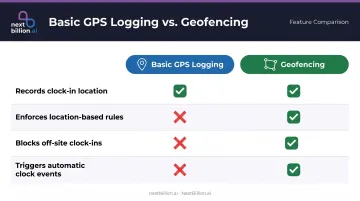
GPS Logging vs. Geofencing
| Feature | Basic GPS Logging | Geofencing |
|---|---|---|
| Records clock-in location | ✅ | ✅ |
| Enforces location-based rules | ❌ | ✅ |
| Blocks off-site clock-ins | ❌ | ✅ |
| Triggers automatic clock events | ❌ | ✅ |
Who Actually Needs This
Two workforce profiles drive most adoption:
- Distributed field teams — construction crews, pest control technicians, HVAC workers, and home service providers where site-level attendance accountability is non-negotiable
- Multi-location businesses — retail chains, restaurant groups, and logistics depots where centralized visibility across sites prevents time fraud at scale
GPS precision can vary significantly depending on environment — Android documentation notes accuracy can be as broad as several hundred meters in some conditions. Most providers recommend setting geofence radii of 100–300 meters and testing boundaries on-site before going live. This matters most for US employers operating across multiple states, since a geofence set too tight can lock out employees on a legitimate job site, while one set too loose undermines the wage-and-hour recordkeeping the software is meant to support. Testing radius accuracy at each site during rollout, rather than relying on a single default setting, avoids both problems.
Best Time Clock Software with GPS & Geofencing in 2026
The five tools below were selected based on GPS and geofencing reliability, ease of deployment for field employees, payroll integration depth, and overall value. Each has a distinct enforcement model and ideal customer profile.
Workyard
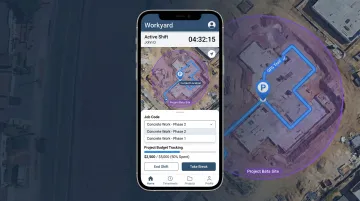
Workyard is purpose-built for construction and field service companies. It captures GPS location trails throughout a shift — not just a snapshot at punch-in — which gives managers continuous visibility rather than a single data point per day.
What sets it apart:
- Circular and polygon geofence support, with updates every ~5 minutes while clocked in
- Offline clock-in, breaks, and clock-out with local GPS storage and sync once connectivity returns
- Job code tracking that connects labor hours directly to project budgets — critical for construction cost control
- Kiosk mode for shared device setups alongside individual mobile mode
Workyard is particularly strong for teams of 5 to 500 field workers where job-level profitability matters as much as attendance accuracy.
| Detail | Description |
|---|---|
| Key Features | GPS location trails, polygon and circular geofencing, offline sync, job code tracking, kiosk and mobile modes, payroll exports |
| Best For | Field crews in construction, trades, and landscaping needing job-level cost visibility |
| Pricing | Starter: $6/user/month (annual) or $8/user/month (monthly) + $50/month base fee. Pro: $13/user/month (annual) or $16/user/month (monthly) + $50/month base fee. Enterprise: custom quote. 14-day free trial, no credit card required. |
Hubstaff
Hubstaff covers GPS geofencing and location-based attendance, but its real differentiator is the optional layer of productivity monitoring on top: activity levels, app usage, and screenshots for desktop workers, alongside route history and fleet tracking for field teams. US employers using screenshot or activity monitoring features should confirm the practice is disclosed in an employee handbook or policy, since several states have separate notice requirements for electronic workplace monitoring.
What sets it apart:
- Automated geofenced clock-in and clock-out for mobile employees
- Route history and fleet tracking for workers driving between sites
- Optional productivity monitoring (activity levels, screenshots) for remote or hybrid teams
- Broad integration ecosystem covering payroll, project management, and HR tools
Hubstaff fits service businesses and agencies that need both location verification and output data in one platform.
| Detail | Description |
|---|---|
| Key Features | GPS geofencing, automatic clock-in/out, route history, activity tracking, scheduling, payroll integrations |
| Best For | Service businesses and agencies wanting location-based attendance combined with productivity analytics |
| Pricing | Per-seat billing; Team plan from $10/seat/month. 2-seat minimum. Free 14-day trial. Full tier details at hubstaff.com/pricing. |
Buddy Punch
Buddy Punch focuses on flexible, configurable clock-in controls rather than continuous field tracking. Its geofencing sits alongside PIN, QR code, and photo verification options — letting admins layer multiple anti-fraud measures without requiring complex setup.
What sets it apart:
- Multiple geofences assignable per employee, useful for workers who rotate between several approved sites
- Photo capture at clock-in adds an identity verification layer on top of location enforcement
- Clean manager dashboard for timecard review, PTO approvals, and overtime alerts
- Approachable pricing and setup for businesses new to location-based time tracking
| Detail | Description |
|---|---|
| Key Features | GPS geofencing (multiple zones per employee), photo verification at clock-in, PTO tracking, overtime alerts, payroll exports |
| Best For | Small to mid-sized businesses wanting configurable geofencing with anti-buddy-punching controls |
| Pricing | Starter: $4.49/user/month (annual) or $5.49/user/month (monthly) + $19/month base fee. Pro: $5.99/user/month (annual) or $6.99/user/month (monthly) + $19 base fee. Enterprise: $10.99/user/month (annual) or $11.99/user/month (monthly) + $19 base fee. 14-day free trial. |
allGeo
allGeo is an enterprise-grade field service automation platform where geofencing does more than block off-site punches — it automates the entire attendance capture process across multiple job sites per shift, with no manual action required from the employee.
What sets it apart:
- Geofence-triggered automatic clock-in and clock-out when workers enter or leave job sites
- Multi-site per-day support for technicians completing multiple jobs in a single shift
- Mobile forms tied to location events — capturing photos, signatures, and job status updates at each site
- Deep ERP and payroll integration options plus breadcrumb trail route history for compliance-heavy operations
allGeo targets industries like utilities, logistics, healthcare home services, and facility management where field workers are always moving and compliance documentation is required. For home healthcare operators specifically, location- and time-stamped visit records also support the documentation many state Medicaid programs expect for electronic visit verification, making allGeo's automated capture useful beyond payroll alone.
| Detail | Description |
|---|---|
| Key Features | Geofence-triggered auto clock-in/out, multi-site per-day support, mobile forms, route history, ERP integrations, alerts |
| Best For | Field-intensive operations (utilities, home services, logistics) needing automated attendance plus job-level field data |
| Pricing | Custom pricing — contact allGeo for a quote |
Homebase
Homebase bundles time tracking with shift scheduling, team messaging, PTO management, and basic HR tools for small businesses managing hourly staff. GPS geofencing and photo verification are included, reducing the number of separate tools a small business owner needs to manage.
Key limitations to know: Homebase supports one geofence per location with radius options of 150 feet, one block, or five blocks. It's not built for complex multi-site field routing. It excels for single-location or small multi-outlet businesses where simplicity matters.
What sets it apart:
- Free tier for up to 10 employees at one location — lowest barrier to entry on this list
- GPS clock-in validation combines location data and photo capture
- Native integrations with Gusto for payroll sync and Square for POS
- Scheduling, onboarding checklists, and team messaging in the same platform
| Detail | Description |
|---|---|
| Key Features | GPS geofencing, photo clock-in verification, shift scheduling, overtime alerts, POS and payroll integrations, basic HR tools |
| Best For | Small businesses in retail, food service, and hospitality managing hourly staff across one or a few locations |
| Pricing | Basic: $0/location/month (1 location, up to 10 employees). Essentials: $30/month or $24/month (annual). Plus: $70/month or $56/month (annual). All-in-One: $120/month or $96/month (annual). Payroll add-on: $39/month + $6/employee. |
How We Chose the Best GPS & Geofencing Time Clock Software
The most common buying mistake is choosing based on price or brand recognition without testing GPS accuracy in actual field conditions. A geofence that works perfectly in a suburban parking lot may behave differently inside a warehouse, at a dense urban job site, or in a rural area with patchy cell service. Buyers also frequently overlook whether the enforcement model matches how their workforce actually operates.
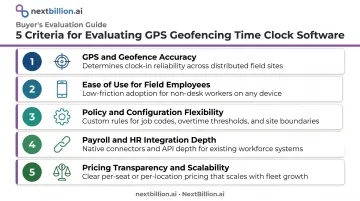
The Five Evaluation Criteria
GPS and geofence accuracy — Does the tool use circular or polygon zones, and how does it handle signal degradation? Workyard supports both circular and polygon geofences and updates location every ~5 minutes while clocked in.
Ease of use for field employees — Tools requiring extensive training don't get adopted. The best options need minimal onboarding, ideally a single tap to clock in within a verified zone.
Policy and configuration flexibility, including:
- Custom shift rules
- Multi-site support per employee
- Offline functionality for areas without cell coverage
Payroll and HR integration depth — Time data is only useful if it flows cleanly into payroll. Verified integrations (Gusto, Square, major ERPs) matter more than a long list of connector names.
Pricing transparency and scalability — Per-user plus base fee models (Workyard, Buddy Punch) scale predictably. Per-location pricing (Homebase) benefits high-headcount fixed sites. allGeo's custom pricing requires a sales conversation to size.
A Note on Enterprise-Scale Geofencing
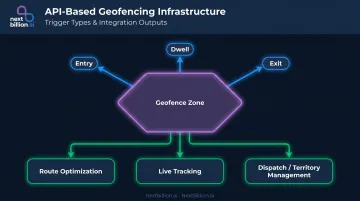
For logistics, delivery, and field service companies that need geofencing as part of a larger operational platform (not just standalone time clocking), packaged SaaS tools have natural limits. Businesses building custom workforce management systems that combine attendance verification with dispatch, territory management, and real-time fleet visibility need API-level geofencing infrastructure.
NextBillion.ai's Geofencing API provides that foundation. It supports:
- Polygons, circles, corridors, and custom shapes
- Time-of-day and day-of-week scheduling
- Direct integration with route optimization and live tracking APIs
Unlike fixed SaaS products, an API layer lets engineering teams define exactly which triggers matter (entry, exit, dwell) and how geofence events connect to dispatch and territory management logic. No SaaS ceiling.
Conclusion
The right GPS geofencing time clock depends on what your workforce actually looks like on the ground.
- Workyard — best for construction and trades crews needing offline reliability and job-level cost tracking
- allGeo — best for complex field service operations with multi-site per-day workflows and compliance requirements
- Hubstaff — adds productivity monitoring for distributed or remote teams beyond basic attendance
- Buddy Punch — clean, configurable option for small and mid-sized businesses wanting layered anti-fraud controls
- Homebase — strongest for retail, restaurants, and hourly teams at fixed locations who want scheduling and HR in the same tool
Before committing to any platform, run a pilot with a small crew. Test geofence boundaries at the actual physical worksite, verify how offline sync behaves in your connectivity conditions, and confirm payroll export compatibility end to end. A feature that works in a demo doesn't always work on a construction site in a signal dead zone.
For organizations in logistics, fleet management, or large-scale field service, attendance tracking is often just one input into a broader location intelligence stack. When packaged time clock tools hit their limits, API-based geofencing infrastructure — like NextBillion.ai's Geofencing API — lets engineering teams build custom workflows around their specific operational data, without being constrained by what a vendor's UI allows.
Frequently Asked Questions
What is the best time clock software with GPS geofencing in 2026?
Workyard leads for GPS precision and job costing in construction and field service. Hubstaff suits teams that need productivity analytics alongside location tracking. allGeo is strongest for complex multi-site field service workflows. If clock-in enforcement is just one piece of a larger dispatch, routing, or fleet operation, evaluate whether a platform-level solution with field workflow automation fits better than a standalone time clock app, especially if you already run route optimization or ETA tools and want geofence data to feed the same system.
What is the difference between GPS tracking and geofencing in a time clock app?
GPS tracking records the coordinates of each clock-in event for audit and visibility purposes. Geofencing actively enforces location-based rules by blocking or triggering clock-in actions based on whether an employee is inside a predefined virtual boundary. One logs location; the other uses location to control behavior.
Can geofencing time clock apps work offline?
Workyard officially supports offline clock-ins that store GPS data locally and sync once the device reconnects. For all other tools on this list, verify offline support directly with each vendor before deploying in low-connectivity environments. Offline handling matters most in rural service areas, warehouses with weak signal, or underground and remote job sites, where a clock-in that fails to save can create payroll disputes and compliance gaps down the line.
How accurate is GPS geofencing for employee clock-ins?
Most apps perform well under open-sky conditions, but Android's geofencing documentation notes accuracy can degrade to several hundred meters in some environments. Set geofence radii of at least 100–300 meters and test boundaries at the physical worksite before go-live.
What industries benefit most from GPS geofencing time clock software?
Construction, field service (HVAC, pest control, home care), facility management, logistics, retail chains, and restaurant groups see the strongest ROI. The common thread: employees work across multiple sites where verifying attendance location is operationally critical. These same industries typically run under FMCSA hours-of-service or DOT compliance requirements for drivers, so geofence-based clock data can also support hours logging and payroll audits without adding a separate compliance tool.
Does GPS geofencing time clock software significantly drain employee phone batteries?
Geofence-triggered apps activate GPS only at clock-in and clock-out, so battery impact is low compared to continuous background tracking. Apps that record full route history throughout a shift will consume noticeably more power — inform employees which mode is active before rollout.
What is a geofencing time clock?
A geofencing time clock is time-tracking software that draws a virtual boundary, or geofence, around a job site, office, or service area. Employees can only clock in or out when their device's GPS location falls inside that boundary. Some systems just log the location for review, while others actively block clock-in attempts made outside the fence, reducing time theft and unverified remote punches.
What is the best GPS time clock app?
There is no single best app for every business. Workyard is a strong pick for construction and field service teams that need job costing tied to GPS data. Hubstaff fits teams wanting productivity analytics alongside location tracking. allGeo handles complex multi-site field service workflows well. Match the choice to your workforce size, industry, and whether you need simple location logging or full geofence enforcement.