Introduction
Field service apps have moved well past being scheduling calendars. For HVAC companies, utilities, pest control operators, and facilities maintenance teams, they're the operational backbone — and job assignment is where that backbone either holds or breaks.
When job scheduling and dispatch fail, the cost shows up fast: a wrong assignment cascades into extra visits, longer resolution times, and higher costs across the whole job. The stakes are concrete. According to the 2024 Field Service Benchmark Report, a failed first visit averages 2.7 total visits, 13 additional days to resolution, and 44% higher resolution cost compared to a job completed on the first attempt. One wrong assignment triggers the entire sequence. That's why field service apps rely on structured job intake, technician matching, dispatch confirmation, and real-time tracking to prevent it before it starts.
This article breaks down exactly how field service apps coordinate job assignments — mechanically, step by step: from the moment a job enters the system to the moment a technician is confirmed, en route, and tracked in real time.
Key Takeaways
- Field service apps coordinate assignments through a four-stage pipeline: job intake and classification, technician matching, dispatch confirmation, and real-time visibility.
- Matching logic evaluates technician location, availability, skills, and job priority simultaneously across all variables.
- Dispatch models range from manual (dispatcher-controlled) to rule-based (criteria-driven) to AI-assisted (constraint-aware, predictive).
- Route optimization determines job sequence across a full day, not just who gets each individual stop.
- Real-time rebalancing keeps the rest of the schedule intact when disruptions occur mid-day.
What Is Job Assignment Coordination in Field Service Apps?
Job assignment coordination is the process by which a field service app receives a service request, evaluates the available workforce, and routes the right technician to the right job at the right time. That sounds simple. In practice, it's the difference between a field operation that scales and one that collapses under pressure.
Without digital coordination, dispatchers rely on phone calls, whiteboards, and institutional knowledge. That system works — until two urgent jobs land simultaneously, a technician calls out, or the schedule has 40 active work orders across 15 technicians.
It's also worth separating this function from adjacent FSM capabilities that often get lumped in:
- Invoicing and billing happen after the job is done — they depend on assignment data, not the other way around
- Asset tracking monitors equipment history and maintenance cycles, not technician routing
- Customer communication (ETAs, confirmations) is an output of assignment decisions, not the mechanism behind them
The assignment engine is the operational core. Billing, tracking, and customer updates all pull from what happens here first.
Field service platforms generally support two coordination models:
- Reactive — jobs are assigned as they arrive, one at a time
- Proactive — the system pre-schedules and optimizes across a full shift before the day begins
The strongest platforms handle both without requiring separate workflows.
How Field Service Apps Coordinate Job Assignments
Job assignment follows a defined sequence. Each stage has its own logic, its own inputs, and its own failure modes. Understanding the sequence explains why some operations run clean and others don't.
Job Intake and Classification
Everything starts with intake. A job enters the system through a customer call, web form, automated alert, or IoT trigger. The app immediately classifies it:
- Job type (installation, repair, inspection, emergency)
- Priority level (routine, urgent, critical)
- Required skills or certifications
- Estimated duration
Classification accuracy here determines assignment quality downstream. A job miscategorized as routine when it requires a licensed electrician will generate a mismatched assignment — and that mismatch surfaces as a failed first visit.
Structured intake forms and CRM or ticketing system integrations reduce classification errors at the source. When job context flows cleanly from the start, matching logic has accurate inputs to work with.
Technician Matching and Assignment
With a classified job in hand, the system cross-references job requirements against a real-time picture of the workforce:
- Who is available during the required window?
- Who has the necessary certifications or skills?
- Who is geographically closest — and does routing to them optimize the rest of their day?
- Who has capacity without creating a workload bottleneck?
There are three ways platforms handle this matching:
| Model | How It Works | Best For |
|---|---|---|
| Manual dispatch | Dispatcher reviews options and selects | Small teams, high-complexity jobs |
| Rule-based automation | System auto-assigns when defined criteria are met | Mid-size operations with standard job types |
| AI-assisted optimization | System scores and ranks candidates by predicted outcome | Enterprise scale, complex constraint sets |
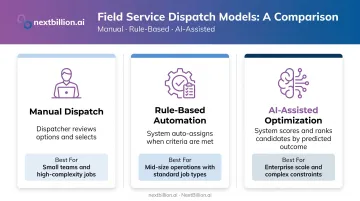
Enterprise platforms are increasingly moving toward the third model. IDC assessed 19 vendors in 2025 supporting AI, generative AI, or agentic AI capabilities for FSM — a clear indicator of where the market is heading.
Dispatch and Confirmation Loop
That assignment then moves immediately to confirmation. The technician receives a notification on their mobile app — and that notification should include:
- Customer name, address, and contact info
- Job description and type
- Required parts, tools, or certifications
- Estimated job duration and arrival window
The technician must acknowledge the assignment. This confirmation step is more important than it sounds. Unacknowledged assignments surface immediately to dispatchers — preventing the silent failure where a job was technically assigned but no technician ever actually received or accepted it.
Real-Time Visibility and Progress Tracking
After dispatch, the app maintains a live picture of every active assignment. GPS tracking shows technician location, and status updates (en route, on-site, job complete) flow back to dispatch in real time.
NextBillion.ai's Live Tracking API, for example, delivers location data with up to 1-meter accuracy, and flags deviations, excessive idle time, or geofence breaches as they occur. ETAs recalculate dynamically based on traffic conditions, giving dispatchers an accurate picture of where each technician will be and when.
That visibility layer connects directly to customer experience. Automated ETA notifications, technician-on-the-way alerts, and completion confirmations keep customers informed without any manual dispatcher effort — turning real-time location data into a direct service quality advantage.
The Variables That Drive Smarter Technician Matching
Not all matching logic is equal. Simple platforms find the nearest available technician. Sophisticated ones evaluate the entire decision differently.
Proximity and Route Sequencing
Geographic proximity matters, but routing a technician to the nearest job isn't always the right call. A smarter system asks: does assigning this technician to this job optimize their remaining day, or does it strand them on the wrong side of town for their next three appointments?
Route optimization engines capable of handling 50+ hard and soft constraints (like NextBillion.ai's Route Optimization API) account for traffic conditions, service time windows, job sequencing, and technician availability simultaneously. That's a different calculation than nearest-first logic.
Skill and Certification Matching
Many field service jobs require licensed or specifically trained technicians. The system must filter out unqualified candidates before surfacing assignment options.
When Hawx Smart Pest Control integrated NextBillion.ai's optimization capabilities, the platform accounted for technician capabilities, shift timings, customer availability, and service duration together — cutting drive times and improving technician coverage across their workforce.
Skip that filter, and failed first visits follow. Research from the 2024 Field Service Benchmark Report ties failed first visits to an average 44% higher resolution cost — the direct cost of sending the wrong technician.
Workload Balancing and SLA Overrides
Qualification filtering solves the "who can do this job" problem. Workload balancing solves the next one: who should do it right now. Assigning every urgent job to the most experienced technician creates a bottleneck. It also contributes to burnout : Salesforce field service research reports 66% of technicians experience monthly burnout, with administrative overload as a major contributor.
Effective matching tracks:
- Current job count per technician
- Estimated time remaining on active jobs
- Shift constraints and scheduled breaks
- Maximum task limits per shift
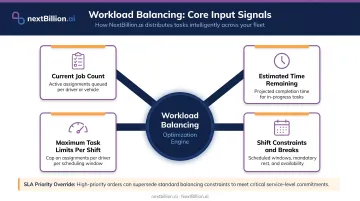
When a critical fault or VIP escalation comes in, priority routing logic can temporarily override standard balancing — assigning the nearest qualified technician regardless of workload distribution. That override should be configurable, not hardcoded.
Real-Time Rebalancing: What Happens When Assignments Change Mid-Day
Optimized schedules don't survive contact with the real world intact. According to Salesforce field service research, 47% of field service appointments don't happen as scheduled, and 38% of technicians say scheduling is often mishandled. Disruptions aren't edge cases — they're the norm.
What Triggers a Rebalance
The system detects disruption signals and responds:
- A job runs longer than estimated → downstream assignments are flagged as at risk
- A technician becomes unavailable → their remaining jobs need reassignment
- A customer cancels → the gap in the schedule can be filled with a new job
- An emergency call arrives → it needs insertion into an existing sequence with minimal disruption
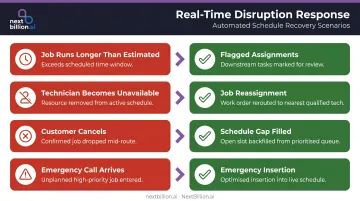
When the signal arrives, the system either auto-reassigns (if confidence and configuration allow) or surfaces options for dispatcher review.
Rebalancing Requires Route Recalculation
Reassigning a job mid-day isn't a calendar edit. It requires recalculating the affected technician's remaining route, re-sequencing their stops, and potentially reordering other technicians' assignments to keep the overall schedule coherent.
NextBillion.ai's reoptimization API handles mid-day changes without rebuilding the full schedule from scratch — new jobs get inserted, cancellations get absorbed, and remaining stops get resequenced around what's already in motion. For operations running dynamic schedules, re-running optimization within a 24-hour window at no additional cost means frequent rebalancing stays financially practical.
Reactive vs. Predictive Rebalancing
Most platforms respond to disruptions after they occur. AI-driven platforms now flag at-risk assignments before they fail, using historical job duration data, traffic patterns, and technician performance history to identify where the schedule is likely to break down before it does.
When a platform can tell you at 10 a.m. that a 2 p.m. appointment is already at risk, dispatchers can act on a problem that hasn't happened yet — rather than scrambling after it does.
Conclusion
Job assignment coordination isn't a single feature — it's a continuous loop. Intake accuracy shapes match quality. Match quality drives dispatch success. When confirmation is missing, silent failures compound; when real-time visibility is present, dispatchers can rebalance before a bad hour becomes a bad day.
Field service businesses that evaluate platforms on front-end features — mobile app UI, invoice generation, customer portals — often miss the question that actually determines operational outcomes: how sophisticated is the assignment engine, and how well does it adapt when the day goes sideways?
Platforms that handle that question well show it in measurable ways: higher first-time fix rates, tighter technician utilization, and fewer jobs that need a second visit. That's the assignment engine doing its job — quietly, in the background, every dispatch cycle.
Frequently Asked Questions
How do you use a field service app?
Dispatchers use the back-end interface to receive jobs, manage technician assignments, and monitor field activity in real time, often relying on route optimization to sequence stops efficiently. Technicians use the mobile app to view assigned jobs, navigate to sites, update job status, log work notes, capture signatures, and communicate with the office throughout their shift.
What is the difference between CRM and FSM?
A CRM manages customer relationships — who the customer is, their purchase history, and past interactions. An FSM manages field operations — who is assigned to a job, when, and how the work is executed, tracked, and closed out. The two often integrate: CRM data (contact history, service agreements) feeds into FSM job assignment logic so dispatchers have full context when scheduling technicians.
What criteria do field service apps use to assign technicians to jobs?
The core matching variables are technician location and proximity, required skill certifications, current availability and workload, shift constraints, and job priority. AI-assisted platforms evaluate all of these simultaneously rather than applying them sequentially.
How do field service apps handle last-minute schedule changes?
Apps detect disruptions through status updates or technician signals, then surface reassignment options or trigger automated rebalancing. The quality of that response depends on how tightly the platform integrates route optimization with scheduling logic.
Can field service apps operate without internet connectivity?
Most modern field service mobile apps offer offline mode, letting technicians access job details, log updates, and collect signatures without a connection. Data syncs automatically when connectivity returns — NextBillion.ai's Navigation SDK extends this with offline maps for uninterrupted navigation in low-coverage areas.
How do field service apps improve first-time fix rates?
By matching jobs to qualified technicians and surfacing complete job context — customer history, required parts, site notes — before arrival. Skill-based matching and structured intake together cut the most common cause of repeat visits: a technician showing up unprepared.
How does field service work?
Field service work starts when a job is created — from a customer call, service contract, or scheduled maintenance. Dispatchers or automated systems assign the job to a technician based on location, skill, and availability. The technician navigates to the site, completes the work, logs updates through a mobile app, and closes the job. Data from each step feeds back into scheduling and reporting for future jobs.
What are the three key elements of field service management?
Field service management generally centers on scheduling and dispatch (assigning the right technician to the right job at the right time), field execution (technicians completing work with mobile access to job details and navigation), and tracking and reporting (monitoring job status, technician location, and outcomes for accountability). Coordinating all three well is what determines how efficiently field teams operate day to day.