Introduction
Managing a fleet of 50, 100, or 500 vehicles without being physically present used to mean constant check-in calls, manual logs, and reactive problem-solving. Today, fleet managers are expected to track dozens to hundreds of vehicles simultaneously across delivery, logistics, field service, and construction — in real time, without the phone tag.
Location technology has stepped in to close that gap, and the market reflects it. The global geofencing market reached $2.37 billion in 2023 and is projected to grow at 21.7% CAGR through 2030, with transportation and logistics among the primary verticals driving that growth.
But there's a real operational gap that often goes unaddressed. Geofencing goes beyond GPS tracking by telling you whether a vehicle is where it's supposed to be. GPS tracking tells you where a vehicle is. Geofencing tells you whether that vehicle is where it's supposed to be, and triggers an automated response when it isn't. It does this by using virtual boundaries — defined by fields like center point (latitude/longitude), radius or polygon shape, and trigger type — to fire alerts or notifications automatically when a vehicle enters or exits a defined area, helping fleet managers monitor compliance and reduce reactive problem-solving.
Most fleet teams either underuse this capability entirely or configure it poorly, leading to alert fatigue, missed compliance events, and untracked dwell time.
What follows breaks down how geofencing actually works, where it delivers the most value, and what separates a well-configured setup from one that creates more noise than signal.
Key Takeaways
- Geofencing creates virtual boundaries around real-world locations and automatically triggers alerts or logs events when a vehicle crosses them.
- It works using GPS (plus cellular, WiFi, or RFID) combined with fleet software that compares live vehicle position against stored boundary coordinates.
- Core use cases: arrival/departure tracking, theft detection, compliance enforcement, automated timekeeping, and customer ETA notifications.
- Key benefits: operational efficiency, asset security, driver accountability, cost reduction, and data-driven decision-making.
- Effective geofencing depends on deliberate zone design, purposeful alert routing, and consistent data review.
What Is Geofencing in Fleet Management?
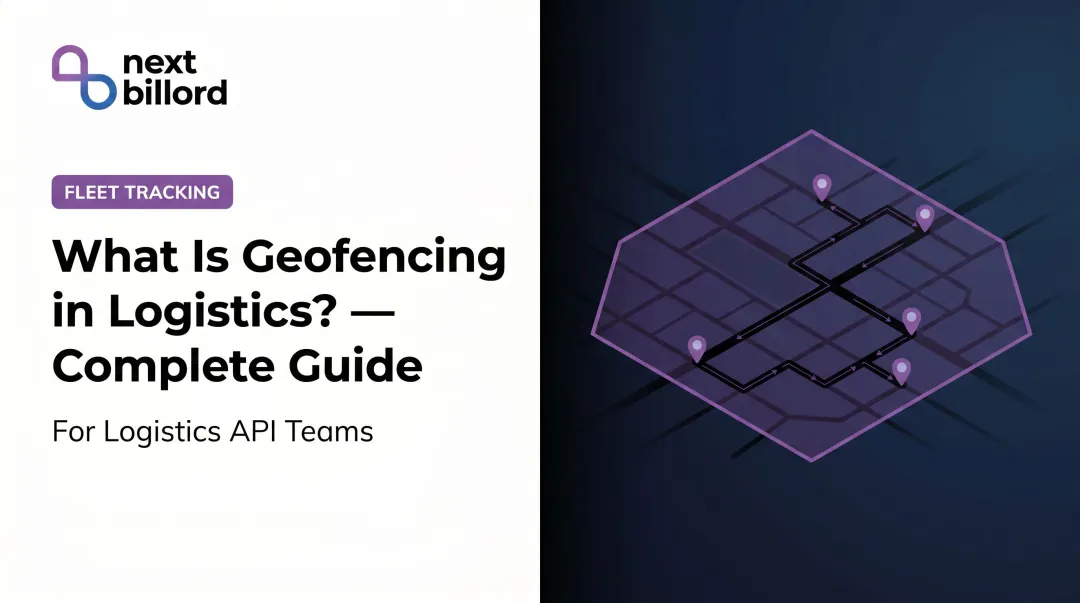
Geofencing is a virtual perimeter drawn around a geographic area — anything from a single loading dock to an entire state — that triggers a predefined action when a tracked vehicle enters or exits that boundary. The action could be an alert, a timestamped log entry, or an automated workflow like updating a customer ETA or flagging a compliance violation.
Before geofencing, fleet managers relied on driver check-ins, manual logs, or passive GPS replay to verify vehicle location. That approach was reactive by design. Geofencing shifts to automated, event-driven visibility — the system notifies you when something happens, rather than waiting for you to go looking.
What Geofencing Is Not
These three terms are related but not interchangeable:
- GPS tracking shows you where a vehicle is at a given moment
- Route planning prescribes the path a vehicle should take
- Geofencing defines location-based rules and automates responses when those rules are crossed
All three work together, but each solves a different problem.
Types of Geofences
Once you understand what geofencing does, the next question is which boundary type fits your operation:
| Type | Shape | Best For |
|---|---|---|
| Circular | Radius around a point | Customer stops, depots, fuel stations |
| Polygon | Custom shape | Facility perimeters, job sites |
| Corridor | Linear zone along a route | Highway compliance, restricted road enforcement |
| Dynamic | Temporary, route-specific | Last-mile delivery windows, time-sensitive zones |
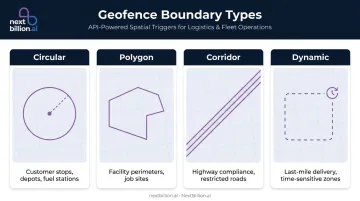
The trigger logic — entry, exit, dwell — works similarly across types. What differs is the use case and how precisely the boundary matches the physical location it represents.
NextBillion.ai's Geofencing API supports all four boundary types, with geofences configurable via direct map drawing, GeoJSON import, or programmatic API creation — which covers teams generating hundreds of zones from address lists or stop data in a single operation.
How Does Geofencing Work?
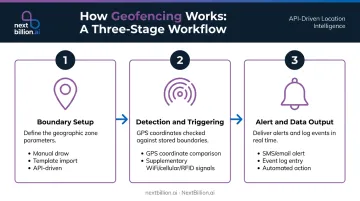
Geofencing operates through three distinct stages: boundary setup, real-time detection, and automated output. Each stage contributes to the overall monitoring capability, and each stage has variables that affect how reliable the system is in practice.
Boundary Setup
A fleet manager draws a boundary on a digital map, selects the vehicles to monitor, and defines what constitutes a trigger: entry, exit, dwell time exceeded, or movement during restricted hours.
Setup can happen three ways:
- Manual — manager draws zones one by one through a map interface
- Template-based — bulk import from customer or depot location lists
- API-driven — programmatically generated from address data or stop sequences
The accuracy of the boundary definition directly affects the reliability of every downstream alert. A zone drawn too small will miss crossings due to GPS drift. Too large, and arrival detection loses precision.
Detection and Triggering
The vehicle's GPS device continuously reports coordinates to the fleet platform. The platform compares those coordinates against stored geofence boundaries and fires a trigger when the device crosses the defined perimeter.
GPS accuracy under open sky is typically within 4.9 meters (16 feet), degrading near buildings, bridges, or dense tree cover. In environments where GPS signal is weak — urban canyons, warehouse interiors, underground facilities — supplementary signals fill the gap:
- WiFi positioning improves indoor accuracy
- Cellular data covers wider areas with lower precision
- RFID supports asset-level tracking in dense facility environments
Update frequency matters too. A tracker reporting every 5 seconds detects a boundary crossing within 5 seconds of the actual event, so low-frequency ping rates can cause delayed or missed triggers on fast-moving vehicles. Samsara's platform, for example, supports location polling as frequently as every second.
Raw crossing events only tell part of the story. Platforms like NextBillion.ai layer geofence event data with route and traffic intelligence — so when a vehicle crosses a boundary, fleet managers can see whether it arrived on time, stayed on route, and operated within defined parameters, not just that the crossing happened.
Alert and Data Output
When a trigger fires, the system produces:
- An alert (SMS, email, or in-app notification) sent to the designated recipient
- An event log with timestamp, vehicle ID, and boundary name
- In some configurations, an automated action — updating a customer ETA, triggering a timecard entry, or flagging a compliance violation
That event log doesn't just serve real-time alerting. It feeds downstream into reports on dwell time, arrival patterns, and zone-level activity, turning raw location data into decisions that drive dispatch, payroll, billing, and compliance.
Key Benefits of Geofencing for Fleet Operations
Operational Efficiency
Automated arrival and departure logging eliminates manual check-in calls. Dispatchers get real-time job site presence visibility without interrupting drivers mid-route. Back-office teams stop chasing timestamped confirmations from drivers at the end of the day.
Motive notes that fleet managers can receive automated location reports — loading spots, rest areas, destinations — instead of making check calls, with geofences creating virtual timestamps for working hours. The administrative burden drops because the data collects itself.
Asset Protection and Theft Deterrence
CargoNet recorded 3,625 US cargo theft incidents in 2024 — a 27% increase over 2023 — with average stolen cargo value reaching $202,364 per incident. In 2025, that number held near the same level at 3,594 incidents.
Geofences set around depots, job sites, or secure zones send near-real-time alerts the moment a vehicle or piece of equipment moves outside authorized boundaries during off-hours. The difference between an automated geofence alert at 2 AM and discovering the same event during a morning log review isn't just speed — it's the difference between a recovery attempt and a theft report.
Compliance and Policy Enforcement
FMCSA hours-of-service regulations set strict limits for property-carrying drivers:
- 11-hour driving maximum per shift
- 14-hour consecutive on-duty window
- Mandatory 30-minute break before hour 8
- 60/70-hour weekly caps
Automated geofence logs create verifiable records of where vehicles were and when — reducing disputes and providing auditable data that supports ELD compliance without additional manual recordkeeping.
Beyond HOS, geofencing supports:
- Restricted zone enforcement (keeping vehicle classes off specific roads)
- Customer contract SLA verification
- Unauthorized vehicle use detection during non-operating hours
Customer Experience and ETA Accuracy
When a delivery vehicle enters a customer's geofence zone, the system can automatically trigger an ETA notification — no dispatcher involvement required. Inbound "where's my delivery?" calls drop, and the system creates a documented arrival record for detention and proof-of-delivery purposes.
PwC's 2025 Customer Experience Survey found 49% of respondents are likely to use AI to track an order or delivery status — a signal that customers increasingly expect real-time visibility as a baseline expectation, not a premium feature.
Data-Driven Route Optimization
Accumulated geofence event data reveals patterns that individual alerts never show: which sites generate chronic dwell time overruns, which delivery windows consistently slip, which vehicles regularly exit authorized zones. Those patterns feed into better route planning and sharper resource allocation decisions.
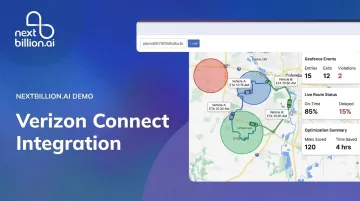
NextBillion.ai's platform integrates geofence event data with its Route Optimization API to provide live ETA recalculations as on-road conditions change — enabling closed-loop fleet operations from planning through dispatch, live monitoring, and post-trip analysis in a single API suite.
Where Geofencing Is Used in Fleet Operations
Geofencing is applied at every workflow stage where arrival, departure, or zone presence has operational meaning.
Common application points:
- Confirms technician presence at job sites for payroll and dispatch (field service)
- Timestamps freight handling automatically at loading docks (trucking and logistics)
- Triggers ETA alerts and proof-of-delivery when drivers enter customer locations (last-mile)
- Verifies authorized fuel and rest stops versus unplanned ones (long-haul)
- Captures shift start/end at depots without manual sign-in (all fleet types)
Industry-specific patterns:
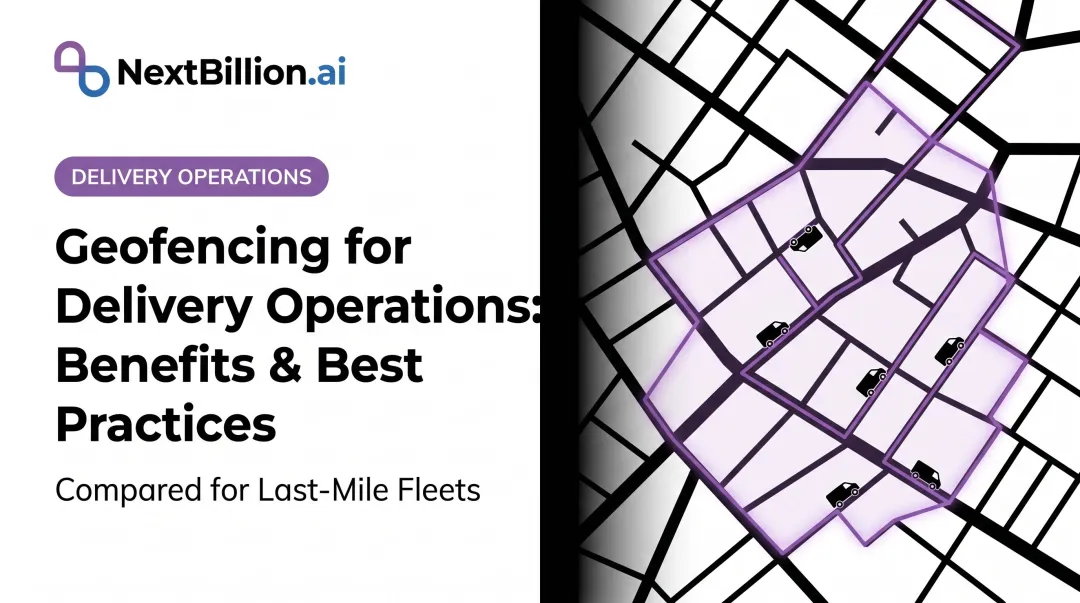
- Delivery fleets set geofences around customer stops for automated ETA updates and delivery confirmation
- Construction fleets monitor job sites to detect unauthorized equipment movement after hours
- Oil and gas fleets confirm crew arrival and departure at remote sites — critical where communications are unreliable or nonexistent
- Rental companies use state or regional geofences to flag unauthorized cross-border movements
| Works well | Open outdoor environments with clear GPS signal, defined facility perimeters, and consistent stop patterns |
| Watch for gaps | Dense urban canyons with signal interference, warehouse interiors, and routes that change frequently enough to make zone definitions stale |
Geofencing Best Practices for Fleet Managers
Define Zones With Operational Intent
Setting up a geofence for every possible location creates alert overload. Prioritize zones where arrival and departure time is operationally meaningful — high-value stops, compliance-critical areas, and locations tied to payroll, billing, or SLA verification.
Zone size is as critical as placement. Too small, and GPS drift causes missed triggers. Too large, and arrival detection loses the precision that makes the data useful for scheduling and billing.
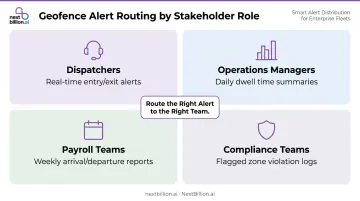
Route Alerts to the Right People
A geofence is only as valuable as what happens after the alert fires. Misconfigured notification routing is one of the most common reasons geofencing underdelivers:
- Dispatchers need real-time entry/exit alerts
- Operations managers may need daily dwell time summaries
- Payroll teams need weekly arrival/departure reports
- Compliance teams need flagged zone violation logs
Sending everything to everyone means nothing gets acted on. Match each alert type to the team that can do something with it.
Review Geofence Data Regularly
The long-term value of geofencing lies in patterns, not individual alerts. Build a review cadence — weekly or monthly — to examine:
- Sites with recurring dwell time anomalies
- Stops with chronic late arrivals
- Vehicles with frequent unauthorized zone exits
That data improves route planning, shifts resource allocation, and catches scheduling problems before they compound. Platforms that connect geofence event data directly to route optimization — NextBillion.ai does this — can automatically recalculate routes based on what the patterns reveal, rather than waiting for a manager to manually identify the problem first.
Frequently Asked Questions
What is geofencing in fleet management?
Geofencing is a virtual boundary around a geographic location that automatically triggers alerts or logs events when a vehicle enters or exits. It replaces manual driver check-ins with automated, event-driven visibility — giving fleet managers real-time confirmation of vehicle presence at job sites, depots, and customer locations without phone calls or manual reporting.
What are the benefits of using geofencing?
The core benefits are automated monitoring, theft deterrence, compliance support, improved customer ETAs, and operational data insights. Automated entry and exit events remove manual check-ins, cutting driver phone calls and dispatcher data entry. This matters for hours-of-service documentation and payroll accuracy, since timecard logging tied to a geofence gives a defensible, timestamped record instead of a self-reported one. Accumulated event data also feeds into better route planning and scheduling decisions over time.
What are the capabilities of a geofence?
Geofences support entry/exit detection, dwell time tracking, restricted zone alerts, automated notifications, timecard logging, and integration with downstream systems including payroll, dispatch, and route optimization. Advanced platforms also support time-of-day or day-of-week scheduling, so rules only apply during defined operational windows.
What are geofencing best practices?
Define zones with clear operational intent, size them appropriately to avoid GPS drift errors, and route alerts to the right stakeholders at the right cadence. The configuration takes little time; consistent operational value comes from reviewing accumulated data regularly to refine routing and scheduling.
How much does geofencing cost?
Geofencing is typically included within fleet management or telematics platform subscriptions rather than priced as a standalone feature. Costs vary by platform — some use per-vehicle monthly pricing, others use API-call-based models. If you build geofencing yourself using a mapping or routing API, cost shifts from a bundled subscription fee to usage-based API calls plus engineering time to set up zones, event triggers, and alert routing, so total cost depends on how much you build versus buy.
Does geofencing work for equipment and non-vehicle assets?
Yes. Any asset with a GPS tracker attached can be monitored with a geofence — including trailers, equipment, and containers. The same entry/exit logic applies, making geofencing useful for theft deterrence and utilization tracking beyond the vehicle fleet.
Is geofencing legal in the US?
Yes. Geofencing itself is a location-boundary trigger, not a wiretap or biometric tool, so it is broadly legal for fleet use in the US. The main legal considerations involve employee privacy and consent, especially for driver-owned devices or off-duty tracking. Fleets typically address this with clear policies disclosing what is tracked, when, and why, and by limiting geofence-based monitoring to work vehicles and working hours.
Can I do my own geofencing?
Yes. If you have GPS-equipped vehicles and access to a mapping or routing API, you can define geofence boundaries and build your own entry/exit detection and alerting logic rather than relying on a packaged telematics feature. This requires engineering resources to maintain zone data, handle GPS drift, and integrate alerts with dispatch or payroll systems, which is why many fleets choose a built-in platform feature instead.