Operations managers evaluating dispatch software face a real decision: invest in a system that changes how your team works, or keep absorbing costs that are harder to see on a spreadsheet. This guide gives you a balanced view of what field service dispatch software actually delivers, where it falls short, and how to evaluate whether it's worth the investment for your operation.
Key Takeaways
- Dispatch software automates technician assignment, routing, and job tracking — going well beyond calendar-based scheduling
- Key benefits include smarter routing, real-time visibility, improved first-time fix rates, and KPI-driven performance management
- Main drawbacks are upfront cost, implementation complexity, user adoption friction, and connectivity dependence
- Phased rollouts and strong change management resolve most of these drawbacks before they affect operations
- ROI is clearest for operations managing 10+ technicians, multiple zones, or SLA-bound customer commitments
What Is Field Service Dispatch Software?
Field service dispatch software is a digital system that manages the full job lifecycle — from work order creation through technician assignment, routing, real-time tracking, and job closeout. Gartner defines field service management as modular software for managing work and commercial interactions for workforces that travel to customer or asset locations. Buyers researching the best dispatch software for service companies or the best field service management app are often comparing tools within this same category, since most platforms bundle scheduling, routing, and mobile job tracking into one system rather than sell them separately.
How It Differs from Basic Scheduling Tools
Calendar-based scheduling tools tell you when a job is booked. Dispatch software tells you who should take it, how to get there, and what's happening right now across your entire field team.
The difference shows up in the decision layer:
- Basic scheduling: Assigns time slots, manages availability, sends reminders
- Dispatch software: Matches technicians by skill, proximity, and availability; dynamically reroutes when jobs change; surfaces real-time job status and GPS location
This distinction matters because the inefficiencies most field service operations struggle with — repeat truck rolls, late arrivals, skill mismatches — aren't scheduling problems. They're dispatch and optimization problems.
Industries That Rely on It Most
The heaviest users span industries where technician availability and response time directly affect revenue:
- HVAC and mechanical services
- Pest control
- Utilities and telecom
- Medical equipment servicing
- Logistics-adjacent field operations
The 2024 Field Service Benchmark Report analyzed 24 million work orders across 145 service organizations — making it one of the most comprehensive views available of how dispatch quality drives operational outcomes at scale.
Key Pros of Field Service Dispatch Software
Pro 1: Smarter Scheduling and Route Optimization
Automated dispatch eliminates the manual job assignment bottleneck by matching technicians to jobs based on skill set, proximity, availability, and job priority — simultaneously and at scale.
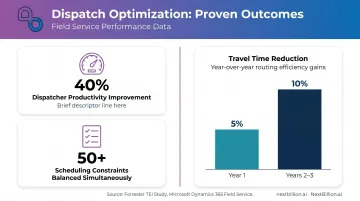
Modern platforms support 50+ hard and soft constraints: time windows, SLA requirements, vehicle type, technician certifications, and customer preferences. No dispatcher can balance that combination manually across 20+ technicians without dropping variables.
A commissioned Forrester TEI study on Microsoft Dynamics 365 Field Service reported 40% improved dispatcher productivity and $1.6M in scheduler/dispatcher redeployment savings for a composite enterprise organization — though those figures apply to a large deployment and shouldn't be assumed universally.
For field service operations specifically, NextBillion.ai's Route Optimization API handles exactly this type of constraint-heavy dispatch — supporting skill-based technician matching, time window management, and dynamic job reoptimization when same-day cancellations or additions occur.
Pro 2: Real-Time Visibility and Operational Control
GPS tracking and live job-status dashboards give managers situational awareness that manual systems simply can't replicate. When a job runs long, you see it. When a technician is idle, you can act.
What this enables in practice:
- Proactive customer communication with accurate, updated ETAs
- Early identification of SLA risks before they become missed appointments
- Faster response to same-day emergencies without disrupting the entire schedule
- Dispatcher confidence when prioritizing competing demands
That visibility converts directly into faster, better decisions — grounded in live data, not status-call estimates.
Pro 3: Reduced Travel Time and Operating Costs
Optimized routing reduces drive time, which compounds across your entire fleet daily. The same Forrester TEI study reported 5% technician travel-time reduction in Year 1 and 10% in Years 2 and 3, valued at $2.1M over three years for the enterprise composite. Travel time savings translate directly to more jobs completed per day and lower operating costs per job.
Better workload balancing also cuts overtime. Work distributes more evenly across available technicians instead of defaulting to whoever is closest or most familiar.
Pro 4: Better First-Time Fix Rates and Customer Outcomes
First-time fix rate (FTFR) is one of the clearest indicators of dispatch quality. When a skill-mismatched technician arrives without the right tools or knowledge, the job fails — and the cost compounds.
The 2024 benchmark data shows:
- Median FTFR: 76% across 145 organizations
- Top performers: 87% | Bottom performers: 55%
- A failed first visit adds an average of 2.7 total visits and 13 days to resolution
Dispatch software directly addresses this by ensuring the technician assigned to a job has the skills, certifications, and history to complete it on the first visit. Hawx Smart Pest Control, a NextBillion.ai customer operating 30+ offices across 16 states, attributed faster technician response times and higher route compliance directly to skill- and location-aware job assignment.
Pro 5: Data-Driven Performance Management
Dispatch platforms generate KPI data — response time, technician utilization, job duration, SLA adherence — that gives managers concrete visibility into where performance gaps actually live.
The performance gap this addresses is significant. The 2024 benchmark found:
- Top performers resolve issues in 2.44 days vs. 9.67 days for bottom performers
- If all employees performed like the top 20%, service costs could fall by as much as 22%
- 25% of service leaders struggle to analyze data for performance insights
Dispatch software builds the measurement layer that makes improvement systematic: surface which technicians, zones, or job types are driving inefficiency, then act on it.
Bonus: Scalability Without Proportional Headcount Growth
As job volume grows — seasonally or through geographic expansion — manual dispatch requires more dispatchers. Automated dispatch absorbs that volume increase without proportional headcount costs. This ROI argument often gets overlooked in pure licensing-cost comparisons.
Key Cons of Field Service Dispatch Software
Con 1: Upfront Cost and Total Cost of Ownership
Licensing fees are only part of the real cost. Buyers consistently underestimate the full TCO when scoping budget. This is also where trucking dispatch software comparisons diverge from general field service tools, since carriers subject to FMCSA hours-of-service and IFTA reporting requirements often need dispatch systems with built-in compliance tracking, which adds to the total cost but reduces manual paperwork and audit risk.
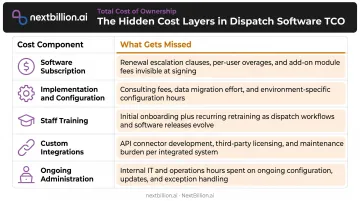
Full cost layers to budget for:
| Cost Component | What Gets Missed |
|---|---|
| Software subscription | Per-user or per-technician multiplied by team size |
| Implementation and configuration | Setup time, data migration, workflow mapping |
| Staff training | Dispatcher and technician training hours |
| Custom integrations | Middleware, API development for legacy systems |
| Ongoing administration | Internal system ownership cost |
Published pricing ranges from $29/month for SMB tools like Jobber to $175–$650/user/month for enterprise platforms like Salesforce Field Service. The Forrester TEI for Microsoft Dynamics 365 Field Service reported a total implementation investment of $9.5M for a composite enterprise organization, including $700,000 in training costs alone.
Con 2: Implementation Complexity and Time-to-Value Gap
Even well-resourced deployments take weeks to months before teams are operating efficiently. During that transition period — retraining dispatchers, reconfiguring workflows, running parallel systems — productivity often dips before it improves.
This time-to-value gap is real and worth planning for. Operations that underestimate it often attribute early-stage underperformance to the software when the actual issue is incomplete adoption.
Con 3: User Adoption Friction and Change Resistance
User adoption — not software capability — is the most common reason FSM implementations underperform.
Service Council data makes the challenge concrete:
- 99.5% of technicians already use mobile devices for field work
- One-third are dissatisfied with learning and mentoring opportunities
- GPS tracking is cited as a least-liked mobile feature — a meaningful signal about privacy and trust concerns
Dispatchers accustomed to managing jobs manually often resist systems that reduce their discretion. Technicians worry about surveillance. Without deliberate change management, even well-designed software underdelivers.
Con 4: Integration Challenges with Legacy Systems
Once the people challenges are addressed, the technical side surfaces its own friction. Businesses running older ERP, accounting, or CRM systems face real compatibility issues: real-time field data needs to flow into back-office workflows — work orders to invoices, job status to CRM records, parts usage to inventory — and that connectivity isn't automatic.
Middleware or custom API development adds cost and project risk. The integration complexity scales with how many legacy systems are in the stack and how inflexible they are. This is a diligence question, not a dealbreaker, but it needs to be evaluated before signing a contract.
Con 5: Connectivity Dependence and Offline Vulnerabilities
Most dispatch software requires reliable mobile data or Wi-Fi for real-time synchronization. In areas with poor connectivity — remote sites, building basements, rural routes — technician apps can fail to sync job updates, creating data gaps and dispatcher blind spots.
Real platform limitations exist. Salesforce Field Service requires a connection to generate final service-report PDFs. Oracle Field Service stores offline actions in browser memory and syncs when connection returns. Neither is a dealbreaker, but both require testing in your actual operating environments before rollout.
How to Overcome the Cons
Address Cost and Implementation Complexity
- Phase the rollout: Start with core dispatch and scheduling, then layer in analytics and integrations after adoption stabilizes
- Choose API-first platforms: Systems that integrate into existing stacks (rather than replacing them) reduce switching costs and deployment risk
- Set realistic timelines: Plan for a 4–12 week transition period and measure success at 90 days, not 30
For operations already running ServiceTitan or Salesforce Field Service, NextBillion.ai's Route Optimization API adds optimization capability on top of your existing FSM platform — no rip-and-replace required. With solutions engineering support, production go-live typically takes about one week.
Address Adoption Challenges
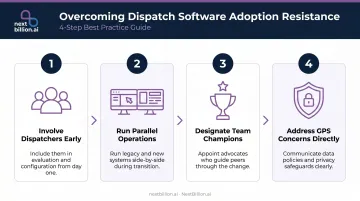
- Involve dispatchers in the tool selection process — not just managers
- Run parallel operations during the transition so staff can build confidence before the old system is removed
- Designate a team champion in each operational group to drive peer adoption
- Treat GPS tracking concerns directly and early — explain what's tracked, why, and who sees it
Address Integration and Connectivity Risks
- Test offline behavior explicitly during demos, using your actual device types and operating environments
- Ask vendors for documented integration paths with your specific ERP, CRM, and telematics systems before committing
- Evaluate vendors with pre-built connectors to common platforms (Samsara, Geotab, Salesforce, Dynamics 365) to reduce custom development
What Features to Look for in Field Service Dispatch Software
Must-have capabilities:
- Real-time GPS tracking and technician location visibility
- Skill-based, constraint-aware job assignment (time windows, certifications, priority)
- Mobile app with documented offline functionality
- Dynamic rerouting for same-day job changes
- CRM/work order integration
Evaluation criteria beyond features:
- Clarify pricing structure upfront — per-user, per-API-call, and per-vehicle models carry very different cost profiles at scale. For high-frequency dispatch operations, per-vehicle or flat-fee models typically outperform pay-per-call at volume
- Verify support response times and whether dedicated onboarding is included or billed separately
- Test the platform at 2x your current technician count, not just your current size
- Confirm security certifications — SOC 2 Type II and ISO 27001 are baseline requirements for enterprise procurement. NextBillion.ai holds both, plus GDPR compliance and on-premise deployment options for organizations with strict data residency requirements
General FSM vs. Specialized Optimization Layer
General FSM platforms — ServiceTitan and Salesforce Field Service among them — handle work orders, customer records, invoicing, and scheduling well. The gap shows up in route optimization. Once you're running 50+ daily technicians, multi-stop sequencing, or territory-based constraints, native schedulers hit their ceiling.
A dedicated route optimization engine can layer on top of your existing FSM rather than replace it. NextBillion.ai, for example, supports 50+ hard and soft constraints — time windows, vehicle type, technician certifications, priority tiers — giving dispatch the optimization depth that general-purpose platforms don't offer out of the box.
Is Field Service Dispatch Software Worth It?
Clear ROI cases:
- Managing 10+ technicians across multiple service zones
- Running SLA-bound contracts where missed appointments have financial consequences
- Experiencing scheduling conflicts, repeat truck rolls, or dispatcher burnout
- Scaling geographically without wanting to scale dispatcher headcount proportionally
Cases where lighter tools may suffice:
- Fewer than 5 technicians with simple, predictable daily schedules
- Single-zone operations with minimal scheduling complexity
- Very low job volume without time-window or skill-matching requirements
The cost-of-inaction argument is concrete. Failed first visits add an average of 2.7 total truck rolls and 13 days to resolution. Bottom performers cost 80% more than top performers within low-ranking organizations, per the 2024 benchmark. If any of those numbers describe your current operation, the software pays for itself faster than a line-item cost comparison suggests.
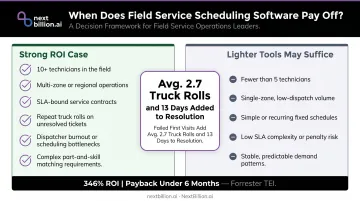
The Forrester Total Economic Impact study for Dynamics 365 Field Service found 346% ROI with payback under six months for a composite large organization. Mid-market and SMB ROI is less documented in public benchmarks, but the underlying mechanics — fewer wasted miles, fewer repeat visits, better technician utilization — apply at any scale.
Frequently Asked Questions
What is field service dispatch software?
Field service dispatch software automates technician assignment, routing, job tracking, and customer communication across the full job lifecycle. It goes beyond calendar scheduling by adding real-time GPS, skill-based matching, and dynamic rerouting for mid-shift changes.
What are the advantages of field service management software?
The main operational benefits include faster response times, reduced travel costs, and higher first-time fix rates through skill-matched assignment. Real-time routing engines account for traffic, vehicle restrictions, and job priority, cutting idle windows between calls. KPI dashboards add visibility that enables data-driven performance improvement over time, and dispatchers gain a live view of technician location instead of relying on phone check-ins.
What's the difference between CRM and FSM?
CRM manages customer relationships and sales pipeline data. FSM manages the execution of on-site service work — scheduling, dispatch, job tracking, and technician management. Most teams integrate the two so customer records flow directly into work orders, and dispatch decisions (technician skill, location, availability) feed back into the CRM as job history. Without integration, dispatchers work from stale contact data and sales teams lose visibility into open service tickets.
What are the main disadvantages of field service dispatch software?
The most common drawbacks are upfront licensing and implementation costs, a time-to-value gap during rollout, user adoption friction (especially around GPS tracking), legacy system integration complexity, and connectivity dependence in low-signal environments.
How much does field service dispatch software typically cost?
Pricing varies widely: SMB tools start around $29–$149/month, mid-market platforms run $100–$230/user/month, and enterprise platforms like Salesforce Field Service reach $230–$650/user/month. Budget beyond the subscription — implementation, training, and integrations typically push total first-year costs well above the sticker price.
Is field service dispatch software worth it for small businesses?
For operations under 5 technicians with straightforward schedules, lighter scheduling tools are usually sufficient. Once you're managing 10+ technicians, SLA commitments, or multi-zone routing, full dispatch software typically delivers clear ROI — especially when you factor in the cost of repeat truck rolls and dispatcher overhead.
What is the best dispatch software for service companies?
There is no single best option; the right choice depends on fleet size, job complexity, and existing systems. Small teams often do fine with basic scheduling tools, while operations juggling SLA windows, multi-technician routing, or regulatory tracking (like hours-of-service for drivers) need platforms with real-time routing and dynamic rerouting. Evaluate based on integration with your CRM or ERP, routing accuracy, and how it handles mid-shift job changes.
What is the best trucking dispatch software?
For trucking specifically, the priority shifts from technician scheduling to route compliance and vehicle-specific routing — accounting for truck height, weight, hazmat restrictions, and hours-of-service limits. The best fit depends on fleet size and whether you need IFTA reporting, ELD integration, or multi-stop optimization. Compare platforms on how well they handle truck-specific routing constraints rather than general field service features.