The tension is real: cloud promises elastic scaling and low upfront cost, but organizations with compliance mandates, data sovereignty requirements, or high-volume workloads increasingly find that operating Kubernetes on their own infrastructure makes more operational and financial sense.
This article covers exactly what on-premises Kubernetes means in practice, why enterprises choose it, the operational challenges they face, and the best practices that separate successful deployments from multi-month engineering disasters.
Key Takeaways
- On-prem Kubernetes gives you full control over data residency, hardware, and the entire stack — with full operational responsibility to match
- Compliance-driven industries (healthcare, government, logistics) are the primary adopters
- The biggest risks are networking complexity, etcd management, and upgrade discipline
- Minimum viable production setup: 3 control plane nodes, SSD-backed etcd, and a CNI selected before workloads deploy
- Enterprise distributions (OpenShift, Rancher) reduce operational burden; DIY paths (kubeadm, Kubespray) require deeper Kubernetes expertise
What Is Kubernetes On-Premises?
On-premises Kubernetes means running a Kubernetes cluster on infrastructure you own or control — physical servers, on-prem VMs, or hardware in a co-location facility — rather than on public cloud provider servers.
Kubernetes itself is platform-agnostic — it has no inherent awareness of whether it's running on AWS or a bare-metal rack in your data center. The core orchestration logic — scheduling, scaling, self-healing — behaves identically across environments.
What Changes Without the Cloud
The functional difference isn't Kubernetes itself. It's everything around it:
- Control plane nodes — you provision and maintain them
- etcd — the distributed key-value store holding all cluster state, entirely your responsibility
- Networking — no software-defined cloud networking; you select and configure a CNI plugin
- Storage — no automatic persistent volume provisioning; you integrate with SAN/NAS or deploy distributed storage
- Load balancing — no managed load balancer service; you deploy MetalLB, HAProxy, or hardware alternatives
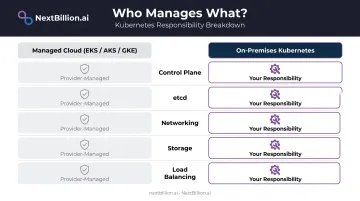
Managed cloud services like EKS, AKS, and GKE abstract all of this. On-prem exposes it — which is exactly why teams choose it (full control) and exactly why it demands more engineering investment. Some cloud-specific features, such as EKS Autoscaling tied to EC2, rely on provider APIs that simply don't exist on-prem. Core Kubernetes functionality remains identical; cloud-native add-ons don't make the move with it.
Key Benefits of Running Kubernetes On-Premises
Compliance and Data Sovereignty
Regulated industries have a specific problem with public cloud: proving exactly where data lives, who can access it, and what happens to it under a breach. Cloud providers can be HIPAA business associates even when they only store encrypted data — HHS guidance makes clear that the shared-responsibility model still applies. GDPR's data transfer restrictions add another layer for EU-facing operations.
On-prem Kubernetes doesn't eliminate compliance work, but it gives organizations direct control over:
- Physical and logical data residency
- Access controls and audit trails
- Network perimeter and egress
- Upgrade and patch timing
For logistics and field-service operators, this matters in concrete terms. Platforms like NextBillion.ai — which carries SOC 2 Type II and ISO/IEC 27001:2013 certifications — offer on-premises Kubernetes deployment built for organizations where routing queries, user data, and operational logs must stay entirely behind the customer's own firewall.
Government agencies, healthcare logistics operators, and financial services fleets are the primary buyers of this deployment model for exactly this reason.
Long-Term Cost Predictability
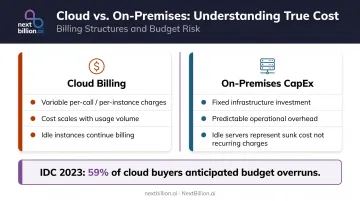
IDC reported that nearly half of cloud buyers exceeded expected spending in 2023, with 59% anticipating budget overruns in 2024. The a16z "Cost of Cloud" analysis made the same structural argument: at scale, cloud billing can materially compress margins for data-intensive workloads.
The on-prem question isn't "cloud is always more expensive." It's about workload characteristics:
- Stable, high-volume workloads — real-time routing at scale, large distance matrix computations — generate predictable, high cloud costs
- CapEx vs. variable billing — on-prem replaces per-call/per-instance charges with fixed infrastructure costs and known operational overhead
- Idle resources — unused cloud instances keep billing; unused on-prem servers represent sunk CapEx, not recurring charges
IDC also found only 8-9% of companies plan full workload repatriation. Selective migration of high-utilization workloads is the more common pattern.
Avoiding Vendor Lock-In
Every managed Kubernetes offering introduces platform-specific dependencies. AWS EKS binds networking to the VPC CNI and storage to the EBS CSI driver. AKS integrates with Azure AD and Azure Disk. These integrations work well within their ecosystems and create real friction when you want to move.
On-prem Kubernetes keeps the organization in control of the full stack — CNI, storage drivers, IAM, load balancing. Combined with a cloud-agnostic deployment approach (deployable on EKS, GKE, AKS, or self-managed clusters), this enables genuine multi-cloud optionality rather than theoretical portability.
Hardware Utilization and Deployment Speed
Two more factors often tip the decision for organizations already running on-prem infrastructure:
- Existing hardware ROI — organizations with on-prem servers that would otherwise sit underutilized can run Kubernetes workloads on that sunk CapEx
- Local image deployment — if development and CI/CD pipelines live on-prem, pushing container images to an on-prem cluster avoids internet transfer bottlenecks (this reverses if pipelines are cloud-hosted)
Challenges of Running Kubernetes On-Premises
Networking Complexity
Cloud Kubernetes comes with networking pre-integrated. On-prem means selecting a CNI plugin and wiring it into your existing data center network — firewall rules, routing tables, VLAN configurations, and all.
The major CNI options have distinct trade-offs:
| CNI | Best For | Key Characteristic |
|---|---|---|
| Cilium | Large clusters (1,000s of nodes, 100K+ pods) | eBPF data plane, strong observability |
| Calico | Policy-heavy environments | Supports Linux, Windows, and eBPF data planes |
| Flannel | Simpler deployments | Lightweight L3 fabric, minimal configuration |
Choose based on your scale requirements, existing team expertise, and network policy needs — not benchmarks alone.
Load Balancing, Storage, and etcd Management
Three more operational gaps that cloud managed services paper over:
Load balancing — cloud providers deliver load balancers as a service. On-prem requires deploying MetalLB, HAProxy, or a hardware appliance (F5) and maintaining it yourself.
Persistent storage — stateful workloads (databases, ML pipelines, location data stores) need persistent volumes. Kubernetes doesn't provision these automatically on-prem. You integrate with existing SAN/NAS infrastructure or deploy a distributed storage layer like Ceph/Rook and configure the appropriate CSI drivers.
Cluster upgrades — Kubernetes releases three minor versions per year, roughly one every four months. Each minor version receives approximately one year of patch support, with API deprecations that can break running workloads. Without a managed upgrade path, teams must plan and execute staged upgrades manually across dev, staging, and production environments.
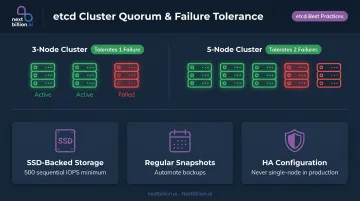
That upgrade risk is highest when etcd is misconfigured — because etcd holds all cluster state. A failed etcd cluster without proper HA, regular snapshots, and SSD-backed storage means losing everything. The etcd documentation recommends SSD-backed storage and sets 500 sequential IOPS as the minimum for heavily loaded clusters.
Monitoring and Security Overhead
Security and observability gaps don't surface until something breaks — and on-prem, there's no managed baseline to catch them first. Red Hat's 2024 Kubernetes security report found 67% of organizations delayed or slowed application deployment due to security concerns, with 42% lacking capabilities to address container-specific threats.
On-prem removes cloud-native monitoring defaults (CloudWatch, Azure Monitor) and replaces them with a stack you build and maintain: Prometheus, Grafana, log aggregation, alerting runbooks, and on-call processes. CNCF's 2024 survey found 46% of organizations report CNCF projects are too complex to run in production — a number that only grows without a managed service to fall back on.
Best Practices for Kubernetes On-Premises
Plan Node Architecture for High Availability
Minimum viable production setup:
- 3 control plane nodes minimum — required for etcd quorum (a 3-node cluster tolerates 1 failure; 5 nodes tolerate 2)
- SSD-backed storage for etcd: disk write latency directly impacts cluster stability
- Keep master and worker nodes separate — don't co-locate control plane and application workloads
- Dedicated load balancer for the control plane API endpoint
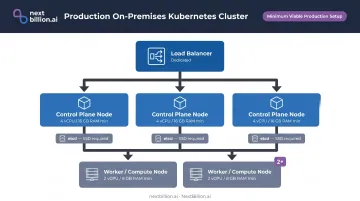
For hardware baselines, Red Hat OpenShift production sizing suggests at minimum 4 vCPU / 16 GB RAM for control plane nodes and 2 vCPU / 8 GB RAM for compute nodes — treat this as a floor, not a target. Production environments should provision significantly beyond minimums to handle peak workloads without degradation.
Staff and Certify Your Team
On-prem Kubernetes demands a broader skill set than cloud Kubernetes. Your team needs competency across physical infrastructure, Linux administration, networking, and Kubernetes operations simultaneously.
Certifications worth pursuing:
- CKA (Certified Kubernetes Administrator) — covers cluster architecture, installation, networking, storage, and troubleshooting. Directly relevant to on-prem operations
- CKAD (Certified Kubernetes Application Developer) — relevant for teams building applications on the platform
DIY enterprise Kubernetes projects regularly balloon into multi-month efforts when teams underestimate the operational depth required. Budget time for this explicitly — and budget for what comes next: a solid disaster recovery plan is just as important as the people running the cluster.
Implement Backup and Disaster Recovery
A corrupted or lost etcd cluster means losing all cluster state — every deployment, service, config map, and secret. Treat etcd backups as foundational infrastructure, not an optional safeguard.
- Automate etcd snapshots on a frequent schedule
- Store snapshots off-site or in a geographically separate location
- Back up PersistentVolume data separately to protect against localized failures
- Test restoration procedures regularly — a backup you've never restored is a backup you don't have
Set Up Storage and Networking Before Workloads Deploy
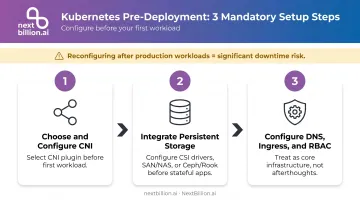
Reconfiguring storage architecture or CNI choice after production workloads are running creates significant downtime risk. The right sequence:
- Choose and configure your CNI before the first workload hits the cluster
- Integrate persistent storage (CSI drivers, SAN/NAS, or Ceph/Rook) before deploying stateful applications
- Configure DNS, Ingress controllers, and RBAC as core cluster infrastructure, not afterthoughts
Establish Monitoring and an Upgrade Cadence
Deploy your monitoring stack on day one — not after the first incident. Prometheus + Grafana covers the fundamentals; configure alerts for node resource saturation, etcd health, and pod scheduling failures before production traffic arrives.
For upgrades, create a formal schedule aligned to Kubernetes release cadence:
- Always upgrade non-production environments first
- Test existing workloads against the new version before promoting to production
- Never skip minor versions (the version skew policy limits kubelet to 3 minor versions behind kube-apiserver)
Deployment Approaches for Kubernetes On-Premises
Three broad categories, each with distinct trade-offs:
Self-Managed Tools
kubeadm, Kubespray, and kOps automate cluster bootstrapping and are the right choice for teams that want full upstream control and are willing to own the entire lifecycle. kubeadm is the official upstream tool and the most widely documented; Kubespray suits Ansible-centric teams. Talos Linux is worth noting separately: it's an immutable, minimal OS purpose-built for Kubernetes, with documented air-gapped installation support.
Enterprise On-Prem Distributions
Red Hat OpenShift and SUSE Rancher package more complete, opinionated platforms with support contracts. They suit enterprises that want a managed-like operational experience on private infrastructure — and carry the procurement-ready contracts that regulated industries require.
- OpenShift: includes documented disconnected installation for air-gapped environments
- Rancher: manages multiple clusters and distributions from a single control plane
Platform9 takes a SaaS-operations model for private infrastructure, making it relevant for teams that want cloud-like management without cloud-provider dependency.
CSP Hybrid Extensions
Amazon EKS Anywhere, Google Anthos/Distributed Cloud, and Azure Arc extend cloud management planes to on-prem hardware. EKS Anywhere explicitly supports isolated and air-gapped environments. Azure Arc connects existing clusters to Azure management; verify disconnected mode requirements carefully before assuming air-gap support.
These are strong options for AWS/GCP/Azure-standardized enterprises running hybrid estates. They're not appropriate for sovereignty-first deployments that need to eliminate cloud dependency entirely.
Infrastructure Substrate
| Option | Pros | Cons |
|---|---|---|
| Bare metal | Best raw performance | Least flexible for dynamic scaling |
| VMs (vSphere/KVM) | Cloud-like elasticity, easier lifecycle | Adds hypervisor layer |
| Co-location | Reduces hardware ownership | Physical access constraints |
VMs on vSphere or KVM represent the best balance for most enterprise use cases. They enable snapshot-based node management and easier cluster lifecycle operations without sacrificing meaningful performance.
Infrastructure substrate choice also shapes what application workloads you can run privately. For specialized workloads like location intelligence or route optimization, look for software vendors that support Kubernetes-native on-prem deployment with certifications like SOC 2 Type II and ISO 27001. NextBillion.ai, for example, deploys its full routing and mapping API stack (Directions, Distance Matrix, Route Optimization) via Helm chart templates on any Kubernetes cluster — self-managed, EKS, GKE, or AKS — with all routing queries and operational data staying entirely within the customer's own infrastructure.
Frequently Asked Questions
Can Kubernetes run on-premises or in the cloud?
Kubernetes is platform-agnostic and runs identically on on-premises servers, public cloud infrastructure, or hybrid combinations. The core difference is operational: on-prem deployments require teams to manage all infrastructure components — networking, storage, load balancing — that cloud providers abstract away. For fleet and logistics workloads, this matters when routing and mapping APIs must stay inside a private network for compliance reasons, such as DOT or HIPAA-adjacent location data handling, rather than transiting a third-party cloud.
Is Kubernetes still relevant in 2026?
Yes. CNCF reported 82% production use in 2025, up from 80% in 2024, with 93% of organizations engaged including pilots. Its ability to span cloud, on-prem, and edge environments — combined with accelerating adoption in AI/ML workloads — makes it the de facto container orchestration standard.
What is the difference between on-premises Kubernetes and managed Kubernetes?
Managed Kubernetes (EKS, AKS, GKE) abstracts control plane management, upgrades, and infrastructure provisioning. On-premises Kubernetes gives teams full control but full responsibility for every layer, from hardware selection to cluster upgrades and etcd backup.
How many nodes do you need for a production on-premises Kubernetes cluster?
Minimum viable production: 3 control plane nodes (for etcd quorum and HA), 2+ worker nodes, a dedicated load balancer for the API endpoint, and a separate management machine. Size hardware well beyond Kubernetes minimums — clusters routinely hit resource ceilings under real production load.
Is on-premises Kubernetes more secure than cloud-based Kubernetes?
On-prem can offer stronger data sovereignty and physical security controls, but security depends entirely on team practices. On-prem requires manually managing OS hardening, network security, and software updates that cloud providers handle by default — more control doesn't automatically mean better security. For fleets handling driver hours-of-service or delivery location data, on-prem can simplify audit scope, but only if patching and access controls are enforced with the same discipline a managed provider applies automatically.
What tools are most commonly used to deploy Kubernetes on-premises?
Common options by use case:
- kubeadm — standard self-managed cluster bootstrapping
- Kubespray — Ansible-based provisioning for multi-node setups
- Talos Linux — immutable, minimal OS purpose-built for Kubernetes
- Red Hat OpenShift / SUSE Rancher — enterprise distributions with full support contracts
Is it possible to run Kubernetes locally?
Yes. Tools like Minikube, Kind, and k3d let you run a single-node or multi-node Kubernetes cluster on a laptop or workstation for development and testing. These local setups mirror production APIs closely enough to test manifests, routing logic, or API integrations before deploying to an on-premises or cloud cluster, but they are not sized or hardened for production traffic.
Why are people moving away from Kubernetes?
Some teams move away from self-managed Kubernetes because of the operational overhead: cluster upgrades, etcd maintenance, networking, and security patching require dedicated staff. Smaller teams often shift to managed Kubernetes services or simpler container platforms to reduce that burden. This is not a decline in Kubernetes itself but a shift toward reducing the operational cost of running it directly on-premises.