MACPAC reported over 60 million Medicaid NEMT ride-days and $2.6 billion in state and federal NEMT spending in FY2018 — and that figure excludes managed care payments. At that volume, every manual handoff between systems carries real financial and patient safety exposure.
This guide covers the prerequisites, step-by-step integration process, core technologies, common failure points, and how to measure success after go-live.
Key Takeaways
- EHR integration pushes patient scheduling, eligibility, and mobility data directly into dispatch — no manual re-entry
- FHIR R4 works for modern EHRs (Epic, Cerner, athenahealth); HL7 v2 requires middleware for legacy systems
- HIPAA compliance requires BAAs, access controls, encryption, and audit trails built into the architecture from day one
- Phased rollout starting with one department or location reduces risk and accelerates approval from healthcare IT teams
- Most failures trace back to readiness gaps, legacy compatibility issues, and insufficient staff training
What You Need Before Starting: Prerequisites for NEMT-EHR Integration
What you discover before writing a single line of code determines whether this integration succeeds or stalls. Teams that skip this phase consistently hit the same preventable failures mid-project.
System and Infrastructure Readiness
Start with a direct audit of both platforms:
- NEMT platform: Confirm it supports open API access and can send/receive FHIR R4 or HL7 v2 formatted data. Vendor lock-in on integrations is a red flag. Look specifically for published API documentation.
- EHR version: Determine whether your EHR exposes RESTful APIs with JSON (Epic, Cerner, athenahealth, MEDITECH all support FHIR R4) or relies on older HL7 v2 messaging over MLLP. This single factor determines your middleware requirements.
- Data field alignment: Map address formats, patient identifier schemas, and service codes across both systems before connecting anything. Mismatches here cause scheduling failures and billing rejections that typically only surface post-launch.
Compliance and Stakeholder Alignment
Once your technical stack is mapped, two compliance requirements must be in place before any PHI touches the integration:
- Business Associate Agreements (BAAs): Under 45 CFR 160.103, any vendor that creates, receives, maintains, or transmits PHI — including your NEMT platform, middleware engine, cloud host, and API intermediary — qualifies as a business associate and needs a signed BAA before go-live.
- Breach notification procedures: Per 45 CFR 164.410, business associates must notify covered entities after discovering a breach of unsecured PHI. Update your incident response runbooks accordingly, and confirm vendor contracts specify escalation timelines.
On the stakeholder side, align transportation coordinators, case managers, billing staff, dispatchers, and IT leads on workflows, access permissions, and success metrics before any technical work begins. Integration decisions made without billing staff input routinely miss claim submission requirements.
How to Integrate NEMT Scheduling with EHR Systems
The integration process follows a consistent four-phase sequence regardless of organization size. Each phase gates the next.
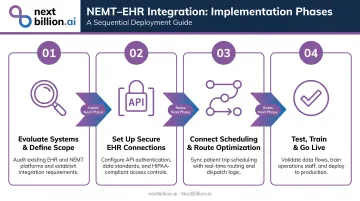
Step 1: Evaluate Current Systems and Define Integration Scope
Map existing workflows to identify where manual data transfers occur. The four highest-friction points in most NEMT operations are:
- Trip requests — manually called or faxed from care coordinators to dispatchers
- Eligibility checks — verified by phone rather than pulled from the EHR at dispatch
- Appointment confirmations — re-confirmed by staff instead of synced from the scheduling module
- Billing submissions — assembled from two systems instead of generated automatically
Before integration begins, establish your current baseline for on-time trip performance, clean claim rates, and no-show percentages. Document these as your before/after benchmarks before integration begins.
Step 2: Set Up Secure Connections with the EHR
For modern EHRs (Epic, Cerner, athenahealth, MEDITECH):
- Implement RESTful API connections using FHIR R4
- Start with read-only access to the Patient, Appointment, and Location resources — this is faster to get approved and lets you demonstrate clean data flow before requesting write permissions
- Use OAuth 2.0 Authorization Code flow for user-facing applications and Client Credentials with JWT for system-to-system connections; the HL7 SMART App Launch framework documents this pattern for EHR-connected apps
For legacy EHRs:
- Use HL7 v2 ADT (Admission, Discharge, Transfer) and ORM (Order Entry) message types for NEMT-relevant data
- Secure connections via VPN tunnels, TLS-wrapped MLLP, and IP whitelisting
- Deploy middleware to translate HL7 v2 messages into FHIR resources your NEMT platform can consume
Step 3: Connect Trip Scheduling and Route Optimization to EHR Data
Once the connection is live, configure your NEMT scheduling system to automatically pull from the EHR on trip request:
- Patient identifiers and demographics
- Appointment date, time, and facility location
- Mobility requirements: wheelchair, stretcher, bariatric, or ambulatory
- Special equipment needs (lift-equipped vehicle, oxygen accommodation)
That same patient data also drives route optimization. Patient pickup/drop-off addresses, appointment time windows, and vehicle type constraints should drive multi-stop route construction automatically, not be re-entered by a dispatcher.
Route optimization APIs designed for NEMT workflows can consume this structured input directly. NextBillion.ai's Route Optimization API, for example, supports 50+ hard and soft constraints including vehicle accessibility tagging (wheelchair lifts, stretcher tie-downs), multi-dimensional capacity modeling, and strict appointment time windows with soft constraint flexibility for minor schedule variations. Once EHR data populates a trip request, the Driver Assignment API can automatically match the right vehicle and driver without manual intervention, with sub-second response times.
For NEMT operators with strict data residency requirements, NextBillion.ai supports on-premise deployment within your own Kubernetes environment, AWS EKS, GCP GKE, or Azure AKS, keeping routing data entirely within your infrastructure.
Step 4: Test, Train, and Go Live
Testing: Run all integration testing in a sandbox using synthetic patient data. Validate that patient demographics, mobility flags, appointment times, and pickup addresses transfer accurately. Define a UAT checklist that includes edge cases: canceled appointments, will-call trips, multi-leg journeys, and trips crossing midnight.
Training: Begin role-specific training approximately three weeks before go-live:
- Administrative staff: integration settings and eligibility workflows
- Dispatchers: new scheduling and dispatch process
- Drivers: updated app behavior and navigation
Designate trained super-users in each department. In practice, super-users typically cut help desk ticket volume by 30–50% in the first month post-launch — a faster return than any training manual.
Go-live: Launch in one department or location first. Use the first 30 days to capture UAT results, resolve edge cases, and document issues before expanding to full deployment.
Key Technologies That Enable NEMT-EHR Integration
FHIR R4
FHIR R4 (published November 2019) is the current standard for healthcare data exchange, and 69% of US hospitals used FHIR APIs for patient access in 2022 — up 12 percentage points year-over-year following the ONC Cures Act Final Rule.
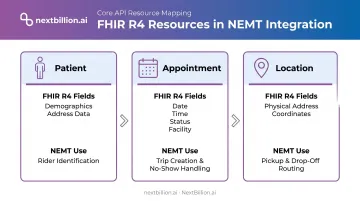
For NEMT, three FHIR R4 resources do the heavy lifting:
| FHIR Resource | What It Contains | NEMT Use |
|---|---|---|
| Patient | Demographics, contact info, address | Rider identification, address matching |
| Appointment | Date, time, status, facility | Trip creation, no-show handling |
| Location | Physical address, coordinates | Pickup/drop-off mapping |
HL7 v2 and Middleware
HL7 v2 remains the dominant messaging format for older and mid-generation EHRs. ADT and ORM message types are most relevant for NEMT workflows. The limitation: HL7 v2 requires middleware or an integration engine to translate its message format into structures modern NEMT platforms can consume.
Established options include:
- Rhapsody — transforms HL7 to FHIR and connects any standard healthcare system
- Azure Health Data Services — converts multiple health data formats into FHIR R4 via
$convert-data - AWS HealthLake — imports FHIR data and supports FHIR-native data management
When selecting middleware, look for idempotency controls and durable message queues. These prevent duplicate trip submissions during connectivity disruptions — a real operational problem in NEMT.
Webhooks and Real-Time Notifications
Middleware handles format translation — webhooks handle timing. Rather than polling the EHR on an interval, webhooks push status changes directly into the NEMT platform the moment they occur.
For same-day scheduling, that speed is everything. Subscribe your NEMT platform to at minimum these EHR event types:
- Appointment cancellations and reschedules
- Discharge status updates
- New appointment bookings for same-day trips
A canceled appointment that takes 20 minutes to reach the dispatcher is a wasted vehicle deployment. With webhooks configured correctly, that same cancellation reaches dispatch in seconds.
HIPAA Security Layer
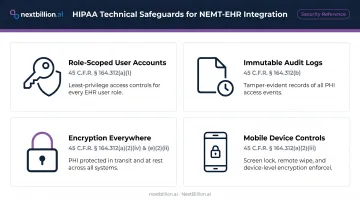
Every integration layer must include:
- Role-scoped user accounts: Least-privilege access by role (dispatcher, billing, driver) with automatic logoff — per HHS technical safeguards under 45 CFR 164.312(a)
- Immutable audit logs: Every PHI access event, trip change, eligibility check, and billing submission recorded — required under 45 CFR 164.312(b)
- Encryption everywhere: NIST-aligned encryption for data in transit and at rest; HTTPS/TLS for all API connections
- Mobile device controls: Screen lock, remote wipe, and encryption for driver-facing apps accessing any PHI — per NIST SP 1800-1 guidance
Meeting these requirements is non-negotiable for any routing platform that touches NEMT data. NextBillion.ai holds SOC 2 Type II and ISO/IEC 27001:2013 certifications and operates HIPAA-compliant workflows. The routing layer works on opaque location inputs — no PII required — with all trip scheduling handled through encrypted, access-controlled workflows.
Common Mistakes and How to Troubleshoot Them
Most integration problems are predictable. They originate in planning decisions, not technical defects. The four patterns below account for most failed go-lives.
| Mistake | What Breaks | Fix |
|---|---|---|
| Skipping the readiness audit | Address formats, service codes, and patient IDs don't match | Map and normalize all data fields during scoping, before go-live |
| Requesting broad EHR permissions upfront | Healthcare IT denies the request outright | Start read-only on minimal FHIR resources; expand access incrementally once clean data flow is confirmed |
| No sandbox testing | Mobility flags, appointment times, or addresses don't transfer, often discovered after real patients are affected | Define a UAT checklist covering edge cases; validate every scenario with synthetic data first |
| Under-training staff | Dispatchers and billing staff revert to manual processes; integration never delivers ROI | Train three weeks before go-live; designate super-users in each department |
Benefits of NEMT-EHR Integration You Can Actually Measure
Operational Efficiency
CAQH's 2023 Index Report found that manual eligibility and benefit verification costs providers $7.97 per transaction versus $2.18 electronic — with an average savings opportunity of 16 minutes per transaction when shifting to automated verification. At NEMT volume, that time compounds fast.
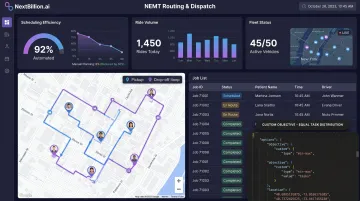
Ride Care, an NEMT operator using NextBillion.ai's routing and dispatch platform, reduced route planning time from half a night of manual work to just two hours — roughly a 75% reduction in scheduling effort. The company scaled from 60 to nearly 200 rides per day on the same team.
Financial Impact
Denied claims are expensive to fix. HFMA reported average administrative rework costs of $47.77 per Medicare Advantage denial; AHIMA put the figure at $25 per claim for practices and $181 for hospitals. Integrated systems reduce preventable denials by enabling automated claims submission with pre-verified eligibility data pulled directly from the EHR.
Patient Safety and Appointment Adherence
Financial gains matter, but the patient-facing impact is just as concrete. When EHR mobility data flows directly into dispatch, vehicle matching happens automatically — no longer dependent on a dispatcher catching a notation in the chart. The results:
- Wheelchair-accessible vehicles route to wheelchair patients without manual verification
- Stretcher-equipped vehicles assign to stretcher patients by default
- Wrong-vehicle arrivals are eliminated at the system level, not caught after the fact
A 2022 peer-reviewed systematic review found that interventions addressing non-emergency transportation barriers are associated with fewer missed appointments. For patients managing chronic conditions, correctly matched, reliable transport isn't a convenience — it's a direct factor in whether treatment plans hold.
Frequently Asked Questions
How does integration with EHR systems improve NEMT service delivery?
EHR integration automates patient data transfer into trip scheduling, ensuring the correct vehicle and mobility accommodations are dispatched based on clinical records. The result is fewer manual errors, reduced no-show rates, and faster reimbursement cycles — eligibility and appointment data are already verified before dispatch occurs.
Which module of the EHR software helps schedule patients using a calendar interface?
Most modern EHRs (Epic, Cerner, athenahealth) include a scheduling or appointment management module that exposes appointment data via FHIR R4 APIs. NEMT platforms connect to this module to pull appointment dates, times, and facility locations directly into the transportation scheduling workflow. This module also flags rescheduled or cancelled visits, which lets dispatch adjust or cancel a trip before a vehicle is sent out.
What EHR data should an NEMT platform pull first during integration?
Prioritize these four fields: patient identifiers, appointment date/time/location, pickup and drop-off addresses, and mobility or equipment requirements. These inputs drive vehicle matching and trip creation ; everything else is secondary. Once these fields are mapped and validated, teams can extend the integration to secondary data such as insurance eligibility or care coordinator notes, without holding up the initial go-live.
How do you integrate NEMT scheduling with an EHR that doesn't support FHIR?
Legacy EHRs without FHIR support can be connected via HL7 v2 messaging (ADT/ORM message types) combined with a middleware integration engine. The middleware translates older HL7 formats into data structures the NEMT platform can process. Rhapsody and Azure Health Data Services are two widely used middleware tools for this.
What security certifications should an NEMT platform have before connecting to an EHR?
At minimum: SOC 2 Type II certification, strong encryption for data in transit and at rest, OAuth 2.0 authentication, and the ability to sign a Business Associate Agreement. Healthcare IT teams will require all four before granting access. NextBillion.ai holds SOC 2 Type II and ISO/IEC 27001:2013 certifications and supports HIPAA-compliant workflows. Ask vendors for their most recent audit report and confirm the BAA covers the specific data fields your integration will exchange, not just a generic template.
How long does NEMT-EHR integration typically take to implement?
Most integrations take 4–12 weeks, depending on EHR vendor, system maturity, and organizational complexity. Smaller NEMT providers with modern EHRs typically land at the lower end; large health systems with legacy infrastructure often need more time. Starting with a single location or department reduces risk and accelerates the initial go-live.
What is the best software for scheduling patients?
There is no single best patient scheduling software for every organization; the right choice depends on your EHR vendor, patient volume, and whether transportation needs to be coordinated alongside clinical appointments. For NEMT providers, the priority is a scheduling tool that connects to your EHR's appointment module, handles mobility and equipment requirements, and supports real-time updates when appointments are rescheduled or cancelled.
What is the best scheduling software for transportation?
For patient transport specifically, the best scheduling software is one that goes beyond dispatch and routing to also integrate with clinical systems: it should pull appointment and mobility data from the EHR, support HIPAA-compliant data handling, and let dispatchers adjust trips when appointment times change. General-purpose transportation scheduling tools without EHR connectivity typically require manual data entry, which increases the risk of missed or duplicate trips.