Introduction
Picture a dispatcher at a mid-sized carrier managing 40 drivers across a single shift. Each driver needs at minimum a job assignment, route confirmation, ETA update, and delivery confirmation. At 40 drivers, that's potentially 160+ individual touchpoints per shift, most handled by phone or radio.
Now multiply that across multiple shifts, add route changes triggered by traffic, and factor in a driver who hasn't checked in.
Businesses automate driver-dispatch communication by replacing manual phone or radio touchpoints — job assignments, route confirmations, ETA updates, delivery confirmations — with software that triggers those messages automatically based on operational events. This closes the gap that manual dispatch communication creates: it doesn't scale. It creates delays between a route change and driver awareness, produces inconsistent updates when multiple dispatchers cover the same fleet, and leaves no traceable record when something goes wrong. Automation addresses each of these directly, keeping updates consistent across dispatchers and creating a traceable record as fleets and shifts grow.
According to FMCSA data, CMV drivers who text while operating are 23.2 times more likely to be involved in a safety-critical event — which puts phone-based dispatcher check-ins in a different light entirely.
This article covers what automated driver dispatch communication is, why operations adopt it, how it works in practice, and where it tends to fall short.
Key Takeaways
- Automated dispatch communication uses software-triggered messages tied to real operational events — not manual dispatcher initiation
- The process runs as a closed loop: event triggers message, driver acknowledges, status feeds back to dispatch
- Effective automation depends on data accuracy, driver app adoption, and telematics integration depth
- Automation handles high-volume routine messaging; human dispatchers remain essential for exceptions and complex decisions
- The communication layer (notifications) and the decision layer (load assignment) are separate capabilities — each must be configured independently
What Is Automated Driver Dispatch Communication?
Automated driver dispatch communication is the systematic use of software to generate and deliver operational messages to drivers — job assignments, route updates, ETAs, delivery confirmations — based on predefined triggers or real-time data events, without requiring a dispatcher to manually compose or send each one.
The goal is straightforward: every driver has accurate, timely information at every stage of their shift, while dispatchers spend less time on routine messaging.
What It Isn't
Two important distinctions worth drawing clearly:
- Automated dispatch decisions (load-to-driver matching, assignment algorithms) are a separate capability. Communication automation is the messaging layer that conveys those decisions and keeps drivers updated — it doesn't make the decisions itself.
- Customer notification systems face outward toward recipients; driver dispatch communication faces inward toward the people executing the operation. The two often share underlying data but serve different audiences and require different configurations.
Understanding this scope matters practically. Some operations implement load-matching tools and assume the driver communication layer follows automatically — it doesn't. Dispatch communication automation must be explicitly configured, tested, and maintained as its own capability.
Why Businesses Automate Driver Dispatch Communication
The Volume Problem
Dispatchers typically manage 30 to 60 drivers, according to research cited in an MIT Supply Chain Management thesis analyzing carrier operations. At that ratio, routine touchpoints — assignment confirmations, ETAs, route change alerts, proof-of-delivery prompts — scale faster than any dispatcher can handle manually without dropping things.
The operational cost shows up as:
- Delays between a route change and driver awareness
- Missed delivery windows from untimely updates
- Inconsistent messaging when multiple dispatchers cover the same fleet
- No traceable communication record when disputes or audits arise
Safety and Compliance
Phone and radio check-ins require drivers to engage while operating. FMCSA rules restrict hand-held mobile phone use and texting by CMV drivers under 49 CFR 392.80–392.82. Reaching for a phone while driving makes CMV drivers 3 times more likely to be involved in a safety-critical event; dialing makes that 6 times more likely.
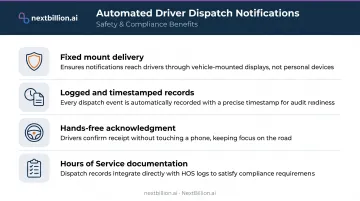
Automated in-app notifications delivered to a mounted device sidestep this entirely. Key operational benefits:
- Delivered to a fixed mount — no phone handling required
- Logged and timestamped for audit trails
- Acknowledgment-capable without taking hands off the wheel
- Supports Hours of Service documentation automatically
The Customer Expectation Connection
Accurate driver status data isn't just an internal operational asset. Capgemini's last-mile delivery research found that 45% of consumers cited late delivery as a reason they would not recommend a retailer's delivery service, and 75% said they'd spend more with retailers if satisfied with delivery services.
When dispatch automation keeps ETA data accurate in real time, that accuracy flows through to customer-facing status updates. Bad dispatch data doesn't stay internal — it surfaces as missed windows and frustrated customers.
How Automated Driver Dispatch Communication Works
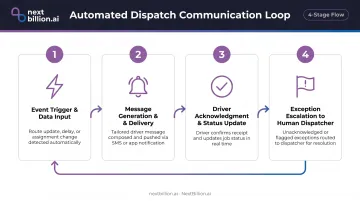
The process operates as a closed loop across four stages.
Step 1: Event Trigger and Data Input
Automation starts with a system event, not a human decision to communicate. Common triggers include:
- New job assignment created in the TMS
- GPS-detected delay or route deviation
- Geofence entry or exit at a customer location
- Route recalculation triggered by traffic data
- Customer confirmation of appointment
The quality of this trigger layer determines whether the resulting message is useful. Platforms like Samsara use geofence technology to detect when a driver approaches a stop and mark it missed or complete. Trimble's Notifications Service sends webhook alerts for ETA changes, stop status updates, out-of-corridor deviations, and traffic incidents.
Route optimization platforms feed precise routing and ETA data into this layer — separating actionable automated messages from generic placeholders. NextBillion.ai's Route Optimization API handles truck-specific constraints (vehicle dimensions, weight limits, road restrictions) so the ETAs powering automated messages reflect what drivers will actually encounter, not what a generic routing engine assumes.
Step 2: Message Generation and Delivery
Once the trigger fires and route data is in place, the system converts that event signal into a structured driver notification, typically via:
- A mobile driver app (Samsara, Motive, Geotab Drive, or a custom app)
- In-cab messaging device
- SMS for operations without app infrastructure
Businesses configure message templates in advance. The automation populates them dynamically with live data: stop address, load ID, customer contact, ETA window, special instructions. Motive's Driver Workflow, for instance, presents structured stop workflows when a route is dispatched and can require specific forms at each stop.
Step 3: Driver Acknowledgment and Status Updates
The loop requires a return signal. Drivers confirm receipt, mark jobs as started, en route, arrived, or completed through their mobile interface. Those status updates feed back to the dispatcher dashboard in real time — no phone call needed.
This creates an automatic communication record with timestamps, which matters for compliance audits, customer disputes, and operational analysis.
Step 4: Exception Escalation to Human Dispatchers
Well-designed automation handles routine communication and flags the rest. Escalation triggers typically include:
- Driver misses an acknowledgment window
- Driver reports an issue through the app
- Vehicle goes off-route beyond a defined threshold
- Real-time conditions fall outside predefined parameters (significant ETA deviation, geofence violation)
Without exception routing, automation creates a false sense of coverage. Dispatchers either miss critical events because everything looks handled, or they're buried in alerts with no clear action required.
Key Factors That Affect How Well It Works
Not all dispatch communication automation performs equally. Four factors separate operations that run well from ones that generate driver complaints and dispatcher frustration.
Data Quality and Routing Accuracy
Automated messages are only as reliable as the data behind them. Outdated maps, inaccurate ETAs, or missing vehicle-type constraints produce messages drivers can't act on.
Truck-specific routing is a real differentiator here. Generic routing APIs frequently direct trucks to roads with weight restrictions, bridge height limits, or access prohibitions. When a driver receives a route that leads to a bridge they physically can't cross, the automated message has failed, regardless of how fast it was delivered.
NextBillion.ai's Road Editor App lets operations set custom road attribute restrictions and time-sensitive route constraints, ensuring that the routing data behind automated messages accounts for actual truck constraints.
Driver App Adoption and Usability
The automation loop only closes if drivers actually use the mobile interface. Commercial Carrier Journal reported in 2023 that more than 90% of truck drivers use smartphones daily, and 14 of the top 20 largest fleets had deployed custom mobile apps. That baseline adoption is in place, but app quality determines whether drivers actually engage with it.
Critical selection criteria for driver-facing apps:
- Intuitive UX that doesn't require training time
- Offline capability for low-connectivity areas
- Minimal manual burden (forms that take too long create resistance)
- Driving lock screens that prevent interaction while the vehicle is in motion
Integration Depth With Existing Fleet Systems
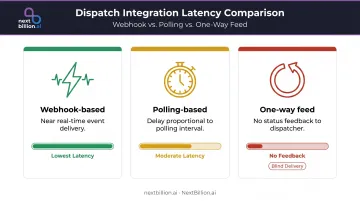
Automated communication requires live data from GPS/telematics, TMS, and order management systems. Shallow integrations — one-way data feeds, polling rather than webhooks — introduce latency that undermines time-sensitive notifications.
| Integration Type | Latency Implication |
|---|---|
| Webhook-based | Near real-time event delivery |
| Polling-based | Delay proportional to polling interval |
| One-way feed | No status feedback to dispatcher |
Platforms like Samsara, Geotab, and Motive all support webhook-based event delivery for dispatch communication. NextBillion.ai integrates natively with all three, allowing optimized routes to push directly to these platforms and eliminating manual re-entry between planning and execution systems.
Fleet Scale and Message Volume Calibration
Automation thresholds differ between a 10-truck operation and a 500-vehicle fleet.
- Smaller fleets risk over-automation: too many notifications create fatigue, and drivers start ignoring them
- Larger fleets risk the opposite: gaps in automated coverage leave drivers and dispatchers without key status updates
Getting this right means deliberately configuring trigger rules and message frequency for your specific operation — not accepting default settings. What works for a 15-stop local delivery route will overwhelm drivers on a long-haul run with fewer but more complex stops.
Common Misconceptions About Dispatch Communication Automation
"Automation replaces dispatchers." Not quite. Automation handles the high-volume, low-complexity messaging layer — confirmations, status updates, reminders. Dispatchers remain essential for exception handling, driver relationships, complex routing decisions, and customer escalations. The role shifts from message-sender to operations monitor.
"Set it up once and it runs itself." Many operations activate automation without configuring meaningful exception rules. The result: drivers get flooded with automated messages they learn to ignore, and dispatchers never see escalation alerts when something actually goes wrong. Automation requires deliberate setup of trigger rules, acknowledgment thresholds, and escalation paths — plus periodic review as operations evolve.
"The decision layer and the communication layer are the same thing." Some businesses implement automated load-matching or driver assignment tools and assume the communication layer follows automatically. These are separate capabilities that each require explicit configuration.
The Route Optimization API (or equivalent) answers who does what and when. The dispatch communication layer ensures those decisions reach drivers, tracks acknowledgments, and escalates exceptions when something goes wrong. Neither layer configures the other automatically.
Frequently Asked Questions
What is an automated dispatch system?
An automated dispatch system is software that manages job assignment and driver communication without manual intervention for each transaction. It covers two layers: a decision layer (matching loads to drivers) and a communication layer (sending notifications, capturing confirmations) — and most enterprise fleets use multiple platforms to handle both.
How do dispatchers maintain communication with drivers on the road?
Modern dispatch communication runs through automated in-app notifications via driver mobile apps, in-cab messaging devices, and SMS triggers tied to dispatch system events. Dispatchers initiate direct contact — voice or app message — for exceptions, complex situations, or when a driver misses an acknowledgment window.
Which software is used for truck dispatching?
Trucking dispatch software spans TMS platforms (McLeod, AscendTMS, Tailwind), telematics tools (Samsara, Geotab, Motive), and route optimization APIs. Most operations run more than one layer — typically a TMS for load management paired with a telematics platform for GPS and driver communication, and a route optimization API for planning.
What types of messages are typically automated in driver dispatch?
The most common automated message types include job assignment notifications, route update alerts, ETA confirmations, proof-of-delivery prompts, geofence arrival/departure alerts, maintenance reminders, and weather or traffic alerts tied to active routes. Each message type is triggered by an event in the dispatch or telematics system rather than a dispatcher's manual input, which keeps drivers informed in real time and frees dispatchers to handle exceptions like missed windows, route deviations, or delivery disputes instead of routine status checks.
Does automating dispatch communication reduce the need for human dispatchers?
Automation reduces the time dispatchers spend on routine messaging but does not eliminate the role. Dispatcher focus shifts toward exception management, driver support, and operational decisions — the work that requires judgment rather than transaction volume. A dispatcher freed from manually texting ETAs and confirmations can typically manage a larger group of drivers, since routine acknowledgments, geofence alerts, and status updates fire automatically instead of requiring a phone call or manual message for each stop.
How does route optimization quality affect automated driver communication?
Automated driver messages are only actionable if the underlying route and ETA data is accurate. Poor routing data produces misleading notifications — wrong ETAs, ignored truck restrictions, stops out of sequence. Route optimization that accounts for vehicle type, live traffic, and stop constraints ensures messages reflect what drivers will actually encounter.
What is the best dispatch software for trucking companies?
There is no single best option — the right fit depends on fleet size, freight type, and existing systems. Most trucking operations combine a TMS for load and billing management with a telematics platform for GPS tracking and driver messaging, often layered with a route optimization API for planning. Evaluate based on integration with existing systems, HOS compliance support, and how well it fits your dispatch workflow.
How many drivers should a dispatcher have?
There is no fixed industry standard — the right ratio depends on route complexity, freight type, and how much communication is automated. Dispatchers handling mostly exception-based work, because routine notifications, confirmations, and geofence alerts run automatically, can typically manage more drivers than those manually calling or texting every update. Local or service-route dispatch with frequent stops generally requires a lower ratio than long-haul, point-to-point trucking.