Yes. Consumer navigation apps like Google Maps and Waze predict traffic using historical patterns and live crowd-sourced GPS data, showing a forecasted ETA when you set a departure or arrival time. For businesses running delivery or field service fleets, dedicated platforms such as NextBillion.ai's routing APIs apply the same prediction approach but add vehicle-specific constraints like capacity, time windows, and hours-of-service compliance.Yes, traffic prediction works by combining historical speed data on a road network with live GPS feeds from vehicles and devices. Machine learning models use these two inputs to forecast conditions for a future time window rather than just reporting what is happening now. Consumer navigation apps expose this as a predicted ETA, while fleet platforms use the same underlying method to plan routes and schedules in advance.
For individual commuters, that translates to missed appointments and wasted fuel. For logistics operations, it compounds across every vehicle in a fleet—eating into delivery windows, SLA compliance, and margins.
The fix isn't checking traffic right before you leave. It's understanding how prediction actually works and applying the right method for your situation.
This guide covers exactly that: how traffic prediction works, which tools to use (from consumer apps to enterprise APIs), how to read what you see, and which mistakes reliably produce bad route decisions.
Key Takeaways
- Traffic prediction combines real-time GPS signals, historical road-speed patterns, and machine learning models to generate future ETAs
- Google Maps lets you check future traffic by setting a departure or arrival time before navigating—not just "leave now"
- Enterprise routing APIs offer traffic model types (best-guess, optimistic, pessimistic) so fleet operators can control prediction risk across multi-stop routes
- TTI's 2025 Urban Mobility Report recommends 34 minutes for a trip that takes 20 minutes in light traffic—build in buffer time
- The biggest mistakes: checking current traffic instead of your actual departure time, and treating predictions as guarantees
What You Need to Predict Traffic on Your Route
Before choosing any method, you need three inputs:
- A defined origin and destination (plus any intermediate stops)
- A specific planned departure or arrival time
- A tool that layers both real-time and historical data
Without a time anchor, traffic predictions default to current conditions—which may be completely irrelevant if you're planning a trip three hours from now. Yes, there is a reliable way to predict traffic: set a specific departure or arrival time in a navigation app, or use a routing API with a traffic model, rather than relying on a live look at current road conditions.
Tools and Data Sources
| Use Case | Tool Type | What It Provides |
|---|---|---|
| Solo commuter | Google Maps / Waze | Future ETA, color-coded overlay, typical traffic by hour |
| Small fleet / field service | Navigation apps + operational logs | Pattern analysis for recurring corridors |
| Enterprise fleet / multi-stop | Routing APIs (e.g., NextBillion.ai, Google Routes API) | Traffic model selection, multi-stop sequencing, vehicle-specific constraints |
Not all predictions are equal. A consumer app drawing on millions of GPS signals will produce far more reliable ETAs than any model applied to a rural road with sparse coverage. That gap widens once you layer in operational constraints — which is where the preconditions below start to matter.
Preconditions for Accurate Prediction
Accurate predictions require more than just opening an app:
- Realistic departure time — "leave now" tells you nothing about 3pm conditions
- Known vehicle type — truck routing differs from passenger car routing; height, weight, and hazmat restrictions change which roads are even viable
- Awareness of external events — sports games, school schedules, and seasonal road closures rarely surface in consumer apps, but they reliably affect travel time
Methods to Predict Traffic on Your Route
Multiple methods exist, and the right choice depends on your use case. A solo commuter needs different tools than a fleet dispatcher managing 40 deliveries.
Method 1: Consumer Navigation Apps (Google Maps / Waze)
Google Maps and Waze allow users to check predicted traffic for a future departure or arrival time—making them the most accessible option for individual drivers and small operations. Google Maps can predict future traffic because it blends historical speed data for a road segment with live conditions as your departure time approaches, so setting a future time returns a forecast rather than a snapshot of current traffic. Waze layers crowd-sourced incident reports on top of this but is built around live conditions rather than long-range forecasting, so its predictive accuracy for departures many hours out is weaker than its real-time incident detection.
How to check future traffic in Google Maps (mobile):
- Enter your destination and tap Directions
- Tap the More (⋯) menu
- Select Set depart or arrive time
- Choose Leave at or Arrive by, then set your date and time
- Maps returns a predicted travel time and traffic overlay for that window
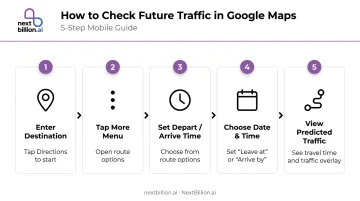
On iOS, you'll also see a "Remind me to leave on time" toggle—useful for recurring trips where you want a push notification rather than manually checking each time.
Reading the color overlay:
- Green — no traffic delays
- Orange — moderate traffic
- Red — traffic delays present
- Dark red — slower, more significant congestion
Adjusting your departure time in the app lets you scan different windows and identify lower-congestion options before committing to a route.
Waze adds a crowd-sourced incident layer on top of this. Users can report heavy traffic, standstill conditions, crashes, and road closures directly from the app—and a reported closure immediately affects your route calculation.
Where this method falls short:
- Not designed for multi-stop sequencing or stop-order optimization
- Accuracy decreases for departures more than a few hours out
- Doesn't expose raw traffic model data for operational use
Method 2: Analyzing Historical Traffic Patterns
For recurring routes—daily commutes, regular delivery corridors, scheduled field service runs—historical pattern analysis lets you build time-of-day departure rules without depending solely on live data.
How to access typical traffic data in Google Maps (Android):
- Enter your destination and tap Directions
- Tap the bottom bar showing current traffic conditions
- Scroll to the "Typical traffic by hour" graph
- Identify which hours show consistent slowdowns on your specific segments
Cross-reference this with your own operational data—delivery timestamps, driver check-ins, actual vs. predicted arrival logs. Over time, you'll identify patterns specific to your corridors that generic apps won't surface.
What makes historical data valuable:
- School zones and stadium events follow predictable weekly cycles
- Seasonal tourist corridors (coastal highways in summer, ski resort access roads in winter) repeat annually
- Morning and evening peak windows shift by city and neighborhood
One important caveat: Historical baselines drift. The TTI 2025 Urban Mobility Report found that 2024 average annual delay reached 63 hours per commuter, with more than 5% of total freeway delay now occurring outside traditional morning and evening peak windows. Pre-2020 commute assumptions no longer hold for many corridors.
Always layer historical analysis with a real-time check closer to your actual departure.
Method 3: Traffic-Aware Routing APIs (Enterprise/Fleet Use)
For businesses routing multiple vehicles or managing hundreds of daily orders, traffic-aware routing APIs provide programmable access to traffic predictions and route optimization that consumer apps aren't built to handle.
Core API parameters for traffic-aware routing:
The Google Routes API documents three traffic model types that enterprise developers can configure:
| Traffic Model | What It Returns | Best Use Case |
|---|---|---|
BEST_GUESS |
Blends live + historical; live data weighted more heavily near departure time | Default for most routing decisions |
PESSIMISTIC |
Duration longer than actual travel on most days | Setting customer-facing delivery windows; SLA buffer planning |
OPTIMISTIC |
Duration shorter than actual travel on most days | Best-case scenario planning; internal capacity estimation |
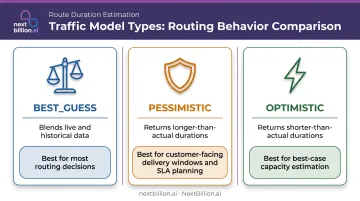
Setting TRAFFIC_AWARE_OPTIMAL routing preference activates the full traffic model with highest accuracy—at the cost of higher latency. Google documents a spectrum: TRAFFIC_UNAWARE prioritizes speed, TRAFFIC_AWARE balances both, and TRAFFIC_AWARE_OPTIMAL maximizes accuracy.
Where enterprise APIs go further than consumer apps:
Platforms like NextBillion.ai's Route Optimization API combine traffic-aware ETAs with constraints consumer apps don't touch:
- Multi-stop sequencing for up to 10,000 stops in a single request
- Vehicle-specific constraints: truck weight limits, bridge clearances, hazmat corridor restrictions
- Time window optimization for customer-facing delivery slots
- Real-time reoptimization when conditions change mid-shift
- Integration with fleet management systems (Samsara, Geotab, Motive) to push updated routes directly to driver apps
NextBillion.ai's predictive ETA modeling achieves 95% accuracy by combining real-time traffic data with historical pattern modeling—a meaningful improvement for operations where late deliveries have direct cost consequences. The platform also uses per-vehicle or per-order pricing instead of per-API-call billing, which matters when running thousands of daily route optimization requests across a fleet.
How to Interpret Traffic Predictions and Act on Them
A traffic prediction is only useful if you know what to do with it.
Reading Traffic Conditions
Green (clear route): ETA matches baseline travel time. For fleet operations, this is the window to batch schedule deliveries and tighten time windows.
Orange/Yellow (moderate congestion): Slowdowns exist but the route remains viable. Check whether an alternate route saves meaningful time, or test whether shifting departure by 15–30 minutes moves you out of the congestion window.
Red/Dark red (heavy congestion): Expect significant delays. Evaluate alternate routes, adjust departure time, or—for fleet operators—prioritize rerouting vehicles still en route rather than those already committed to a corridor.
Handling Incident-Based Disruptions
Prediction models respond to incidents—accidents, sudden closures, disabled vehicles—that appear in real-time feeds from Waze user reports and official government data. These can cause sudden ETA spikes that weren't reflected in the historical model.
During active navigation, keep rerouting notifications enabled. For fleet dispatch, monitor live status updates across your driver app or fleet management platform rather than relying solely on pre-trip predictions.
Translating Predictions into Fleet Operations
Once you've accounted for real-time disruptions, the next step is embedding those predictions into your scheduling decisions before vehicles leave the yard:
- Apply pessimistic model estimates when setting customer-facing delivery time windows
- Use best-guess estimates for internal route sequencing and driver scheduling
- When one corridor shows heavy congestion, reassign stops between drivers before departure rather than managing delays reactively
- Build buffer time into SLAs rather than routing to arrive exactly at a deadline
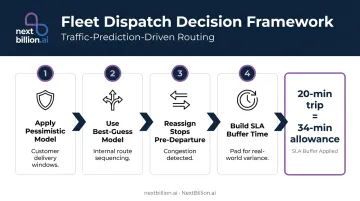
The Texas A&M Transportation Institute found that on major urban freeways, travelers need to allow 34 minutes for a trip that takes 20 minutes in light traffic—a 70% buffer—to account for reliability variance on congested corridors.
Common Mistakes When Predicting Traffic
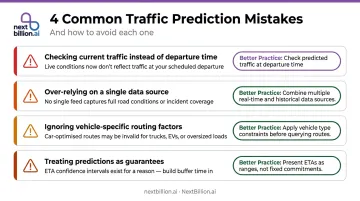
Most traffic prediction errors come down to a few consistent habits — here's what to avoid:
- Checking current traffic instead of your departure time. Real-time conditions at 8am tell you nothing about 11am traffic. Always set the departure or arrival time before evaluating a route.
- Over-relying on a single data source. Apps using only live GPS signals miss historical context; tools using only historical models miss live incidents. Know what your tool uses before trusting its output.
- Ignoring vehicle-specific factors. Standard car routing doesn't account for truck weight restrictions, low bridges, or hazmat corridors — making it unsuitable for commercial vehicle planning regardless of traffic accuracy.
- Treating predictions as guarantees. No model achieves 100% accuracy — Google's ETA figures come from internal benchmarks, not third-party audits. Build buffer time into schedules rather than routing to arrive exactly at a hard deadline.
Best Practices for More Accurate Predictions
- Test 2–3 departure windows before finalizing any route. A 30–45 minute shift can often avoid a significant congestion window, especially during morning commutes and afternoon peak hours.
- Layer multiple signals: Cross-check your app's prediction with local event calendars, weather forecasts, and your own historical delivery data. FHWA data shows that heavy rain reduces average freeway speeds by 3–16% and heavy snow by 5–40%—enough to noticeably shift ETAs on long routes.
- Log actual vs. predicted ETAs on recurring routes. Over time, this calibrates which tool is most accurate for your specific corridors and identifies chronic prediction gaps.
- Use traffic model types strategically: Apply pessimistic models when communicating delivery windows to customers, and best-guess models for internal routing optimization. That gap is intentional — it's the buffer that keeps SLA performance intact.
Frequently Asked Questions
Can Google Maps predict future traffic?
Yes. Google Maps predicts future traffic by blending historical road-speed patterns with live crowd-sourced GPS signals and machine learning. Set a specific departure or arrival time in the app before navigating, and Maps returns a predicted ETA and traffic overlay for that window rather than current conditions.
Does Google Maps have a route optimizer?
Google Maps supports basic multi-stop routing (up to 9 stops on Android) but doesn't sequence stops for maximum efficiency or apply operational constraints. Businesses needing true route optimization — covering vehicle capacity, time windows, and traffic-aware multi-stop sequencing — use dedicated platforms like NextBillion.ai's Route Optimization API.
What is an example of route optimization?
A last-mile delivery company with 30 stops per vehicle uses route optimization software to automatically sequence those stops in the order that minimizes total drive time, while accounting for real-time traffic, customer delivery windows, and vehicle capacity. The result: more deliveries completed per shift with less fuel burned.
How far in advance can you predict traffic on a route?
Consumer apps can predict trips planned hours or even days ahead using historical patterns, though accuracy drops the further out you go. The strongest predictions blend historical and live data, weighting real-time signals more heavily as departure time approaches.
What factors affect the accuracy of traffic predictions?
The main variables include:
- GPS user density (urban corridors predict more accurately than rural roads)
- How recently the algorithm's historical baseline was updated
- Unplanned events like accidents or weather
- Whether vehicle-specific routing constraints are applied
A prediction built for a standard car will be less accurate than one built with truck-specific routing for the same corridor.
Can Waze predict future road conditions?
Waze primarily reports near-real-time conditions from crowd-sourced driver reports, such as accidents, road closures, and slowdowns, rather than forecasting traffic hours or days ahead the way Google Maps does with historical modeling. Waze does factor recent and current data into its ETA calculations, but its core strength is live hazard reporting, not long-range predictive route planning based on historical baselines.