Internal IT teams, DevOps engineers, and solution architects typically handle this work, often alongside vendor support. Teams that attempt self-service deployments without adequate preparation run into predictable failures: misconfigured DNS, certificate store mismatches, and identity issues that cascade across every subsequent step.
This guide covers the complete process — from infrastructure prerequisites through step-by-step deployment, post-deployment validation, and common failure patterns. Whether you're standing up a logistics platform, a route optimization system, or any other enterprise application, the sequencing principles apply across platforms.
Key Takeaways
- On-premises gives you full data and security control, but requires upfront work across hardware, networking, identity, and certificates before any installation begins.
- Prerequisites are non-negotiable: skipped DNS records, certificate misconfigurations, and missing service accounts are the most common causes of deployment failure.
- Deployment follows a strict sequence — infrastructure prep → database/storage → certificates → cluster setup → deployment trigger — and skipping steps creates failures that are difficult to trace.
- Post-deployment validation must confirm service health, connectivity, and access controls before any production data is loaded.
What Is an On-Premises Deployment Environment?
According to IBM, an on-premises environment is one where the organization runs and manages its own hardware, software, data storage, and supporting resources at its own physical location — not rented from a cloud provider. Every component of the application stack lives on infrastructure the organization owns and controls. This differs from cloud, hybrid, and multi-cloud deployment environments, where infrastructure is rented, shared, or split across a provider's data centers; the choice among these deployment types typically comes down to control, compliance, latency, and cost predictability rather than a single best answer.
A deployment environment is a fully configured instance of that stack — servers, databases, networking, authentication, and storage — set up to run a specific workload. Most organizations maintain three tiers:
- DEV — active development and feature testing
- TEST/UAT — pre-production validation and stakeholder sign-off
- PROD — live, customer-facing environment with change controls
Why Organizations Choose On-Premises
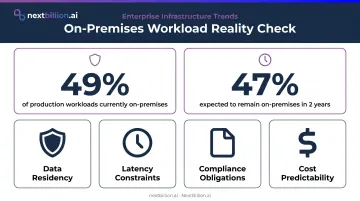
IDC research cited in a 2024 private cloud strategy paper found that 49% of production workloads are still on-premises, with enterprises expecting 47% to remain on-premises in two years — even as public cloud spending continues to grow. The reasons are practical: data residency requirements, latency constraints, compliance obligations, and cost predictability at scale.
Consider a logistics company deploying a route optimization platform on-premises so that GPS tracking data, fleet routes, and customer delivery records never leave their internal network. NextBillion.ai's on-premises deployment option serves exactly this need: a Kubernetes-based deployment path that keeps all routing queries, user data, and logs behind the customer's firewall. SOC 2 Type II and ISO/IEC 27001 certifications cover the underlying security controls.
Prerequisites and Infrastructure Readiness
Infrastructure readiness is the most skipped phase, and skipping it guarantees deployment failure. Every component in a later deployment step depends on something configured here. Before any installation scripts run, the following must be confirmed: hardware and compute capacity, networking and DNS resolution, certificate distribution, and identity and service accounts. Each of these maps to a distinct step later in the deployment sequence, so confirming them early prevents rework once scripts are running.
Hardware and Compute
Hardware requirements vary by platform and workload, so always consult your vendor's sizing guide. As a reference point, Red Hat OpenShift 4.16 bare-metal prerequisites require:
| Node Type | Min CPUs | Min RAM | Min Storage | Min IOPS |
|---|---|---|---|---|
| Control plane / bootstrap | 4 | 16 GB | 100 GB | 300 |
| Compute nodes | 2 | 8 GB | 100 GB | 300 |
For production environments, also plan:
- Failover clustering for application nodes
- Database replication (e.g., Always On availability groups): design this before deployment, not after
- Load balancing across application-tier nodes
For Kubernetes-based platforms like NextBillion.ai, deployment runs on any Kubernetes cluster: AWS EKS, GCP GKE, Azure AKS, or self-managed bare-metal. The open-source k10s utility simplifies setup across all of these. Confirm specific sizing requirements with their solutions engineering team before deployment begins.
Networking, DNS, and Certificates
DNS zones and A records for each application component must be created and resolvable from every node before deployment scripts run. Missing DNS records are a top cause of mid-deployment failures; the installer often can't proceed, and the error message rarely tells you why.
Certificate requirements are equally strict:
- SSL certificates must secure node-to-node communication and encrypt data in transit
- Certificates must come from a trusted CA (or be generated via AD CS)
- Private keys must be exportable
- Certificates must be distributed to the correct stores on each machine before services start
- As NIST SP 1800-16 notes, TLS server certificates are central to both internal and internet-facing web service security — getting the CA chain and store placement right is not optional
Self-signed certificates are acceptable for non-production environments only.
Identity and Service Accounts
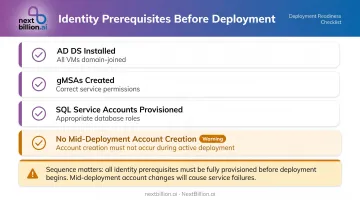
Active Directory Domain Services must be installed and all VMs domain-joined before deployment starts. Complete these identity prerequisites before any scripts run:
- AD DS installed and all VMs domain-joined
- gMSAs created with correct service permissions
- SQL service accounts provisioned with appropriate database roles
- No mid-deployment account creation — adding accounts after scripts start causes failures that are difficult to untangle
How to Set Up and Deploy an On-Premises Environment: Step-by-Step
Steps are interdependent — reordering them creates failures that can take hours to diagnose. Align infrastructure, IT, and application teams before you start.
Step 1: Prepare Infrastructure Configuration Files
Most enterprise deployment tooling — Lifecycle Services for Dynamics 365, Helm charts for Kubernetes, or custom scripts — requires configuration files defining machine names, IP addresses, service accounts, certificates, and topology before anything runs.
Populate these accurately; errors here propagate into every downstream step. Store files in a shared infrastructure folder accessible from all nodes, and version-control them so you can track changes when something breaks.
Step 2: Set Up File Storage and Database Layer
Configure SMB file shares for logs, diagnostics, and application storage. Grant service accounts FULL CONTROL at both the share and NTFS permission levels — SQL Server's SMB storage requirements are explicit on this point, and partial permissions cause hard-to-diagnose access errors.
For SQL Server:
- Use default instances, not named instances (named instances cause common connectivity errors)
- Enable high-availability options during installation, not after
- Configure SQL authentication mode and enable full-text search
- Run initialization scripts to restore from backup and map user roles
Step 3: Configure Certificates and Encrypt Credentials
Import certificates into the correct machine stores (LocalMachine\\My) on every node. Then:
- Grant read access to service accounts on each certificate
- Enable force encryption on SQL Server
- Export credentials in encrypted form from an application node — not a remote machine, or you'll get key mismatch errors
Use PowerShell commands to retrieve certificate thumbprints. The Certificate Manager UI (certlm.msc) sometimes adds invisible characters that cause validation failures.
Step 4: Set Up the Application Cluster
Whether you're running Service Fabric, Kubernetes, or another orchestrator, this step defines node types, manages service deployment, and handles health monitoring.
Run cluster configuration scripts, then validate the configuration file against your actual environment before deploying any services. Confirm all nodes register as healthy in the cluster explorer or Kubernetes dashboard before proceeding.
A node that looks configured but isn't healthy will cause service startup failures that are easy to mistake for application bugs. For Kubernetes deployments, Horizontal Pod Autoscaler and multi-replica HA configuration — such as NextBillion.ai's support for multiple replicas across clusters or regions — must be defined at this stage, not added after go-live.
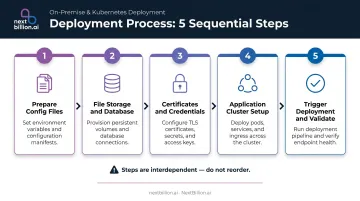
Step 5: Trigger Deployment and Validate Access
Configure the local agent or connector, authenticate against the deployment management service, select your environment topology, and initiate deployment. Monitor state transitions (Preparing → Deploying → Deployed).
If deployment fails, fix the root cause first, then redeploy — re-running without addressing the underlying issue produces the same failure.
Post-Deployment Validation Checklist
Before handing off to users or loading any production data:
- All cluster nodes show healthy status
- Application services are running and responding
- Database connectivity confirmed and reports render
- Admin login works; core application navigation functions
- SSL certificates are trusted across all nodes
- Document deployment state (snapshot the configuration)
Common On-Premises Deployment Problems and Fixes
On-premises deployments tend to fail in the same ways. The two issues below account for the majority of setup failures, along with their root causes and fixes.
Issue 1: Deployment Fails with SQL Connectivity or Agent Errors
Symptoms: Deployment hangs or fails with errors like "Error locating server/instance specified" or local agent communication failures.
Root causes:
- SQL Browser service is not running (it listens on UDP 1434 for named instance discovery)
- Named instances were used instead of default instances
- Firewall rules are blocking required ports
- The agent lacks
db_ownerpermissions on the orchestrator database
Fix:
- Confirm SQL Browser is enabled and running
- Verify TCP/IP is enabled in SQL Configuration Manager
- Test connectivity via PowerShell before re-running deployment
- Confirm service account permissions on the relevant databases
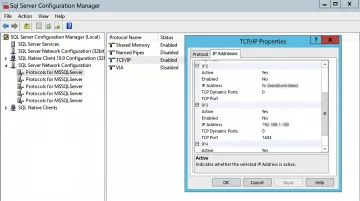
Microsoft's SQL connectivity troubleshooting documentation covers port and instance-name failure modes in detail.
Issue 2: Certificate or Encryption Errors During Component Installation
Symptoms: Components fail with errors like "X509 certificate not valid," "certificate chain issued by an authority that is not trusted," or "invalid algorithm specified."
Root causes:
- Certificates deployed to the wrong store on one or more nodes
- Self-signed certificates not added to the Trusted Root store
- Wrong cryptographic provider: Microsoft documents that using Microsoft Enhanced Cryptographic Provider 1.0 for SQL Server certificates triggers startup errors 17182 and 26014
Fix: Re-export and redeploy certificates to the correct store (LocalMachine\My or LocalMachine\Root as required). Regenerate non-compliant certificates using Microsoft Enhanced RSA and AES Cryptographic Provider. Use PowerShell for thumbprint retrieval to avoid encoding artifacts from certlm.msc.
Pro Tips for a Smooth On-Premises Deployment
Run pre-deployment validation before touching installation scripts. Test network connectivity between every node pair with Test-NetConnection, confirm DNS resolution works from every machine, and validate configuration files against your environment. Catching a misconfigured service account or missing DNS record before deployment starts saves days of troubleshooting later.
Separate DEV, TEST/UAT, and PROD from day one. NIST SP 800-53 requires separate test environments as a security control. Never test patches, integrations, or extensions directly against production — clone production data into your sandbox before any update cycle, and document rollback procedures (full database backups and system snapshots) before applying changes.
Work with vendors who offer certified deployment paths and hands-on support. For logistics, fleet, or field service organizations deploying location intelligence platforms on-premises, the vendor's deployment maturity matters as much as the product itself. NextBillion.ai provides complimentary technical support for initial on-premises setup and integration, with dedicated solution engineers who work directly with your team through initial consultation, environment provisioning, and final integration.
Most clients go live within days to a few weeks, depending on infrastructure complexity. NextBillion.ai's SOC 2 Type II and ISO/IEC 27001 certifications apply to on-premises deployments, reducing the security configuration burden for teams in regulated industries like healthcare, government, or financial services.
Frequently Asked Questions
What is an on-premises deployment?
On-premises deployment means hosting and running software on hardware owned and managed by the organization within its own facilities, rather than using cloud infrastructure. The organization retains full control over data, security configurations, and update cycles. For fleet and routing platforms, this often matters for teams handling regulated data, such as PHMSA hazmat records or driver logs tied to FMCSA hours-of-service compliance, where data residency and access control are non-negotiable.
What does deployment environment mean?
A deployment environment is a fully configured instance of the application stack: servers, databases, networking, and authentication, all configured for a specific workload. Organizations typically maintain separate DEV, TEST/UAT, and PROD environments to test changes safely before they reach production. For routing and mapping systems, each environment should mirror production data volumes and network rules as closely as possible, since map tile caching, geocoding load, and API rate limits behave differently at scale than in a lightweight test setup.
What is an example of a deployment environment?
A production on-premises environment for a route optimization platform might include application servers, a high-availability SQL cluster, AD FS for authentication, and SSL-secured service nodes — all hosted within the organization's data center and accessible only over internal DNS.
What is the difference between on-premises and cloud deployment?
On-premises means the organization owns and operates all infrastructure, which means full control but also full responsibility for maintenance, security, and scaling. Cloud deployment uses provider-managed compute resources, offering easier scaling but less direct data control and per-usage cost exposure. Many fleet operators choose a hybrid path: keeping driver and location data on-premises for compliance reasons while using cloud capacity for burst workloads like batch route recalculation or seasonal demand spikes.
How long does it take to set up an on-premises environment?
A sandbox or single-node environment can be stood up in hours. A production-grade multi-node cluster with HA configuration, certificate management, and security hardening typically takes days to weeks, depending on infrastructure readiness and team experience. With vendor support and documented Helm charts, that timeline can shrink from weeks to days.
What are the different types of deployment environments?
Most organizations run four core environment types: development, where engineers build and unit-test features; testing or UAT, where QA and business users validate changes against realistic data; staging, a near-identical replica of production used for final checks including load and security testing; and production, the live environment serving real users. For on-premises setups, staging is critical since it is the last check before changes touch live routing or dispatch operations.
What are the top deployment strategies for on-premises environments?
Common strategies include blue-green deployment, running two identical environments and switching traffic once the new version is verified; rolling deployment, updating nodes incrementally to avoid downtime; canary deployment, releasing changes to a small subset of traffic first; recreate deployment, shutting down the old version before starting the new one; and shadow deployment, running the new version alongside production without serving live traffic, useful for validating routing logic changes safely.