Introduction
A route optimization software implementation guide should start with this: implementation is a phased process — readiness assessment, data preparation, integration planning, configuration, testing, and rollout — not a single deployment event, and its complexity scales with your operation. A single-depot operation with clean data and no existing integrations can go live in weeks. Add multi-depot routing, ERP connections, and a mix of vehicle types, and you're looking at months of coordinated work across operations, IT, and dispatch.
According to Descartes, most organizations keep route planning solutions for over a decade — which makes getting implementation right a long-term investment decision, not just a deployment task.
The organizations that struggle most are those that treat this as a solo IT project. It's not. Operations managers define the constraints, route planners validate the output, and dispatchers shape the workflow. Drivers determine whether any of it actually sticks in the field.
When implementation is rushed, the failure modes are predictable:
- Addresses that won't geocode
- Routing constraints that don't reflect real operating conditions
- Drivers who distrust the software and revert to old habits
- ROI that never materializes because no one measured a baseline
This guide walks through each phase: readiness assessment, data preparation, integration planning, rollout, and post-launch validation — so your team knows what to expect before the first line of configuration is touched.
Key Takeaways
- Timeline ranges from a few weeks for simple single-depot setups to several months for multi-site enterprise deployments with ERP/TMS integrations
- Data readiness — clean stop addresses, time windows, vehicle specs, driver schedules — is the single most critical prerequisite
- The process follows four phases: Discovery → Configuration → Testing and Training → Go-Live and Ongoing Optimization
- Stakeholder buy-in from operations, IT, dispatch, and drivers must be secured before kickoff
- Post-launch KPI comparison (miles driven, fuel spend, on-time rate) determines whether the software is delivering value
What the Route Optimization Implementation Process Involves
Implementation isn't a single event — it's a sequence of decisions, configurations, and validations that build on each other, which is the core of the process of route optimization: define constraints, feed the system clean data, let the engine (often AI-driven) generate and refine routes, then validate against real-world conditions. The broad arc looks like this:
- Assess readiness and define goals — What are you optimizing for? What data do you have? What systems need to connect?
- Prepare data and plan integrations — Clean address data, map vehicle profiles, scope system connections
- Configure and test — Build routing constraints, run parallel routes, validate outputs against real conditions
- Go live and improve continuously — Phased rollout, post-launch monitoring, ongoing constraint refinement
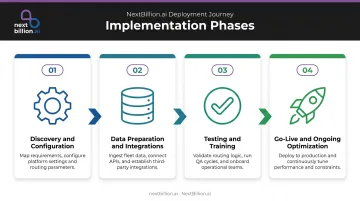
Smaller operations with clean data can move through this in weeks. Enterprise fleets connecting route optimization to ERP, TMS, and telematics platforms should plan for several months. Timeline depends most on four factors: number of locations, integration complexity, constraint depth, and whether your address data is already clean.
Shortcuts in early phases — particularly around data prep and constraint configuration — consistently surface as expensive problems at go-live.
Prerequisites and Readiness Assessment
Before any configuration begins, several conditions need to be in place:
- Stop/order address data — complete, consistently formatted, and geocodable
- Delivery time windows defined per stop, not just estimated
- Vehicle specs — capacity, type, dimensions, and any load restrictions
- Driver availability: shift hours, break requirements, and home depot assignments
- KPI baseline — current metrics documented so post-launch improvement can be measured
- One internal project owner assigned and accountable for the rollout
Descartes notes that organizations using manual planning should assume their current data is suspect and cleanse delivery locations and time windows before importing anything. Legacy data almost always carries inconsistencies, regardless of how carefully it was maintained.
Once your data is in order, the next question is integration scope — specifically, what your route optimization platform needs to connect to.
Compatibility checks to run before starting:
- Which existing systems (TMS, ERP, fleet telematics) need to connect to the route optimization platform?
- Does the platform support those connections natively, or does custom API work need to be scoped?
- Is there an IT resource available for integration work?
Do not proceed if address data is incomplete, routing constraints are undefined, or no internal project owner has been assigned. These aren't minor gaps — they're blockers.
Systems, Data, and Integrations Required
Essential Inputs
Every implementation needs the following data to function:
- Stop and order data, sourced via CSV upload, direct API call, or ERP export
- Vehicle records covering capacity, type, and home depot assignment
- Driver profiles including shift schedules, licenses, and relevant skills
- Map and traffic data, typically provided by the platform itself
Integration Tiers
Not all integrations carry equal urgency. A practical way to think about them:
| Integration Type | Priority |
|---|---|
| ERP or order management (stop data source) | Essential — core to daily operations |
| Fleet management / telematics (Samsara, Geotab, Motive) | High-value — enables real-time sync |
| Customer ETA notification portals | Optional — phase in after stable go-live |
| Advanced analytics / BI tools | Optional — phase in post-stabilization |
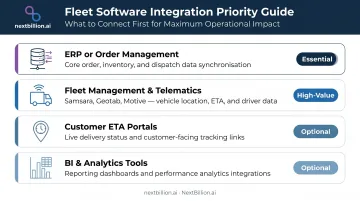
Integration sophistication ranges from batch file uploads (CSV/XLSX) to real-time REST APIs. The more automated the data flow, the more IT involvement is needed upfront, but also the less manual work in daily operations.
NextBillion.ai offers pre-built native connectors for Samsara, Geotab, and Motive that handle bidirectional data sync — pulling vehicle and order data in, pushing optimized routes back out. No custom development required. For teams on other systems, API-based custom integrations are available under enterprise plans. When evaluating the best route optimization software or application for your fleet, connector coverage and integration depth matter as much as the routing engine itself, since a platform that cannot sync cleanly with your existing TMS or telematics stack will create manual work regardless of how good its optimization is.
How to Implement Route Optimization Software: Step-by-Step
Implementation follows a defined sequence. Compressing or skipping phases — especially testing — is the most common cause of poor adoption and rework post-launch.
Phase 1: Discovery and Configuration
Work with your vendor to map current routing workflows before touching any configuration settings. That's where you surface the operational complexity that never appears in a spreadsheet.
Key activities in this phase:
- Document existing routing workflows (how routes are currently built, by whom, and with what inputs)
- Define routing rules: time windows, vehicle type assignments, driver shift limits, priority stops, load capacity
- Configure the platform to reflect those real-world conditions
Constraint accuracy at this stage determines output quality across the entire deployment. Platforms with 50+ configurable constraints — covering multi-dimensional capacity, skill matching, task dependencies, and custom travel costs — give operations teams the flexibility to mirror real-world complexity without workarounds.
Set measurable targets before configuration begins. Goals like "reduce total vehicles by 10%" or "improve on-time delivery by 15%" give your team a clear benchmark for evaluating results in the next phase.
Phase 2: Testing and Training
Run software-generated routes in parallel with your current manual routes before committing to a full rollout. This comparison reveals where constraint settings need adjustment before those errors reach drivers.
- Compare parallel outputs on distance, stop count, time windows met, and estimated completion times
- Conduct role-specific training for dispatchers, route planners, and drivers on their respective workflows
- Refine constraint settings based on pilot feedback
StarTrack Courier found that dispatchers and local operations teams needed just 30–60 minutes of training to manage routing independently after implementation — no data science team involvement required.
Phase 3: Go-Live and Post-Launch Support
Start with a constrained rollout : one depot, one zone, or one driver group. This limits risk and surfaces real-world issues before they affect the full fleet.
Go-live checklist:
- Confirm integration data flows are working end-to-end with real data
- Establish escalation contacts for day-one issues
- Brief drivers on the new workflow before their first routes
- Have vendor support engaged and responsive for the first 30 days
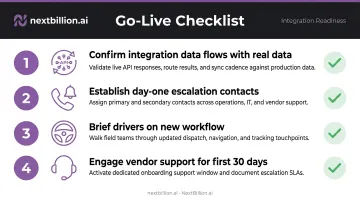
NextBillion.ai provides 24/7 hands-on support from solution engineers during this window, covering both technical issues and constraint adjustments — so teams working through unexpected first-week problems aren't waiting on a ticket queue.
Post-Implementation Checks and Validation
Going live is not the finish line. Configuration errors missed at launch compound quietly — eroding ROI week by week until someone finally pulls the data and asks why nothing has improved.
Functional Validation Checks
Before declaring implementation complete, verify:
- Time windows are being respected across all stop types
- Vehicle capacity constraints are enforced and not being silently overridden
- Driver shift limits are not being violated by generated routes
- Route ETAs align with actual completion times in the field
KPI Comparison
Compare post-implementation performance against your pre-implementation baseline:
| Metric | Why It Matters |
|---|---|
| Total miles driven | Direct proxy for fuel spend and route efficiency |
| Fuel cost per delivery | Clearest cost-reduction signal |
| On-time delivery rate | Service quality indicator |
| Dispatcher planning time | Operational efficiency gain |
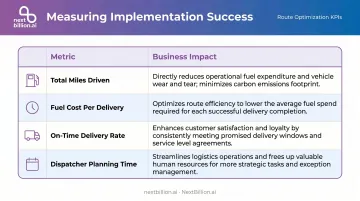
Customer outcomes from NextBillion.ai implementations show the range of what's achievable: one logistics operation reduced miles driven by 13% month-over-month while cutting operating costs by 35%. Another achieved a 30% improvement in ETA accuracy. Your numbers will vary — but if you're not seeing movement in at least two of these metrics within 60 days, the configuration, not the software, is usually where to look.
Getting Stakeholder Alignment Right
Most implementation delays aren't technical failures — they're coordination failures.
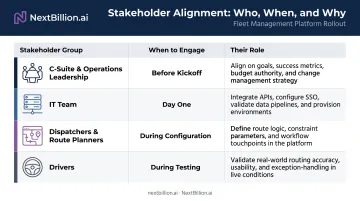
Who Needs to Be Involved, and When
| Stakeholder | When to Engage | Their Role |
|---|---|---|
| C-suite / operations leadership | Before kickoff | Approve budget, scope, and success metrics |
| IT | Day one | Integration planning, data pipeline setup |
| Dispatchers and route planners | During configuration | Shape constraint definitions and workflow design |
| Drivers | During testing | Surface field-reality issues before go-live |
Knowing who's involved is only part of it. You also need clear ownership of how decisions get made. Descartes recommends establishing three governance groups: a project implementation team, a change management team, and a steering committee. Smaller operations don't need all three formally, but someone needs to own each of those functions.
Drivers deserve special attention. Historically, drivers chose routes based on personal familiarity — and presenting algorithmically generated routes without explanation tends to produce real pushback.
The PSE&G meter-reading rollout is a useful case study: the team engaged union officials and visited districts to answer questions before go-live. That early involvement turned potential resistance into a smoother rollout.
Practical approach:
- Hold a project kickoff that aligns all groups on goals, timeline, and roles
- Schedule check-ins tied to implementation milestones (not calendar dates)
- Invest in an early pilot win — a route that clearly outperforms manual planning builds internal credibility faster than any presentation
Common Route Optimization Software Implementation Problems and Fixes
Most implementation failures trace back to one of three root causes — and all three are avoidable. Data, integration, and driver adoption each create a distinct failure mode, and they tend to surface in that order as a deployment progresses.
Poor Data Quality Causing Inaccurate Routes
Problem: Routes cluster inefficiently, addresses fail to geocode, or ETAs miss by wide margins.
Root cause: Stop address data is incomplete, inconsistently formatted, or wasn't validated before import.
Loqate's research found that 99% of eCommerce organizations admit some deliveries go wrong, with 24% reporting more than 1 in 10 orders failing on first attempt — a direct consequence of poor address data upstream.
Fix: Run a full data audit and cleansing process before importing anything. Standardize address formats across all source systems. Use geocoding validation during import, not after routes are generated.
Integration Failures Causing Workflow Gaps
Problem: Route data doesn't flow correctly into dispatch systems, driver apps, or customer notification tools.
Why it happens: Integration wasn't tested end-to-end before go-live, or source system data formats changed mid-project.
Fix: Treat integration testing as its own dedicated phase — not a checkbox at the end of configuration. Test with real data samples, not synthetic test data. Establish data format standards with IT before the integration is built.
Low Driver Adoption Undermining Results
Problem: Drivers deviate from optimized routes or revert to old habits, negating efficiency gains.
Root cause: Drivers weren't trained adequately, or routes feel unrealistic because service times or constraints were misconfigured.
Fix: Involve drivers in the testing phase to surface field-reality issues early. Ensure constraint settings reflect actual conditions. Keep the driver app interface simple. Turn-by-turn navigation, job updates, and proof-of-delivery collection should all be accessible without a learning curve.
Pro Tips for a Smooth Route Optimization Software Implementation
- Constrained pilot first. One depot, one zone, or one driver group. Validate configuration in real conditions before scaling. This limits risk and builds internal credibility for the software before broader rollout.
- Set a pre-implementation KPI baseline. Document current metrics — average miles per route, fuel cost per delivery, on-time rate, dispatcher planning time — before go-live. Without a baseline, ROI measurement is guesswork at 30, 60, and 90 days.
- Treat implementation as the beginning, not the end. The highest-performing operations run route optimization as a continuous improvement loop — reviewing constraint settings quarterly, updating vehicle profiles as fleets change, and incorporating driver feedback to improve output quality.
- Get vendor solution engineers involved early for complex configurations. Multi-constraint routing setups with skills matching, task dependencies, and multi-depot logic aren't configurations to self-teach under time pressure. A vendor with dedicated solution engineers — NextBillion.ai offers 24x7 hands-on support — can compress weeks of trial-and-error into days.
Conclusion
The software doesn't determine ROI — the implementation does. The organizations that realize the cost savings, efficiency gains, and service improvements route optimization promises are the ones that invest in clean data, cross-functional alignment, phased testing, and disciplined post-launch measurement.
The work in between is unglamorous: data audits, stakeholder kickoff meetings, parallel route comparisons. That's where successful implementations are actually built — and where the gap between organizations that realize ROI and those that don't becomes clear.
Frequently Asked Questions
How long does route optimization software implementation typically take?
Simple, single-depot operations with clean data can go live in 6–8 weeks. Multi-site enterprise rollouts with ERP, TMS, or telematics integrations typically take several months. The key variables are the number of locations, integration complexity, and the depth of routing constraints required.
What data do I need to prepare before implementing route optimization software?
You'll need: complete stop/order addresses, delivery time windows, vehicle specs (capacity, type, dimensions), driver shift schedules, and details on systems the software must connect to. Address data quality is the single most common cause of poor output at launch.
Do I need an IT team or developer to implement route optimization software?
Modern platforms like NextBillion.ai's Route Planner App offer no-code setup for core routing workflows — importing stops, configuring constraints, and dispatching routes are all manageable without technical expertise. IT involvement becomes important for ERP/TMS integrations and automated data pipeline setup, particularly at scale. For fleets subject to FMCSA hours-of-service rules, IT or ops staff should also verify that driver duty-time data feeding the software stays accurate and current.
How do I know if my route optimization software implementation was successful?
Compare post-implementation performance against a documented pre-implementation baseline. Primary indicators: total miles driven, fuel cost per delivery, on-time delivery rate, and dispatcher planning time. Improvement across those four metrics is the clearest signal the implementation is working. Track them over several weeks rather than days, since route quality typically improves as drivers adjust and edge cases in the data get corrected.
What is the most common reason route optimization software implementations fail?
Poor data quality and low driver adoption account for most failures. Bad addresses, missing time windows, and outdated vehicle specs produce routes that look optimal on screen but fail on the road, and drivers who weren't consulted during setup often revert to manual planning. Both are preventable: run a data audit before go-live, and involve drivers during testing so constraint settings reflect real field conditions.
Can route optimization software integrate with my existing fleet management or TMS system?
Most modern platforms support fleet management and TMS integrations. NextBillion.ai offers native connectors for Samsara, Geotab, and Motive, with API-based integrations for other systems. When evaluating vendors, confirm whether native connectors exist for your stack — custom integration work adds both time and cost.
What is the process of route optimization?
The process starts with defining constraints: stops, time windows, vehicle capacity, and driver hours. The software then calculates efficient sequences and assignments across the fleet, factoring in real-time traffic and road restrictions where supported. Dispatchers review and adjust proposed routes, then push them to drivers. As deliveries happen, some platforms re-optimize dynamically when conditions change, such as a delayed stop or new order.
Can AI do route optimization?
Yes. Most modern route optimization software uses AI-based algorithms, such as machine learning models and heuristics, to solve routing problems that are too complex for manual planning or simple mapping tools. AI helps balance multiple constraints at once, like time windows, vehicle capacity, and driver hours of service, and can adjust routes in near real time as conditions on the road change.