Yet that's exactly where most enterprise teams find themselves. According to Spectro Cloud's 2024 research, the average Kubernetes adopter operates more than 20 clusters, with half running across four or more environments. Those clusters span public clouds, private data centers, staging environments, and increasingly, edge locations — each with its own configuration, workload profile, and failure mode.
Without a deliberate approach, the result is predictable: configuration drift, inconsistent security policies, upgrade failures from deprecated APIs, and monitoring blind spots that turn routine incidents into prolonged outages. And critically, these problems don't scale linearly — they compound.
This post walks through five strategies that give platform and DevOps teams a structured, scalable approach to managing Kubernetes fleets without losing their minds in the process.
Key Takeaways
- Fleet management = centrally governing a group of clusters as one operational unit, not managing each cluster individually
- Five strategies: automate lifecycle operations, adopt GitOps, implement zero-trust security, build unified observability, enforce policy-based governance
- Each strategy targets a specific failure mode that surfaces as fleet size grows
- Regulated workloads — healthcare, financial services, government — should prioritize security and governance strategies first
- Platform choice matters: prioritize tools that support heterogeneous environments with low operational overhead
What Is Kubernetes Fleet Management — and Why Is It Hard?
Kubernetes fleet management tools are what enable this: they let teams centrally manage, monitor, and govern a heterogeneous set of clusters as a unified operational domain — not as a collection of individual systems. That includes dev, staging, and production environments; on-premises and cloud deployments; single-region and multi-region topologies alike. Rather than logging into each cluster separately, teams use fleet tooling to apply configuration, security policy, and upgrades consistently across every cluster at once, which is what prevents the drift and blind spots that come from managing clusters one at a time.
The difficulty isn't conceptual. It's multiplicative. Every cluster added to a fleet introduces another configuration surface, another upgrade timeline, another set of add-ons to maintain. Manual kubectl-based workflows that work fine for three clusters collapse well before you hit twenty.
The Four Failure Modes at Scale
Without a fleet strategy, teams reliably run into the same four problems:
- Clusters silently diverge from each other and from intended state, making behavior unpredictable across environments (configuration drift)
- Security posture degrades at scale — Red Hat's 2024 security report found 89% of organizations hit at least one container or Kubernetes security incident in the prior 12 months, with misconfigurations and inadequate RBAC among the top causes
- Deprecated Kubernetes APIs break workloads when releases advance, particularly when Helm manifests reference API versions the Go client can no longer parse (upgrade failures)
- Separate observability stacks per cluster create correlation gaps that extend recovery time during multi-cluster incidents (monitoring blind spots)
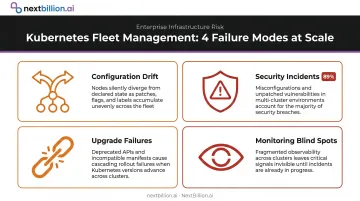
Each strategy below targets one or more of these failure modes — with the goal of getting ahead of them before they become incidents.
5 Strategies for Kubernetes Fleet Management Success
These strategies are complementary pillars, not independent choices. The order in which teams implement them may vary — regulated industries often prioritize security and governance first — but the goal is eventual coverage across all five.
Strategy 1: Automate Cluster Lifecycle Operations
Manual cluster provisioning and version upgrades are the first things that break at scale. Kubernetes releases approximately three times per year, with each version supported for roughly 14 months. Across a fleet of 20+ clusters, that cadence creates a near-continuous upgrade burden if handled manually.
Cluster templates are the foundation. Every cluster should be provisioned from a standardized template encoding approved configurations, add-ons, and security baselines. Templates eliminate the "it worked on cluster 7 but not cluster 12" problem by ensuring clusters start from a known, validated state.
Upgrade automation requires a phased approach:
- Upgrade dev clusters first and validate compatibility
- Run automated pre-upgrade checks to catch deprecated APIs before they reach production
- Roll out to staging, validate workload behavior
- Progress to production with the ability to pause or roll back at each stage
The deprecated API problem deserves specific attention. Helm documents a failure mode where upgrade operations fail because a release manifest contains Kubernetes API versions removed in the target version; the Go client can no longer parse those objects.
GKE's deprecation insights and AWS EKS upgrade insights both surface this risk proactively. That's the pattern to replicate across any fleet tooling you adopt.
Fleet operations should hook into existing CI/CD pipelines so cluster changes follow the same test-and-deploy path as application changes. Ad-hoc interventions — a cluster admin running kubectl commands directly against production — are how fleet configurations drift in the first place.
Strategy 2: Adopt GitOps for Configuration Consistency
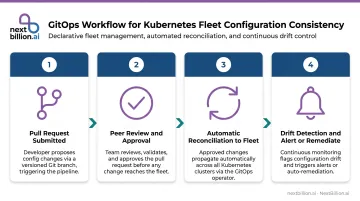
GitOps makes Git the single source of truth for all cluster and application configurations. Any desired-state change goes through a pull request, gets reviewed, and is reconciled into the fleet automatically. No undocumented changes. No manual applies that bypass review.
This isn't a niche pattern. CNCF's 2024 survey found that 77% of respondents say their deployment practices adhere to GitOps principles, with Argo CD used in production by 39% of organizations. CNCF's 2025 Argo CD end-user survey found that nearly 60% of Kubernetes clusters managed by respondents rely on Argo CD — and 25% of those respondents connect a single Argo CD instance to more than 20 clusters.
Infrastructure as Code tools like Terraform or Pulumi extend GitOps to the full stack. When infrastructure, cluster config, and application config are all version-controlled, rollbacks become straightforward: reverting to a prior Git commit restores the known-good state without manual intervention.
Drift detection is what gives GitOps teeth. Tooling should continuously compare actual cluster state against the desired state in Git and alert — or automatically remediate — when deviations appear. This matters most in multi-team environments where engineers may bypass the standard workflow with direct cluster changes. Without continuous reconciliation, GitOps is only as good as team discipline.
Strategy 3: Implement Zero-Trust Security at Fleet Scale
A single-cluster security model doesn't transfer cleanly to a fleet. The attack surface grows with every cluster added, and a misconfiguration on one cluster can expose others if access controls aren't properly segmented.
Zero trust is the right mental model: no user, service account, or workload should be trusted by default. Every access request should be authenticated, authorized, and logged regardless of origin. This aligns with NIST SP 800-207, which defines zero trust as minimizing uncertainty in enforcing accurate, least-privilege, per-request access decisions.
RBAC at fleet scale requires centralization. Managing role bindings per cluster creates exactly the overprivilege problem you're trying to prevent — engineers end up with broader permissions on individual clusters because centralized policy enforcement is operationally hard without tooling. Define roles centrally (cluster admin, namespace owner, read-only auditor) and propagate those bindings consistently across the fleet.
Key zero-trust controls for Kubernetes fleets:
- Centralized RBAC policy with fleet-wide propagation
- Network policies enforcing explicit-deny defaults between namespaces
- Service account token scoping and rotation
- Secrets management integration (not hardcoded values in manifests)
- Centralized audit logging across all clusters
Centralized audit logging does more than detect unauthorized access — for teams operating under SOC 2, HIPAA, or FedRAMP, it's a direct compliance requirement.
NSA/CISA Kubernetes Hardening Guidance specifically recommends unique RBAC roles for users, administrators, and service accounts, along with network policies for isolation.
Strategy 4: Build a Single Pane of Glass for Fleet Visibility
Separate monitoring stacks per cluster are operationally unsustainable. When an incident spans multiple clusters, engineers cross-referencing separate dashboards and log streams adds time to every investigation.
The scale of the problem is documented. Dynatrace's 2024 research found organizations use an average of 10 monitoring tools, and 85% of technology leaders say dashboard volume increases multi-cloud management complexity. That's the fragmentation problem fleet observability solves.
A unified monitoring architecture aggregates metrics and logs from all clusters into a single platform with fleet-wide dashboards. The goal isn't replacing per-cluster telemetry — it's federating it so correlation happens automatically.
Every fleet monitoring solution should capture:
- Cluster health — node status, control plane availability, etcd health
- Resource utilization — CPU, memory, and storage across namespaces
- Application performance — pod status, restart counts, error rates
- Security events — failed authentication attempts, policy violations, unusual API calls
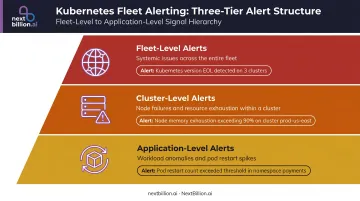
Poorly scoped alerts create noise that buries critical signals. Structure alerting across three tiers:
- Fleet-level alerts for systemic issues (Kubernetes version approaching end-of-life across the fleet)
- Cluster-level alerts for node failures or resource exhaustion
- Application-level alerts for workload-specific anomalies
New Relic's 2024 observability report found that organizations with full-stack observability experience 79% less annual downtime than those without it. The causal mechanism is straightforward — visibility gaps delay diagnosis, and delayed diagnosis extends outages.
Strategy 5: Enforce Governance Through Policy-Based Management
Governance at fleet scale means defining compliance policies centrally and enforcing them uniformly. Relying on individual teams to apply policies correctly on their own clusters doesn't hold at scale — it's the same distributed consistency problem that GitOps solves for configuration.
The core governance capabilities teams need:
- Policy enforcement — using OPA Gatekeeper (adopted by 35% of organizations per Red Hat's 2024 data) or Kyverno (15%) to reject non-compliant workloads at admission time
- Resource quota management — enforcing limits across namespaces and clusters to prevent one team's workload from starving another
- Authorized image and configuration catalogs — defining which images and configurations are approved for production, not just which aren't
Disaster recovery belongs in governance. Fleet governance should include automated backup policies for cluster state and application data, with tested restore procedures. A governance framework that covers policy enforcement but ignores backup is incomplete — a cluster failure without tested backups turns a recoverable incident into a data loss event.
For teams operating under SOC 2, HIPAA, or FedRAMP, centralized policy enforcement and audit trails aren't optional governance features. They're audit requirements. The right tooling generates compliance-ready reports as a byproduct of normal operations, not as a separate manual effort layered on top.
What to Look for in a Kubernetes Fleet Management Platform
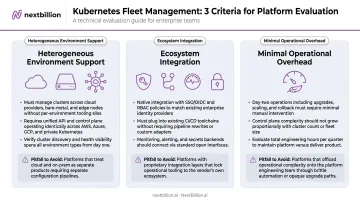
Three characteristics separate platforms that scale from platforms that don't:
1. Heterogeneous Environment Support
The platform must manage clusters across public cloud, on-premises, and edge without requiring separate tooling per environment. Teams running workloads in private data centers — for data sovereignty, latency, or compliance — need a platform that supports private infrastructure without demanding public cloud connectivity.
In practice, that means supporting AWS EKS, GCP GKE, Azure AKS, self-managed clusters, and fully air-gapped environments within a single management plane — no special-case workflows per environment.
2. Ecosystem Integration
A fleet management platform that can't connect to your SSO provider, CI/CD pipeline, monitoring stack, or secrets manager adds operational overhead rather than reducing it. Evaluate integrations against your actual toolchain, not a demo environment.
3. Minimal Operational Overhead
Some fleet management tools require significant management themselves — adding overhead at scale. Evaluate the operational burden of the platform as carefully as its feature set.
Evaluation mistakes to avoid:
- Choosing a tool that performs well at 5 clusters but hasn't been tested at 50 or 500
- Selecting a platform tied to a single cloud provider that creates lock-in
- Underweighting on-premise and edge support because those use cases "aren't the priority right now" — they often become the priority after a compliance audit
Evaluate platforms against your actual fleet — number of clusters, distributions in use, environments, compliance requirements — not against a generic benchmark. A platform that looks strong in a vendor demo may fall apart once it meets your specific mix of cloud, on-premise, and edge deployments.
Conclusion
Kubernetes fleet management is a strategy problem before it's a tooling problem. Teams that try to scale single-cluster management patterns to twenty, fifty, or a hundred clusters will hit walls around automation, security, visibility, and governance. The five strategies here address each of those walls systematically.
Those infrastructure decisions have direct downstream consequences for the services running on top. For platform teams deploying location intelligence workloads, governance and latency are inseparable — you can't deliver sub-second routing responses from a cluster with inconsistent policy enforcement or unpredictable rollout behavior.
NextBillion.ai's routing and mapping platform supports on-premise Kubernetes deployment across any distribution, including fully air-gapped environments, and carries SOC 2 Type II, ISO/IEC 27001, GDPR, and CCPA certifications. The strategies in this guide are what make that kind of deployment operationally viable at scale.
Frequently Asked Questions
What is Kubernetes fleet management?
Kubernetes fleet management is the practice of centrally managing, monitoring, and governing a group of clusters as a unified operational domain — covering provisioning, upgrades, security policies, and observability across all clusters rather than handling each one individually. It treats a heterogeneous collection of clusters as a single system.
What are the key pillars of Kubernetes fleet management?
Five core pillars emerge as fleet size grows, each targeting a distinct failure mode:
- Lifecycle automation — prevents upgrade failures and manual drift
- GitOps-based configuration consistency — closes configuration drift gaps
- Zero-trust security — eliminates access-control vulnerabilities
- Unified observability — removes monitoring blind spots
- Policy-based governance — reduces compliance risk
How is fleet management different from managing a single cluster?
Single-cluster management relies on direct kubectl commands and manual workflows that don't scale past a handful of clusters. Fleet management requires centralized tooling, automated operations, and policy enforcement applied consistently across dozens to thousands of clusters simultaneously — treating the fleet as the unit of management, not the individual cluster. This shift also changes how incidents are diagnosed: instead of checking one cluster's logs, teams query fleet-wide observability data to isolate whether an issue is local or systemic before acting.
What tools are commonly used for Kubernetes fleet management?
Common tools span several categories: GitOps engines (Argo CD, Rancher Fleet), cloud-native managed platforms (Azure Kubernetes Fleet Manager, GKE Fleet Management), and self-hosted platforms (Plural, Rafay). Tool choice depends on fleet size, cloud strategy, on-premise requirements, and compliance needs — there's no universal answer. Teams running location-dependent workloads, such as dispatch or routing services, also need to weigh how each tool handles multi-region failover, since latency-sensitive APIs behave differently under cross-cluster rescheduling.
How do you handle Kubernetes version upgrades across a large fleet?
The standard approach is a phased rollout: start with non-production clusters, run automated compatibility checks to surface deprecated APIs, validate workload behavior, then push to production. The ability to pause or roll back at any stage is non-negotiable. A deprecated API caught in dev is a quick fix; the same issue in production is an incident.
What exactly is Kubernetes used for?
Kubernetes orchestrates containerized applications — it schedules workloads across servers, restarts failed containers, scales services up or down based on demand, and manages networking and storage for distributed applications. It abstracts away individual machines so teams deploy and run software across a cluster rather than managing each server by hand. This makes it a common backbone for running APIs, microservices, and data pipelines at scale.
What is the best software for fleet management?
There is no single best tool — the right choice depends on fleet size, whether clusters run on one cloud or many, and internal compliance requirements. Smaller fleets often start with a GitOps engine like Argo CD, while larger or multi-cloud fleets tend toward managed platforms such as GKE Fleet Management or Azure Kubernetes Fleet Manager. Evaluate based on upgrade automation, policy enforcement, and observability needs rather than popularity.