Introduction
Route optimization software that integrates with CRM connects customer data — time windows, priority tiers, access restrictions, service history — directly into the routing engine, so routes are built on current customer requirements instead of a manual re-entry step. Picture a dispatcher managing 40 deliveries across a city. Customer time windows, priority tiers, access restrictions, and service histories all live in the CRM. The routing tool is a separate system. Every morning, someone manually re-enters customer requirements — and by noon, three deliveries have missed their windows because the routing engine never knew about them.
This disconnect is common. And it's expensive. According to Loqate's research, 24% of businesses report more than 1 in 10 orders failing on the first delivery attempt, with each failed attempt costing an average of $17.20 in the US.
This guide covers logistics, last-mile delivery, field service, and NEMT operations — where customer data held in CRM systems should directly influence how routes get built, sequenced, and adjusted in real time.
What follows covers what CRM-integrated route optimization actually means, how the data flow works, which capabilities matter, and how to implement it without disrupting existing operations.
Key Takeaways
- CRM data (priority tiers, time windows, service history, special instructions) turns routing into constraint-aware planning, not just shortest-path math
- Integration should be bidirectional: CRM feeds routing, and execution data flows back to update customer records automatically
- Dynamic rerouting on cancellations, priority changes, and window updates drives the biggest operational gains
- Look for API-first platforms with deep constraint handling, not tools built for basic stop sequencing
- Most valuable for last-mile delivery, field service, and NEMT — where customer-specific requirements directly shape vehicle routing
What Route Optimization With CRM Integration Really Means
Route optimization software — what Gartner's Vehicle Routing and Scheduling market defines as software that creates static and dynamic routes from orders, deliveries, pickups, rules, and constraints — is fundamentally different from GPS navigation or sales territory tools.
It calculates the most efficient sequence and path for multiple stops across one or more vehicles, accounting for capacity, driver hours, traffic, and customer requirements simultaneously.
A CRM is the system of record for everything about a customer: contact information, delivery preferences, priority tier, contractual SLAs, special handling instructions, and service history. It represents the "who" and "what" that route optimization needs to make the right decisions. AI-based route optimization can process these constraints alongside real-time traffic, driver hours, and vehicle capacity to recalculate routes as conditions change, which is what separates modern platforms from static, one-time route planners.
What Disconnected Systems Actually Cost You
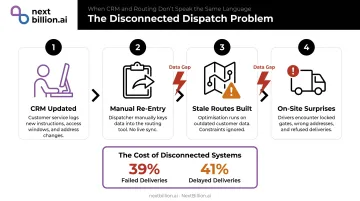
Without integration, the workflow looks like this:
- Customer service reps update the CRM with new delivery instructions
- A dispatcher manually re-enters relevant requirements into the routing tool
- Routes get built without the latest customer data
- Drivers encounter surprises — locked docks, missed windows, wrong vehicle types
The gap between those steps is where failures happen. Loqate's survey found that when address information is inaccurate or incomplete, 39% of deliveries fail and 41% are delayed. That's not a routing problem — it's a data problem.
What True Integration Looks Like
Integration is not simply displaying customer names on a map. True integration means:
- CRM → routing engine: Feeds customer attributes — priority tier, delivery window, access instructions — directly into sequencing, vehicle assignment, and timing decisions
- Routing engine → CRM: Pushes execution data — delivery timestamps, GPS confirmation, driver notes, exceptions — back to update customer records automatically
Together, these two directions close the gap between planning and execution:
- Account managers see current service history
- Customer service teams know about missed windows before customers call
- Dispatchers build routes using live customer data, not yesterday's spreadsheet export
How CRM Data Makes Route Optimization Smarter
Customer Priority and SLA Constraints
Not all customers are equal in a routing algorithm — and they shouldn't be. CRM data on account tier, revenue value, or contractual SLAs can function as constraint weights in the optimization engine.
In practice: a high-priority account with a strict delivery window gets served within that window even if it's less efficient for the overall route. Lower-priority stops absorb the schedule variance. The algorithm handles this trade-off automatically — no dispatcher manually reordering stops each morning.
Hard vs. soft constraints matter here:
- Hard constraints are never violated — a "no deliveries before 9am" rule holds regardless of route efficiency
- Soft constraints can flex under pressure — a 2–4pm window might shift to 4:30pm if traffic forces it, but the system penalizes and minimizes that outcome
Special Handling and Service History
CRM notes fed directly to drivers and dispatchers become operationally critical:
- Loading dock access only (no residential street parking)
- Fragile items requiring specific handling
- Preferred driver assignments based on past experience
- Access codes or contact-on-arrival instructions
- History of previous delivery issues at that address
Surfacing this data automatically — at the moment the route is being built — prevents on-site surprises and repeat failures without requiring anyone to remember to check the notes.
Dynamic Rerouting From Live CRM Triggers
This is where the integration earns its keep in real operations. When a customer cancels mid-day, changes their delivery window, or escalates their priority, a CRM-integrated routing engine can automatically re-optimize remaining stops without a dispatcher manually rebuilding the route.
A 2023 European Journal of Operational Research study found that dynamic routing with forecast order data improved profit by 13.57% to 21.43% compared to static route plans — a meaningful gap that widens as the number of intraday changes increases.
The Reverse Data Flow
Post-delivery data captured in the routing system — completion timestamps, customer signatures, exception notes, driver comments — should push back to the CRM automatically. This matters beyond operations:
- Sales teams see whether an account received its SLA-committed delivery window
- Customer service can pull up the delivery confirmation before the customer finishes explaining the problem
- Account managers have a current service history without asking operations to pull reports
Key Features to Look For
Constraint Handling Depth
Basic route planners handle time windows and vehicle capacity. Operations-grade platforms need to encode the actual business rules driving dispatch decisions.
Look for support across these constraint categories:
- Time windows (hard and soft)
- Vehicle type and dimension restrictions
- Driver skill and certification matching
- Multi-depot planning
- Priority tier weighting
- Load balancing and capacity dimensions
- Hazmat and incompatible cargo restrictions
- Service duration per stop
NextBillion.ai's Route Optimization API supports 50+ hard and soft constraints — including multi-depot planning, skills-based technician assignment, vehicle-type matching, hazmat restrictions, and priority parameters. This lets operations teams encode their actual dispatch logic rather than simplifying it to fit the software.
API-First Architecture for Deep CRM Connectivity
The integration quality of a routing platform depends on how it's built. An API-first platform enables:
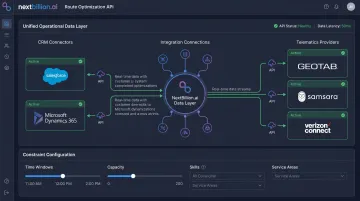
- Syncs bidirectionally with any CRM in real time — Salesforce, Microsoft Dynamics 365, and custom-built systems
- Maps CRM objects to routing constraint parameters at the field level
- Triggers re-optimization automatically when CRM records change mid-day
Contrast this with tools that offer only CSV imports or scheduled daily syncs. A nightly data export means routes are built on yesterday's customer data. An API connection means routes reflect what the CRM says right now. When evaluating the best route optimization software or route optimization app for a given operation, this distinction — real-time CRM connectivity versus periodic file imports — matters more than the interface or map styling.
NextBillion.ai's API-first architecture supports direct integration with Salesforce, SAP, and Microsoft Dynamics 365, with custom integration support for proprietary systems under the Enterprise Plan. The platform also integrates with telematics providers (Geotab, Samsara, Motive), creating a unified operational data layer that combines CRM customer constraints with live vehicle location and status.
Real-Time Dynamic Rerouting
Static route plans break the moment a customer calls. Traffic incidents, cancellations, priority escalations, and vehicle breakdowns happen constantly. The routing engine needs to re-optimize remaining stops on the fly — inserting new stops, removing cancelled ones, resequencing based on updated time windows. Dispatchers shouldn't have to rebuild routes manually every time conditions change.
Automated Status Updates and Two-Way Sync
Every execution status update — in-progress, completed, failed attempt, revised ETA — should push back to the CRM automatically. This eliminates manual logging, keeps customer-facing teams informed in real time, and creates an auditable service history in the CRM that operations didn't have to maintain separately.
Reporting Tied to CRM Segments
That status data becomes genuinely useful when it feeds into segmented reporting. Route performance metrics — on-time rate, stops per route, first-attempt success rate — mean more when broken down by customer tier or SLA type. If premium accounts are running lower on-time rates than standard ones, that's a dispatch prioritization problem. Diagnosing it requires route data connected to CRM segments.
Common Integration Architectures
| Architecture | Setup Time | Best For | Trade-offs |
|---|---|---|---|
| Native connectors | Days | Teams using Salesforce, HubSpot, Zoho, or Dynamics | May not support all custom fields or objects |
| API-based custom integration | 2–8 weeks | Complex or proprietary CRMs needing deep field mapping | Requires developer resources; most flexible |
| Middleware/iPaaS (Zapier, MuleSoft) | 1–3 weeks | Bridging systems when custom APIs aren't feasible | May introduce latency; limits real-time rerouting |
MuleSoft's 2025 Connectivity Benchmark Report found only 2% of organizations have more than half their applications connected; meanwhile, 80% of IT leaders report integration challenges slowing digital transformation.
In practice, the technical connection itself is rarely the bottleneck. The longer phase is almost always data preparation: auditing CRM records, mapping fields, and resolving inconsistencies before the routing engine can use the data reliably.
Industries Getting the Most From This Integration
Last-Mile Delivery and E-Commerce
CRM customer records contain delivery preferences, address notes, priority tiers, and history of previous attempts. When these feed directly into route optimization, they reduce failed first attempts — which cost an average of $17.20 each and affect over 10% of orders for nearly a quarter of e-commerce operators.
Field Service (HVAC, Pest Control, Utilities)
CRM holds appointment history, technician skill requirements, and equipment service records. Integration ensures the right technician reaches the right job within the customer's availability window — which directly affects first-time fix rates. IBM benchmarks average first-time fix rates across service providers at ~80%. Service Council's analysis of 6 million work orders found 1 in 4 service jobs requires at least one repeat visit.
Skills-based routing that draws on CRM job history is the primary lever for moving those numbers.
NextBillion.ai's work with Hawx Smart Pest Control and Xplor Technologies (Service Autopilot) shows what this looks like operationally. Their skill-based dispatching accounts for:
- Technician certifications and specializations
- Shift timings and travel windows
- Customer availability constraints
- Service duration estimates
All of this runs across thousands of concurrent field jobs.
NEMT and Healthcare Logistics
Patient CRM records contain mobility requirements, pickup location specifics, and clinic appointment times — all treated as fixed constraints in route building. HIPAA compliance adds another layer: patient data handling requires business associate agreements and auditable access controls. When both constraints are handled correctly, the operational results are measurable.
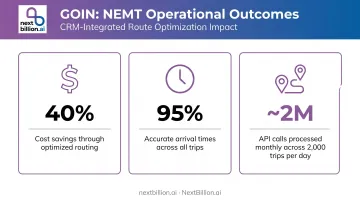
GOIN, a provider of NEMT and paratransit services, achieved 40% cost savings and 95% accurate arrival times after implementing NextBillion.ai's Route Optimization API, processing nearly 2 million API calls monthly across 2,000 trips per day.
How to Roll Out CRM + Route Optimization Integration
Start With Data Quality
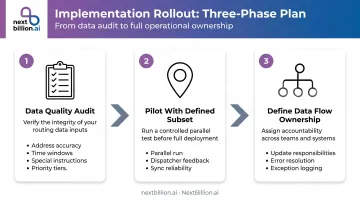
The integration is as reliable as the CRM data feeding it. Before go-live, audit customer records for:
- Address accuracy and completeness
- Time window fields populated consistently
- Special handling instructions formatted uniformly
- Priority tier assignments current
Poor CRM data quality has direct operational consequences. Loqate found 71% of businesses cite incorrect addresses as a leading cause of delivery failure, and 34% don't verify shipping addresses at all. Validity's 2024 survey of 600+ CRM administrators found 24% report less than half their CRM data is accurate and complete.
Pilot With a Defined Subset
Choose a single route, territory, or technician group. Run the integrated system in parallel with existing processes for two to four weeks. Collect dispatcher and driver feedback on:
- Data accuracy when customer requirements arrive in the routing engine
- Routing quality compared to manually built routes
- Sync reliability when execution data flows back to the CRM
Expand only after the pilot validates both data quality and integration stability. What you learn here directly shapes the ownership structure needed in the next step.
Define Ownership of the Data Flow
Establish clear process ownership before go-live:
- Who updates CRM records when customer requirements change?
- Who resolves sync errors when the integration fails?
- How are execution exceptions logged back to the CRM — automatically, manually, or both?
Ambiguity here causes data drift. Within six months, routes get built on stale time windows and outdated priority tiers — and drivers start showing up at the wrong stops in the wrong order.
Frequently Asked Questions
What is the best route optimization software that integrates with CRM?
For operations-heavy use cases requiring deep constraint handling and real-time rerouting, API-first platforms like NextBillion.ai offer the most flexibility to connect with any CRM and encode complex business rules. The right choice ultimately depends on your use case (logistics vs. field service vs. NEMT), your CRM, and whether you need native connectors or a custom API integration. There is no single best product for every fleet: a small field-service team on HubSpot has different needs than a multi-depot carrier managing FMCSA hours-of-service constraints alongside delivery windows, so evaluate against your own constraint set, CRM stack, and dispatch volume rather than generic rankings.
How does CRM data improve route optimization outcomes?
CRM data on customer priority, time windows, special handling requirements, and service history allows the routing engine to build constraint-aware routes instead of simple shortest-path sequences. The result: higher first-attempt delivery success rates, better SLA compliance, and stronger technician-to-job matching.
What is the difference between sales routing and logistics route optimization with CRM integration?
Sales routing tools help field reps visit prospects in an efficient sequence. Logistics route optimization with CRM integration is different: it dispatches vehicles to fulfill deliveries or service appointments using customer-specific operational constraints pulled from CRM records, including vehicle type, time windows, priority tiers, and access requirements.
How long does it typically take to integrate route optimization software with a CRM?
Native connector integrations can go live in days. API-based custom integrations typically take two to eight weeks depending on CRM complexity. The longest phase is almost always data preparation: auditing records, mapping fields, and validating data quality. The technical connection itself is rarely the bottleneck.
Can route optimization software automatically update CRM records after a delivery or service visit?
Yes. Platforms with bidirectional API integration can push execution data back to the CRM automatically after each stop: completion timestamps, GPS confirmation, exception notes, and driver comments. This eliminates manual logging and keeps customer records current. For regulated operations such as NEMT or hazardous materials transport, this same data flow can support the recordkeeping expected under HIPAA or PHMSA guidance, since timestamped, GPS-verified visit logs are easier to produce during an audit than manually entered notes.
What CRM systems does route optimization software typically integrate with?
Common integrations include Salesforce, Microsoft Dynamics 365, HubSpot, Zoho, and SAP. API-first platforms can connect to virtually any CRM with an accessible API, enabling deep, field-level integration with custom or proprietary systems beyond just the widely used ones. Some CRMs, like Zoho, also ship native routing add-ons (for example RouteIQ) that handle basic sequencing inside the CRM itself; these are useful for simple sales-visit planning but generally lack the constraint handling and real-time rerouting that dedicated route optimization APIs provide for logistics or field service fleets.
Can AI do route optimization?
Yes. AI and machine learning techniques are commonly used alongside operations-research algorithms to solve routing problems that involve many stops, vehicles, and constraints at once. AI can also improve estimated time of arrival predictions using historical traffic patterns and adapt routes in real time as conditions change. It works best combined with solid constraint modeling, not as a replacement for it, since routing is fundamentally a constrained optimization problem.