Most developers encounter this limit at the worst possible moment: when a production app silently stops registering new geofences and no error surfaces to explain why. Knowing exactly where this limit applies, what triggers it, how the system responds when it's breached, and what architectural options exist beyond it is essential for any team building production-grade geofencing into a mobile application.
Key Takeaways
- The Android Geofencing API caps active geofences at 100 per app, per device user — a system-enforced design limit, not a configurable parameter
- On multi-user Android devices, each user account gets its own 100-slot allocation for the same app
- Exceeding 100 returns error code
GEOFENCE_TOO_MANY_GEOFENCES(status code 1001); existing geofences remain active, but the new registration fails - All registered geofences are cleared on device reboot; apps must re-register via
ACTION_BOOT_COMPLETED - Workarounds include dynamic geofence cycling, server-side evaluation, or third-party platforms that remove the cap entirely
What the Android Geofencing API Limit Actually Governs
The Android Geofencing API, delivered through Google Play Services (com.google.android.gms.location.GeofencingClient), restricts each app to a maximum of 100 simultaneously registered and actively monitored geofences per device user at any point in time.
This is not a quota that resets on a rolling basis. It represents the total count of live Geofence objects registered via addGeofences() that haven't yet expired, been explicitly removed, or cleared by a device reboot. The 100-slot pool is finite and shared across all geofence registrations for that app/user combination.
How the Limit Interacts With System Resources
Each registered geofence requires the OS to continuously check device location against a defined boundary — consuming CPU cycles, memory, and battery in the process. The 100-unit ceiling is where Google drew the line on the functionality-versus-performance tradeoff.
No official Android or Google Play Services documentation documents a separate cross-app cap on geofences across all installed apps on one device. The only officially documented constraint is the 100 per app, per device user limit.
Treat any claims about a device-wide ceiling as unverified unless you can point to a primary Google source.
The 100-Geofence Ceiling: Scope, Boundaries, and Edge Cases
The 100-geofence limit applies uniformly across all Android versions that support the Geofencing API. No official documentation qualifies this number by device hardware tier or available RAM.
Nominal Operating Range
Under normal conditions, an app registers 1 to 100 geofences simultaneously. A geofence counts toward this total from the moment it's successfully added via addGeofences() until one of the following occurs:
- It's explicitly removed via
removeGeofences() - It expires based on its
setExpirationDuration()value - The device reboots (which clears all registered geofences from memory)
- The app is uninstalled, upgraded, force-quit, or its
PendingIntentis canceled
The single-user, single-package-identifier scenario is where this range holds cleanly.
Boundary Conditions and Multi-User Edge Cases
The official documentation words this explicitly: 100 geofences per app, per device user. On Android devices with multiple user profiles, each user account gets its own 100-slot allocation for the same app. A device with two active profiles running the same app can technically have up to 200 total geofences registered for that app across the device.
That per-user cap is a hard limit. If 100 geofences are already active and addGeofences() is called with even one more, the call fails with GEOFENCE_TOO_MANY_GEOFENCES. There is no automatic eviction or oldest-first replacement.
Geofence.NEVER_EXPIRE (constant value -1) keeps a geofence consuming a slot indefinitely. Using setExpirationDuration() with a finite lifetime frees the slot once the geofence expires — so build expiration logic into your slot management strategy from day one.
Technical Parameters That Interact With the Geofence Limit
Three parameters determine how efficiently each of your 100 registered slots is used — and how reliably each one fires.
Radius and Location Accuracy
Official Android guidance recommends a minimum geofence radius of 100–150 meters for best results under typical Wi-Fi-available conditions. Setting a smaller radius doesn't cause a registration error — the geofence registers successfully and consumes a slot — but it produces unreliable or missed transition events.
In rural or low-connectivity environments, even the 100–150 meter floor may be insufficient. Coarser GPS accuracy in these areas means you'll need a larger radius to compensate, or you'll burn slots on geofences that never fire reliably.
Transition Types and the DWELL Constraint
The API defines three transition types:
| Constant | Value | Behavior |
|---|---|---|
GEOFENCE_TRANSITION_ENTER |
1 | Fires when device enters the boundary |
GEOFENCE_TRANSITION_EXIT |
2 | Fires when device exits the boundary |
GEOFENCE_TRANSITION_DWELL |
4 | Fires after device remains inside for a defined period |
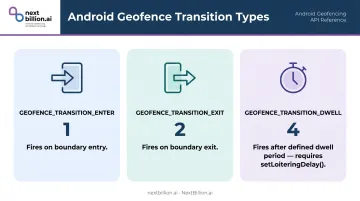
GEOFENCE_TRANSITION_DWELL requires a companion call to setLoiteringDelay(int). Without it, the DWELL transition registers a slot and consumes it — but never fires. That's a quiet slot burn with no diagnostic feedback.
For use cases where immediate entry alerts produce too much noise (retail notifications, workplace check-ins), pairing INITIAL_TRIGGER_DWELL with a loitering delay instead of INITIAL_TRIGGER_ENTER cuts false positive triggers significantly.
Notification Responsiveness and Background Limits
setNotificationResponsiveness(int) controls how frequently the system checks location. Higher responsiveness means more frequent checks and higher battery drain. A large value — 5 minutes, for example — saves power at the cost of detection speed, while a very small value like 5 seconds doesn't guarantee near-real-time notification because the system overrides your setting to conserve battery.
On Android 8.0 (API level 26) and above, background location restrictions mean geofence checks for background apps fire every couple of minutes on average. Official documentation puts the latency breakdown at:
- Under 2 minutes in normal conditions
- 2–3 minutes when Background Location Limits are in effect
- Up to 6 minutes if the device has been stationary for an extended period
If your use case requires sub-minute geofence accuracy — such as arrival detection for last-mile delivery — these background constraints make a server-side geofencing approach worth evaluating alongside the native API.
What Happens When You Exceed 100 Active Geofences
When addGeofences() is called and the active count is already at 100, the call returns an onFailure() callback with GEOFENCE_TOO_MANY_GEOFENCES — status code 1001 per the official GeofenceStatusCodes reference. The previously registered geofences remain in place; only the new registration fails.
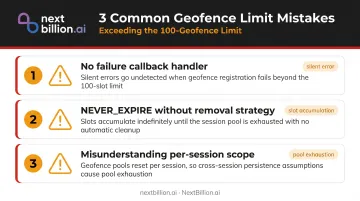
Common developer mistakes that turn this into a hard-to-diagnose bug:
- Not handling the failure callback: The error fires in
onFailure()only if you've implemented it. Without explicit error handling, the failure is silent from the user's perspective. - Using
NEVER_EXPIREwithout a removal strategy: Slots accumulate across app sessions until the device reboots, quietly exhausting your allocation. - Misunderstanding the scope: The 100-limit applies per active registration, not per session. Each
addGeofences()call draws from the same pool across all app launches.
That last point connects directly to reboot behavior. Android clears all active geofences when the device restarts — nothing persists across reboots. Apps must listen for the ACTION_BOOT_COMPLETED broadcast intent and re-register required geofences on startup.
The catch: if your re-registration logic doesn't account for geofences that expired before the reboot, you may end up with fewer active geofences than expected. Worse, if you register without checking the current count first, you can hit the cap all over again.
Strategies for Scaling Beyond 100 Geofences on Android
The 100-geofence limit cannot be raised within the native Android Geofencing API. No flag, manifest setting, permission, or hardware tier override exists for it. Scaling beyond 100 means managing which geofences are registered at any given time.
Dynamic Geofence Cycling (Proximity-Based Loading)
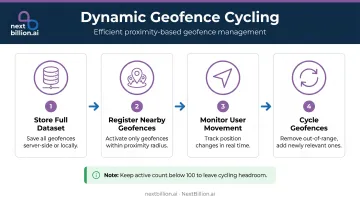
This is the pattern Google's own documentation recommends for large geofence datasets. The approach:
- Store the full geofence dataset server-side or in local storage
- At runtime, register only the geofences within a defined proximity radius of the user's current position
- As the user moves, remove out-of-range geofences and register newly relevant ones
- Keep the active count well below 100 to leave headroom for the cycling logic itself
Google specifically suggests using a larger city-level geofence as a trigger zone, then registering smaller, granular geofences for locations inside that area when the larger zone is entered. This nesting approach works well for retail, delivery, and field service scenarios.
The tradeoff: dynamic cycling requires a reliable location update stream running alongside the geofencing logic, which adds complexity and its own battery considerations.
Server-Side Geofence Evaluation
An alternative architecture moves boundary-crossing evaluation entirely off the device. The app sends periodic location pings to a backend, which checks those coordinates against an unlimited geofence dataset and delivers results via push notification. This removes the on-device limit entirely.
The cost: network dependency and latency, plus the loss of offline functionality. For use cases where connectivity is reliable and near-real-time precision isn't critical, it's a clean solution.
Third-Party Geofencing Platforms
Server-side evaluation solves the limit — but building and maintaining that pipeline at scale is its own engineering project. When geofence counts run into the hundreds or thousands, dedicated geofencing platforms handle the evaluation off-device and skip the slot-management problem entirely.
NextBillion.ai's Geofencing API is built for logistics and fleet operations where monitoring multiple geofences per vehicle or route is standard. For multi-stop delivery fleets or field service dispatch, it removes the need to build a cycling layer from scratch. Key capabilities include:
- Polygons, circles, corridors, and custom shapes
- Time-of-day and day-of-week scheduling rules
- Real-time boundary-crossing alerts
- Cloud and on-premise deployment options
None of these are subject to the per-device slot limits that govern GeofencingClient.
Frequently Asked Questions
What are the limitations of Android geofencing?
Key constraints to know:
- 100 active geofences per app, per device user
- 100–150 meter minimum radius for reliable detection
- 2–6 minute latency on Android 8.0+ due to background location restrictions
- Geofences lost on reboot — must be re-registered after restart
- Accuracy varies based on Wi-Fi and GPS availability
What is the minimum radius for a geofence on Android?
Google recommends a minimum of 100–150 meters to account for typical Wi-Fi location accuracy. Smaller radii can be set without a registration error, but they produce unreliable or missed transitions. In rural or low-connectivity areas, even larger radii are needed for consistent results.
What happens if I try to register more than 100 geofences on Android?
The addGeofences() call fails with GEOFENCE_TOO_MANY_GEOFENCES (status code 1001) in the onFailure() callback. Existing registered geofences are unaffected. You must explicitly remove active geofences before new ones can be added. For apps tracking fleets or delivery zones across the US, this cap is why many teams move boundary logic to a server-side routing and geofencing API instead of relying only on-device.
Does the 100-geofence limit apply per app or across all apps on the device?
The limit is per app, per device user — each app gets its own 100-slot allocation. Android and Google Play Services documentation does not define a separate system-wide cap across all installed apps on a single device.
How can I monitor more than 100 geofences simultaneously on Android?
Two approaches work well in practice:
- Dynamic geofence cycling: register only proximity-relevant geofences at runtime and swap them as the user moves
- Server-side evaluation: run boundary-crossing logic in the backend and push results to the app, bypassing the on-device limit entirely
Server-side evaluation is the more scalable option for logistics and delivery use cases in the US, since it does not depend on device OS limits, background restrictions, or reboots, and it centralizes zone updates across a fleet.
Do registered geofences survive a device reboot on Android?
No. Android clears all active geofences on reboot. Apps must listen for the ACTION_BOOT_COMPLETED broadcast intent and re-register required geofences on device startup to restore monitoring.
What are the limitations of geofencing?
Beyond Android's 100-geofence cap, geofencing has broader constraints: accuracy depends on GPS, Wi-Fi, and cell tower signal, so dense urban or indoor areas can trigger false or missed events. Battery drain increases with frequent location polling. Latency between crossing a boundary and app response can range from seconds to minutes depending on OS power settings. Geofences also do not account for altitude, so they cannot distinguish between floors in a building.
Is geofencing API free?
Android's native geofencing (via Google Play Services) is free to use as part of the OS. Third-party geofencing and location APIs, including NextBillion.ai's mapping and routing tools, typically follow usage-based pricing rather than a flat free tier. Check current pricing pages directly, since terms and tiers change and this article does not track specific rate cards.