Introduction
AWS API Gateway on-premises integration is achieved by pairing a VPC Link and Network Load Balancer with a private connection (Direct Connect or Site-to-Site VPN), so cloud-native consumers can call on-premises backend services without routing traffic over the public internet. Enterprises running critical backend services on-premises face a real architectural problem: cloud-native consumers need to call those services, but routing traffic over the public internet is off the table for security, compliance, or latency reasons.
This gap shows up constantly in regulated industries:
- A healthcare NEMT provider keeping patient routing data behind their firewall
- A financial logistics team with strict data-residency requirements
- A logistics operator running proprietary route optimization on-premises — such as companies deploying NextBillion.ai's on-prem routing stack — who need cloud-based dispatch systems to reach that API without a public exposure
According to IDC, 88% of cloud buyers were already running hybrid cloud deployments as of Q3 2024, with 30% of data still centralized in traditional data centers. The hybrid model isn't going away, and AWS API Gateway's private integration path is a practical solution for bridging that gap.
This guide covers how the integration works, the core components involved, a step-by-step implementation walkthrough, and when this architecture makes sense — versus when it doesn't.
Key Takeaways
- API Gateway fronts on-premises services via VPC Link → NLB → private tunnel, keeping all traffic off the public internet
- Private connectivity requires either AWS Direct Connect (dedicated, high-throughput) or AWS Site-to-Site VPN (IPSec-encrypted, faster to set up)
- The NLB registers on-premises server IPs as targets using an IP-type target group
- On-premises clients resolve private API hostnames via a Route 53 Resolver inbound endpoint
- Security requires layering VPC security groups, API Gateway resource policies, and optional mutual TLS
What Is AWS API Gateway On-Premises Integration?
AWS API Gateway on-premises integration configures Amazon API Gateway as a managed entry point for backend services running in a corporate data center — routing API calls through a private, encrypted network path without touching the public internet.
The result: on-premises backends become consumable as standard REST, HTTP, or WebSocket APIs — with the following applied at the API layer, no backend rewrites required:
- Authentication and authorization
- Throttling and rate limiting
- Request transformation
- CloudWatch monitoring
How This Differs from Standard API Gateway Usage
In a typical cloud-native setup, API Gateway backends are Lambda functions, EC2 instances, or ECS services already inside AWS. On-premises integration is different in two specific ways:
- Private connectivity is a prerequisite — Direct Connect or Site-to-Site VPN must exist before any API Gateway configuration is meaningful
- VPC Link is required — API Gateway cannot directly address on-premises IPs. The VPC Link construct bridges the API Gateway service to a Network Load Balancer inside your VPC, using AWS PrivateLink internally for REST APIs
REST API VPC links use AWS PrivateLink, while HTTP API VPC links use a Hyperplane-based VPC-to-VPC NAT construct — a distinction that surfaces quickly when troubleshooting connectivity behavior. This is also where a common limitation of API Gateway shows up: it is not a general-purpose load balancer, so traffic distribution and health checking across on-premises targets are handled by the NLB, not API Gateway itself.
Why Organizations Use This Pattern
Most enterprises don't move everything to the cloud. Some workloads can't move — proprietary databases, legacy systems, or platforms with tight data-residency requirements. The need isn't cloud migration; it's API-layer access without compromising data control.
The Hybrid Reality
Gartner projected $723.4B in public cloud spending for 2025, yet the same forecast noted 90% of organizations were expected to run hybrid cloud through 2027. Hybrid isn't a transitional state — for many enterprises, it's the target state.
Common drivers for keeping services on-premises:
- Regulatory requirements — HIPAA, PCI DSS, and similar frameworks require data to remain in controlled, auditable environments
- Data sovereignty — financial institutions and government agencies often face legal constraints on where certain data can reside
- Proprietary assets — logistics operators with custom map data, road graph configurations, or optimization models built around private infrastructure
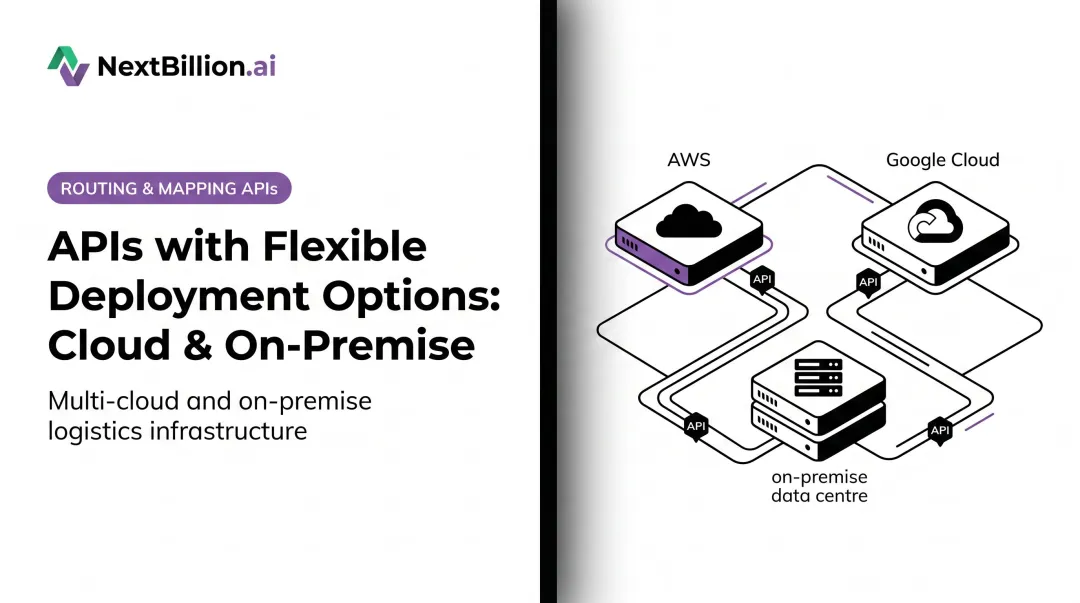
A concrete example: logistics companies deploying NextBillion.ai's on-premise route optimization stack keep their entire routing and mapping layer — including Flex Routing API with Road Editor support, custom road attributes, and regional map data — entirely behind their firewall on Kubernetes clusters (AWS EKS, GCP GKE, Azure AKS, or bare-metal).
Cloud-based dispatch and fleet management systems still need to reach that API. The AWS API Gateway private integration pattern is the architecture that enables it, without pulling proprietary routing intelligence out of the controlled environment.
The Operational Case
Beyond compliance, there's a practical reason to route through API Gateway even for on-premises backends: a single enforcement point. Rate limiting, OAuth authentication, and CloudWatch observability all enforce consistently — whether the backend is a Lambda function or a server in a data center three states away. One gateway, one policy surface, regardless of where compute actually runs.
How AWS API Gateway On-Premises Integration Works
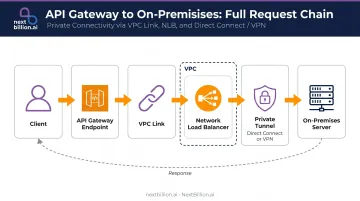
The request chain looks like this:
Client → API Gateway endpoint → VPC Link → NLB (inside VPC) → private tunnel → on-premises server → response travels back the same path
Private Connectivity Options
A private encrypted tunnel between the AWS VPC and the on-premises network is a prerequisite for any API Gateway configuration. Two options:
| Option | Best For | Throughput | Setup Time |
|---|---|---|---|
| AWS Direct Connect | High throughput, consistent latency | 1 Gbps to 400 Gbps (dedicated) | Weeks (physical provisioning) |
| AWS Site-to-Site VPN | Moderate traffic, faster start | Up to 1.25 Gbps standard; 5 Gbps (Large, via Transit Gateway) | Hours |
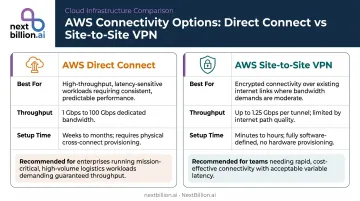
Direct Connect offers resiliency tiers up to 99.99% SLA with maximum resiliency configuration. VPN runs IPSec over the public internet: lower cost, faster to deploy, but bandwidth-constrained for high-volume workloads.
Once connectivity is established, on-premises CIDR blocks must be reachable from within the VPC via routing rules. If security groups don't allow the relevant traffic, NLB target health checks will fail silently even if everything else is configured correctly.
VPC Link and Network Load Balancer
API Gateway can't directly target an on-premises IP. The path goes through a VPC Link, which internally connects API Gateway to a Network Load Balancer (NLB) deployed inside the VPC.
The NLB's role is specific:
- Configured with an IP-type target group where on-premises server IPs are registered
- Performs TCP-level health checks across the private tunnel to confirm targets are reachable
- Routes inbound API Gateway requests to healthy targets
Per AWS documentation, NLB IP target groups support on-premises IP registration via Direct Connect or Site-to-Site VPN, provided the IPs fall within private ranges (10.0.0.0/8, 172.16.0.0/12, 192.168.0.0/16, etc.). Publicly routable IPs cannot be registered.
For production workloads, deploy the NLB across multiple Availability Zones. A single-AZ deployment creates a single point of failure and eliminates the reliability benefit of the managed integration layer. This is also the closest AWS API Gateway comes to acting as a load balancer: it routes requests to the NLB, but the actual traffic distribution and health-check logic across on-premises targets remains the NLB's job, not the gateway's.
DNS Resolution for Private APIs
Private REST API endpoints in API Gateway generate DNS hostnames that are only resolvable inside the VPC by default. For on-premises clients to resolve them:
- Create a Route 53 Resolver inbound endpoint inside the VPC with IP addresses in at least two Availability Zones
- Configure the on-premises DNS server to forward queries for the
execute-apidomain to the resolver endpoint's IP addresses
One constraint that catches teams off guard: on-premises clients must call the API using its DNS hostname, not the VPC Endpoint IP address directly. The TLS certificate is bound to the DNS name — calling the raw IP produces an SSL certificate mismatch error.
Setting Up AWS API Gateway On-Premises Integration: Step-by-Step
This is a three-phase process. AWS CloudFormation can automate most of it (AWS::ApiGateway::VpcLink for REST APIs, AWS::ApiGatewayV2::VpcLink for HTTP APIs) for repeatable deployments across environments.
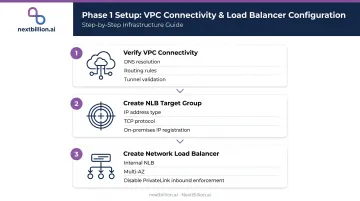
Phase 1: Connectivity and Network Load Balancer
Before creating any API Gateway resources, confirm that traffic can flow between your VPC and on-premises network.
Verify VPC connectivity
- Enable DNS resolution on the VPC
- Configure Site-to-Site VPN or Direct Connect with routing rules covering your on-premises CIDR blocks
- Validate connectivity from inside the VPC (for example, ping the on-prem server from an EC2 instance) before proceeding
Create an NLB target group
- In the EC2 console, create a target group with type IP addresses
- Select TCP protocol and set the port to match your on-premises application
- Register the on-premises server IP addresses; the NLB uses TCP health checks to confirm targets are reachable via the tunnel
Create the Network Load Balancer
- Create an internal NLB mapped to at least two Availability Zones and attach the target group as the listener
- Disable "Enforce inbound rules on PrivateLink traffic" under the NLB's Security tab — skipping this step causes VPC Link traffic to be blocked by security group evaluation
Phase 2: VPC Link and API Gateway
With the NLB in place, you can create the VPC Link and wire it into your API Gateway configuration.
Create the VPC Link
- In the API Gateway console under VPC Links, create a new VPC Link for REST APIs and select the NLB from Phase 1
- Provisioning takes several minutes; wait until status reaches Available before proceeding
Configure the REST API
- Create a new REST API with Regional endpoint type
- Add a resource and method (for example,
GET /routes) - Set integration type to VPC Link, enable proxy integration, select the VPC Link, and set the endpoint URL to the NLB's DNS name with the appropriate port and path
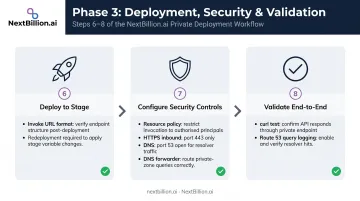
Phase 3: Deploy, Secure, Validate
The final phase locks down access and confirms the full request path works correctly.
Deploy to a stage
- Create a deployment stage (for example,
prod); the invoke URL followshttps://{api-id}.execute-api.{region}.amazonaws.com/{stage} - Every subsequent change to methods or integrations requires a redeployment to take effect
- Create a deployment stage (for example,
Configure security controls
- Add an API Gateway resource policy with
aws:SourceVpcecondition restricting invocation to your specific VPC Endpoint ID - Allow inbound HTTPS (TCP 443) from on-premises CIDR blocks on the VPC Endpoint security group
- Open TCP/UDP port 53 from on-premises CIDR blocks on the Route 53 Resolver inbound endpoint security group
- Point your on-premises DNS forwarder at the resolver endpoint IPs
- Add an API Gateway resource policy with
Validate end-to-end
- From an on-premises client, run
curlagainst the API's DNS hostname - Enable Route 53 Resolver query logging to CloudWatch to confirm DNS resolution and diagnose any routing issues
- From an on-premises client, run
Security and Operational Considerations
Defense in Depth
The AWS Well-Architected Security pillar recommends applying multiple security controls across layers — network, API, and application. For this architecture, those three layers look like this:
- Network layer — VPC Endpoint security group limits who can reach API Gateway at all
- API layer — resource policy restricts invocation to a specific VPC Endpoint ID via
aws:SourceVpce - Authentication layer — IAM authorizers, Lambda authorizers, or API keys add identity verification on top of network controls
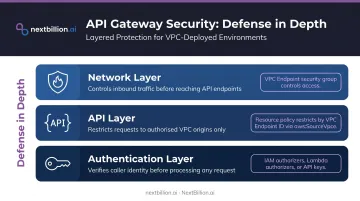
One gap to plan for: mutual TLS is not supported for private APIs in API Gateway. Client certificate validation needs to happen at the on-premises backend or through a custom authorizer.
High Availability Requirements
Network security controls only matter if the underlying infrastructure stays up. Multi-AZ deployment is non-negotiable for production workloads:
- Deploy the NLB across at least two Availability Zones with on-premises targets registered in both
- Route 53 Resolver inbound endpoints require IP addresses in at least two AZs
- Single-AZ deployments introduce a failure point that undermines the reliability this architecture is designed to provide
Monitoring the Three Key Signals
With security and availability in place, observability is the final piece. These three configurations cover most production troubleshooting scenarios:
- CloudWatch access logging on the API Gateway stage — captures request metadata, latency, and error codes
- Route 53 Resolver query logging forwarded to CloudWatch — diagnoses DNS forwarding failures
- NLB target health check alerts — detects when on-premises connectivity degrades across the tunnel
Common Issues and When This Architecture Doesn't Fit
Frequent Mistakes
DNS and TLS errors:
- Calling the VPC Endpoint IP directly instead of the DNS hostname breaks TLS — the certificate is bound to the DNS name, not the IP
- Forgetting to configure the on-premises DNS forwarder to send
execute-apidomain queries to the Route 53 Resolver endpoint leaves on-prem clients unable to resolve the API hostname
Security group and resource policy misconfigurations:
- Creating a VPC Endpoint but not updating the API's resource policy to restrict access to that specific endpoint — leaves the API reachable from any endpoint in the VPC
- Leaving "Enforce inbound rules on PrivateLink traffic" enabled on the NLB — blocks VPC Link traffic at the security group evaluation layer
When to Skip This Architecture
This pattern adds real cost and operational overhead (NLB hourly charges, PrivateLink endpoint fees, VPN or Direct Connect provisioning). Not every hybrid scenario warrants it.
Avoid this approach when:
- On-premises services are already planned for cloud migration in the near term — a direct migration is more practical than building a temporary private integration layer
- Traffic is low-volume, non-sensitive internal tooling with existing public internet access — a public API Gateway endpoint with IP allowlisting is far simpler
When neither of those conditions applies, the overhead pays for itself. This architecture is the right fit when:
- On-premises services are long-lived and migration is not on the roadmap
- Workloads handle sensitive data with compliance requirements around data residency
- High-volume hybrid consumers need consistent SLAs and a unified API management layer
- Proprietary backend assets, such as on-premises routing or mapping engines, carry data exposure risks that rule out cloud migration
Frequently Asked Questions
How do you connect an on-premises network to AWS?
On-premises networks connect to AWS VPCs via AWS Direct Connect (a dedicated physical link, 50 Mbps to 400 Gbps) or AWS Site-to-Site VPN (an IPSec tunnel over the internet). Direct Connect suits high-throughput, low-latency workloads; VPN is faster to provision and cheaper for lighter traffic.
What API types can be integrated with Amazon API Gateway?
API Gateway supports REST APIs, HTTP APIs, and WebSocket APIs. VPC Link private integration works with both REST and HTTP APIs. Private endpoint access from on-premises (using VPC Endpoints and resource policies) is a REST API-only feature. This matters for routing and mapping workloads: REST APIs are typically the right fit when on-premises fleet management systems need private, low-latency access to route optimization or geocoding endpoints without traversing the public internet.
Do I need a load balancer if I already have API Gateway?
For on-premises integrations, yes. API Gateway's private integration requires a Network Load Balancer as the intermediary — VPC Link connects to the NLB, and the NLB handles health checking and routing to on-premises backend targets. For public internet-facing backends, an NLB is not required. API Gateway itself is not a load balancer: it handles request routing, throttling, auth and transformation, while the NLB distributes traffic across backend targets like a routing engine sitting behind fleet or dispatch APIs.
What is the difference between a public and a private API endpoint in API Gateway?
A public endpoint is accessible from the internet by any client. A private endpoint is accessible only from within an Amazon VPC via an interface VPC endpoint (AWS PrivateLink). On-premises clients can reach private APIs only when connected to the VPC through Direct Connect or VPN.
Can a private API Gateway be accessed from on-premises over Direct Connect?
Yes. Either use endpoint-specific public DNS hostnames (containing the VPC endpoint ID) over Direct Connect, or configure a Route 53 Resolver inbound endpoint so on-premises DNS servers resolve the private API hostname to the VPC Endpoint's private IPs.
What are the limitations of the AWS API gateway?
API Gateway adds latency and cost per request, has payload size limits, and its private integration for on-premises access depends on a Network Load Balancer plus a working Direct Connect or VPN path — it does not replace those connections. It also lacks built-in load balancing across backend targets and requires additional configuration (VPC Links, resource policies, DNS resolution) to reach on-premises systems securely.
Can an AWS API gateway act as a load balancer?
No. API Gateway routes, throttles and authenticates API requests, but it does not distribute traffic across multiple backend instances the way a load balancer does. For on-premises integrations, you still need a Network Load Balancer behind the VPC Link to handle health checks and route traffic to on-premises targets such as fleet or telematics servers.