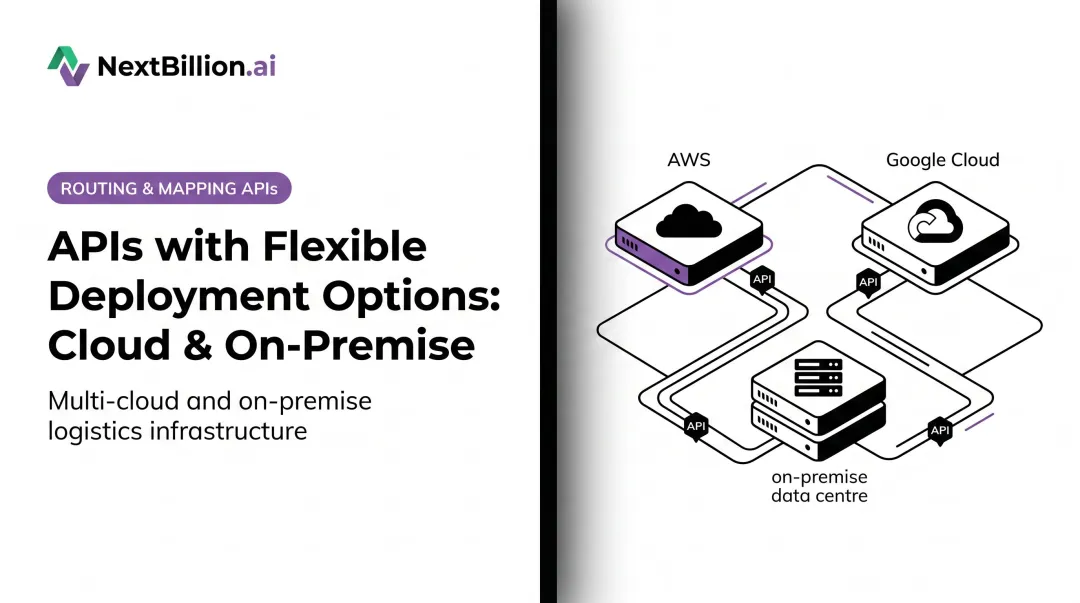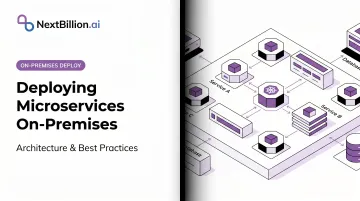
The teams building cloud-native microservices products are facing an increasingly common pressure: customers in defense, government, healthcare transport, and regulated logistics simply cannot route operational data through third-party cloud servers. Regulatory frameworks like ITAR, HIPAA, FedRAMP, and GDPR impose control, authorization, and data-residency requirements that make on-premises deployment attractive — sometimes mandatory.
The core problem is architectural mismatch. Microservices were designed to solve cloud-scale DevOps problems, and the decisions that work in the cloud often fail on-premises without deliberate adaptation. Gartner forecasts that 90% of organizations will adopt a hybrid cloud approach through 2027 — which means the gap between "how we build it" and "where customers need to run it" is only widening.
This guide covers the architecture components, deployment decisions, and operational practices that make the difference between a successful on-premises microservices deployment and a support nightmare.
Key Takeaways
- On-premises microservices deployment runs independently deployable services on customer-owned infrastructure, typically orchestrated by Kubernetes
- Primary drivers are data sovereignty regulations (ITAR, HIPAA, FedRAMP, GDPR), air-gapped network requirements, and cost predictability for high-volume workloads
- Five self-hosted layers are required: container orchestration, private image registry, API gateway, observability stack, and secrets management
- Biggest operational risk: the knowledge gap between the builders and the customer admins who must run it
- Without a compliance mandate or Kubernetes admin capacity, simpler deployment alternatives are worth evaluating first
What Is On-Premises Microservices Deployment?
On-premises microservices deployment means packaging discrete, independently scalable services as container images and running them on an orchestration platform — typically Kubernetes — hosted on infrastructure physically located in a customer's data center, private network, or air-gapped environment.
How It Differs from Cloud Deployment
In the cloud, the operating team and the development team are typically the same people. On-premises, development teams ship the product but customer administrators — who often lack deep knowledge of the system internals — are responsible for operating it. That shift creates a fundamental knowledge and tooling gap that must be deliberately designed around. This is also why a microservice is not simply an API: an API defines how a service is called, while a microservice adds its own deployment lifecycle, scaling behavior, and failure modes that someone on the customer side now has to operate.
How It Differs from On-Premises Monoliths
A traditional on-premises application ships as a single deployable artifact. A customer admin installs it, and the internal architecture stays hidden. An on-premises microservices system exposes its internal architecture directly to whoever runs it. Dozens of pods, services, ConfigMaps, and ReplicaSets are visible in the Kubernetes dashboard — each one independently configurable, breakable, and in need of monitoring.
That exposure is what makes microservices both more flexible and far harder to operate than a monolith. Specifically, customer admins now have to reason about:
- Service-to-service communication failures and timeouts
- Per-pod resource allocation and scaling policies
- Distributed logging and tracing across multiple containers
- Rolling updates that affect interdependent services
Designing for this reality — rather than assuming away the complexity — is the core challenge of on-premises microservices architecture.
Why Organizations Deploy Microservices On-Premises
Regulatory Compliance and Data Sovereignty
Regulations impose control, authorization, and transfer requirements that can make on-premises deployment the most defensible option:
- ITAR (22 CFR 120.33) defines "technical data" broadly to include information required for the design, development, production, and operation of defense articles — putting strict requirements on where that data can be processed and stored
- FedRAMP applies to cloud services that process federal information offered as shared services; private single-agency deployments may fall outside FedRAMP scope entirely
- HIPAA requires covered entities to enter a Business Associate Agreement with any cloud service provider handling ePHI — on-premises processing eliminates that third-party relationship
- GDPR Chapter V restricts transfers of personal data to third countries; EU-regulated teams can reduce cross-border transfer complexity by keeping processing on-premises
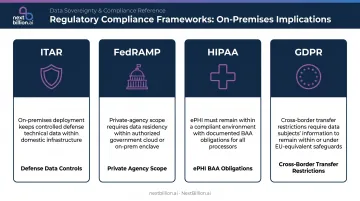
None of these regulations categorically prohibit cloud deployment. What they create are control and authorization obligations — and on-premises architecture lets engineering and compliance teams satisfy those obligations without negotiating data processing agreements with a third-party provider.
Air-Gapped Network Requirements
Some environments have no public internet access. Classified networks, remote industrial sites, and certain government facilities operate under a hard connectivity constraint — on-premises deployment is the only viable option.
This matters architecturally: if any customer operates in an air-gapped environment, the entire deployment model must assume zero connectivity to external package registries, update servers, or monitoring services.
Single Codebase and Cost Predictability
Organizations that have already built cloud-native microservices face a build-vs-adapt decision. Rewriting a separate monolithic on-premises edition is expensive and creates a divergent codebase. Packaging existing container images and Kubernetes manifests for on-premises delivery preserves development velocity while satisfying customer requirements.
That repackaging approach is what NextBillion.ai uses for its location intelligence platform: existing container images and Kubernetes manifests are delivered for on-premises deployment with a modular, cloud-agnostic architecture — serving logistics and field service operators in regulated environments who cannot route operational data through third-party cloud infrastructure.
For high-volume workloads, on-premises deployment with a fixed subscription model can also offer more predictable total cost of ownership than cloud billing per API call. NextBillion.ai's on-premises offering provides unlimited API calls at a fixed cost — which eliminates per-call billing uncertainty for organizations processing millions of routing queries per month.
Core Architecture Components for On-Premises Microservices
Cloud deployments take five infrastructure layers for granted as managed services. On-premises, every one of them requires self-hosted deployment and lifecycle ownership.
Container Orchestration Platform
Kubernetes is the industry standard, but cloud-managed distributions (EKS, GKE, AKS) aren't available on-premises. Teams must choose a self-hosted distribution:
| Distribution | Best For | Air-Gap Support |
|---|---|---|
| k3s | Lightweight/edge, resource-constrained environments | Official air-gap install guide |
| RKE2 | Security-focused; passes CIS Kubernetes Benchmark v1.7/v1.8 with minimal operator intervention | Official air-gap install guide; FIPS 140-2 support |
| OpenShift | Enterprise support with Red Hat backing | Available |
| Tanzu | VMware/vSphere environments | Internet-restricted deployment documented |
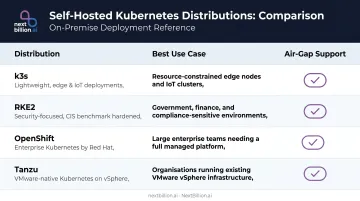
The choice significantly affects customer admin burden. RKE2's CIS hardening defaults make it a natural choice for defense and government environments; k3s is appropriate for edge deployments where cluster footprint matters. Whichever distribution is chosen, deploying microservices generally follows the same sequence: containerize each service, define its resource and networking requirements in Kubernetes manifests, push images to a private registry, and roll out through the orchestrator with health checks and rolling-update policies in place before customer admins take over operations.
Private Container Registry
Air-gapped networks cannot pull images from Docker Hub or GitHub Container Registry. A self-hosted registry — Harbor (a CNCF graduated project used in production by China Mobile, JD.com, and others), Nexus, or GitLab Container Registry — must be pre-populated with all required images before deployment.
That has a concrete operational implication: every image update, security patch, and dependency upgrade must flow through a controlled, offline-compatible pipeline. This pipeline is the image supply chain — there is no fallback to a public registry.
API Gateway and Service Communication
On-premises deployments need:
- North-south traffic (external requests into the cluster): self-hosted API gateway — Kong, NGINX, or Traefik
- East-west traffic (service-to-service): network policies at minimum; a service mesh (Istio or Linkerd) for mTLS, circuit breaking, and observability
Istio provides mutual TLS for inter-service communication and circuit breaking for connections and requests. Linkerd enables automatic mTLS by default for TCP traffic between meshed pods. Both add real security benefits, but also real operational complexity for admins who didn't build the system.
Observability Stack
Without a working observability stack, customer admins cannot diagnose failures. This is the layer most frequently under-resourced in on-premises deployments.
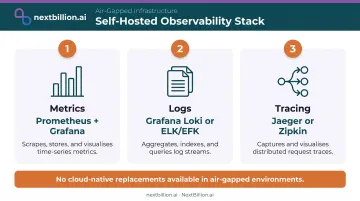
The standard self-hosted stack:
- Metrics: Prometheus + Grafana (Prometheus led adoption at 86% in the CNCF observability microsurvey)
- Logs: Grafana Loki (deployable via Helm chart) or ELK/EFK
- Tracing: Jaeger or Zipkin
None of these can be replaced by cloud-native services (CloudWatch, Datadog SaaS) in an air-gapped environment. All must be deployed, maintained, and monitored themselves.
Secrets and Configuration Management
Cloud-managed secrets services (AWS Secrets Manager, GCP Secret Manager) aren't available on-premises. Three self-hosted approaches are commonly used:
- HashiCorp Vault: purpose-built secrets management with native Kubernetes integration
- Sealed Secrets (Bitnami): asymmetric encryption ensures only the in-cluster controller can decrypt secrets, making it a natural fit for GitOps workflows
- Kubernetes Secrets with encryption at rest: the minimum viable path, but only if the cluster is carefully hardened
In an on-premises environment where the network perimeter is a primary defense layer, misconfigured secret handling is a significant exposure. This deserves more than the default Kubernetes Secrets configuration.
Best Practices for On-Premises Microservices Deployment
Right-Size the Service Count
In the cloud, fine-grained microservices are justified by independent scaling and deployment velocity. On-premises, every additional service is a new failure point that customer admins must monitor, restart, and troubleshoot.
Before packaging for on-premises delivery, audit every service against two questions:
- Does it independently scale in the customer's environment?
- Does it independently deploy in the customer's environment?
Services that fail both tests are candidates for consolidation into coarser-grained components. The right architecture for on-premises is not necessarily the right architecture for the cloud.
Build Automation for Every Operational Task
The implicit operational knowledge distributed across a cloud DevOps team must be made explicit in automation for customer-operated environments. Installation, upgrades, health checks, rollback procedures, and diagnostic data collection should all execute via scripts or operators — not via tribal knowledge.
A Kubernetes Operator or well-structured Helm chart that encapsulates the full deployment lifecycle — with sane defaults and self-healing behaviors — is the right approach. NextBillion.ai provides Helm chart templates and the k10s open-source utility to streamline Kubernetes deployment and cut the manual steps required at initial setup.
Create a Product-Specific Admin Interface
Customer admins should see: "routing engine is healthy" and "map tile service has 3 replicas running." They should not be navigating raw Kubernetes dashboards to assess system state.
A semantic abstraction of product health reduces the skill requirement for customer admins and shrinks the surface area for misconfiguration. Teams that build this layer typically see a measurable drop in escalations — admins resolve common issues without opening a support ticket.
Design for Air-Gap from the Start
Assume no internet connectivity and build an offline-capable delivery bundle. Package the following as a single versioned artifact transferable via physical media or secure file transfer:
- Container images and Helm charts
- Kubernetes manifests and CRDs
- Operator binaries and all runtime dependencies
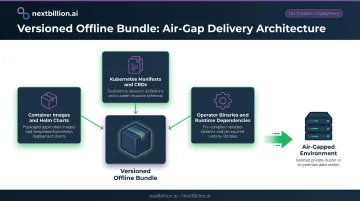
Teams that treat air-gap as an afterthought typically discover undocumented external dependencies — init containers pulling from public registries, hardcoded cloud endpoints — late in the delivery cycle, after the customer has already set up their environment.
Write Runbooks for Customer Admins, Not Cloud Operators
Operational documentation written for a cloud DevOps team will not work for a generalist customer admin. The runbook needs to be a separate artifact:
- Translate failure modes into plain language
- Include specific
kubectlcommands with expected outputs - Build decision trees for common scenarios: pod crash loops, persistent volume failures, network policy misconfigurations
- Write for readers unfamiliar with Kubernetes internals — define terms like ReplicaSet and explain pod restarts without assumed context
When On-Premises Microservices Isn't the Right Fit
On-premises microservices deployment creates more problems than it solves in several scenarios:
- Applications with fewer than 5–8 services can be packaged as a single container or docker-compose stack — full Kubernetes orchestration is overkill
- Without an admin team capable of operating a Kubernetes cluster, the operational overhead is disproportionate to the value delivered
- Without a regulatory mandate or connectivity restriction, SaaS or private cloud deployments deliver faster time-to-value
These scenarios are often avoidable — but only if the team recognizes when on-premises microservices is being pursued by default rather than by genuine need. Watch for these signals:
- The primary justification is "we already use Kubernetes in the cloud" without validating customer infrastructure readiness
- Service count is high because of cloud DevOps team structure, not genuine business domain separation
- The product team has no operational documentation and assumes customers will figure out Kubernetes independently
If on-premises delivery is required but Kubernetes expertise is limited on the customer side, consider a simpler runtime. k3s works well for minimal-footprint clusters; docker-compose covers very small deployments. A custom installer that abstracts orchestration details can bridge the gap without forcing customers into full cluster management.
NextBillion.ai's three deployment modes — multi-tenant cloud, private cloud, and on-premises — are designed to match deployment complexity to customer readiness rather than defaulting to the most operationally demanding option.
Frequently Asked Questions
What is the difference between on-premises and cloud microservices deployment?
Container images and architecture are often identical between the two. The difference is operational ownership: cloud providers abstract away the underlying infrastructure, while on-premises deployments put that responsibility on customer admins. This shifts design priorities toward automation, documentation, and operational simplicity rather than development velocity. For US teams under DOT, FMCSA, or HIPAA obligations, on-premises deployment also means audit logs, data residency, and access controls are managed in-house rather than delegated to a cloud vendor.
Do I need Kubernetes to deploy microservices on-premises?
Kubernetes is the most common choice, but lighter alternatives like k3s, docker-compose, or Nomad exist for smaller deployments. The right choice depends on service count, available admin expertise, and whether the customer environment already has a Kubernetes distribution running. For routing and fleet-optimization workloads with several interdependent services, Kubernetes simplifies scaling and rolling updates; for a single-service deployment behind an existing load balancer, a lighter option avoids unnecessary operational overhead.
How many microservices is too many for an on-premises deployment?
There is no universal number. The right question is whether each service independently scales or deploys in the customer's environment. Services that don't meet that bar are candidates for consolidation — the overhead of operating them falls on customer admins, not your DevOps team.
What are the biggest security challenges in on-premises microservices?
Three risks dominate on-premises deployments:
- Secrets management without a managed cloud service (no AWS Secrets Manager, no GCP Secret Manager)
- Inter-service communication security, which requires a service mesh or explicit network policies
- Container image vulnerabilities in environments where automated patching pipelines may not exist
Can microservices deployed on-premises migrate to the cloud later?
Generally, yes. If container images and Kubernetes manifests avoid cloud-provider-specific APIs and storage classes, the same artifacts can deploy to a managed cloud Kubernetes service. Before migrating, audit on-premises-specific configurations: node selectors, local persistent volumes, and private registry endpoints.
What industries most commonly require on-premises microservices deployment?
Defense, government, healthcare, and EU-regulated organizations are the most common cases. Compliance mandates drive the requirement: ITAR technical data controls, FedRAMP private-agency requirements, HIPAA ePHI handling obligations, and GDPR cross-border transfer restrictions. Critical infrastructure operators with air-gapped networks also frequently require on-premises deployment. In the US logistics and fleet sector, carriers handling FMCSA hours-of-service data or operating under DOT oversight often add on-premises deployment to internal data-handling policies even when not strictly mandated by regulation.
How do you deploy microservices on premise?
The general sequence is: containerize each service, choose an orchestrator (Kubernetes, k3s, Nomad, or docker-compose), set up an internal container registry, define network policies and secrets management, then roll out with a CI/CD pipeline pointed at the customer's cluster instead of a cloud endpoint. The core difference from cloud deployment is that admins own provisioning, scaling, and patching instead of a managed service handling it.
Is a microservice just an API?
No. A microservice is an independently deployable unit of business logic with its own data store and lifecycle; an API is simply how it exposes that logic to callers. A single microservice can expose multiple APIs, and not every API sits in front of a microservice — a monolith can expose an API too. The distinction matters for on-premises deployment because each microservice needs its own scaling and failure isolation, not just an API gateway route.