D365 offers multiple routing-adjacent tools across different modules, each with distinct capabilities and real limitations. Knowing which tool applies to which use case — and where the native toolset runs out — determines whether your field team spends their day driving productively or backtracking across a territory.
This guide explains what sales route optimization in Dynamics 365 actually means, which modules and tools support it, how the process works end-to-end, and where native capabilities fall short.
Key Takeaways
- D365 supports route optimization through URS, the RSO add-in, and ISV integrations like Maplytics for sales-specific routing
- RSO automates booking and scheduling for Field Service teams — it is not a standalone route path optimizer
- The optimization engine factors in resource availability, customer locations, work order requirements, and constraints to sequence stops efficiently
- Native D365 routing handles mid-scale operations well but struggles with large constraint sets, high-volume matrices, and same-day re-optimization
- Teams with complex or high-volume routing needs typically extend D365 with a dedicated route optimization API
What Is Sales Route Optimization in Dynamics 365?
Route optimization in the D365 context means algorithmically sequencing a field rep's or technician's daily client stops to minimize travel time, fuel, and mileage — while satisfying business constraints like territory boundaries, time windows, skill requirements, and customer priorities.
The intended outcome: reps spend more time in front of clients and less time in transit, achieving higher daily visit counts without manual route planning.
Scheduling vs. Route Optimization — Not the Same Thing
These terms get conflated constantly, and mixing them up leads to misconfigured systems.
| Function | What it does | D365 tool |
|---|---|---|
| Scheduling | Assigns who handles which work order and when | URS / Schedule Board |
| Route optimization | Sequences the most efficient travel path between assignments | RSO add-in, ISV integrations |
| Navigation | Turn-by-turn directions during execution | Google Maps, Waze, Apple Maps |
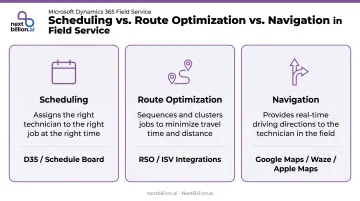
D365's RSO add-in blends scheduling and route logic, but its primary strength is the former. Teams expecting geometric path optimization from RSO alone often find the results underwhelming.
Three Separate D365 Routing Layers
That limitation makes sense once you understand the architecture. D365 is not one product — routing capabilities sit across three distinct modules, each serving a different operational need:
- Universal Resource Scheduling (URS): the foundational layer for Field Service; assigns resources to jobs and manages the Schedule Board
- Resource Scheduling Optimization (RSO) add-in: a paid Field Service add-in that automates booking decisions and schedule optimization using AI
- D365 Supply Chain Management Transportation Management: covers freight route planning, multi-stop carrier routes, and the Load Building Workbench for logistics operations
Maplytics (an ISV app by Inogic on Microsoft AppSource) fills a separate gap. It extends D365 Sales and CRM with map visualization, territory management, proximity-based account search, and multi-stop route planning — capabilities not covered natively by Field Service RSO.
Why Route Optimization Matters for D365 Field Teams
Field reps and technicians operating in D365 already have the data — customer locations, appointment schedules, territory assignments. What they lack, without optimization logic, is a system that translates that data into an efficient daily sequence.
Without it, default behavior is manual or intuition-based routing. The consequences are predictable:
Without it, default behavior is manual or intuition-based routing. The consequences are predictable:
- Excessive mileage from unoptimized stop sequences
- Missed service windows due to poor time estimation
- Fewer client visits completed per day
McKinsey research on AI workforce planning for travel and logistics documents daily route planning with a 15% reduction in travel time for drivers — a meaningful figure when multiplied across a field team running 200+ working days a year.
At small team sizes, manual routing is manageable. The problem compounds quickly as headcount grows, territories become more complex, and same-day scheduling changes multiply. Teams that delay setting up optimization until they hit this wall often find themselves retrofitting configuration under pressure, rather than scaling a system that was designed for growth from the start.
Dispatcher workload grows in direct proportion — unless automation absorbs it. Route optimization's core operational value isn't just reduced mileage; it's keeping dispatcher capacity from becoming the ceiling on how much your field team can actually do.
How Sales Route Optimization Works in Dynamics 365
The Three Control Levels
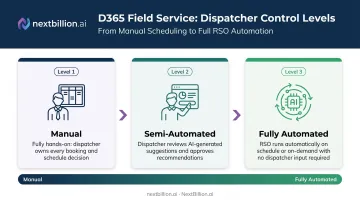
D365 Field Service supports three dispatcher control modes, each progressively reducing manual intervention:
- Manual — Dispatchers use the schedule board to view resources, requirements, and bookings and assign work manually
- Semi-automated — The schedule assistant recommends resources and time slots, factoring in location, travel time, and distance; dispatchers review before booking
- Fully automated — RSO automatically schedules jobs to qualified resources against configured optimization goals, running on schedule or on-demand
What Drives Optimization Quality
The quality of every optimized route depends entirely on the quality of the inputs:
- Customer/account data — geocoding accuracy and completeness of location records in D365 CRM
- Resource profiles — skills, home location, working hours, and territory assignments
- Work order data — accurate location, required service duration, and time window constraints
- Constraint rules — specificity of the scheduling configuration (skill match requirements, max travel time, territory boundaries)
A well-configured RSO instance with complete, accurate data will consistently outperform one running the same algorithm on incomplete records.
Step 1: Data and Constraint Configuration
Before optimization runs, teams must complete three configuration layers within D365:
- Set resource profiles — territory assignments, skills, and availability windows
- Define work order types, priorities, and service duration estimates
- Establish scheduling constraint rules (skill matching, max travel time, territory boundaries)
This setup phase is where most implementations succeed or fail.
Step 2: Schedule Generation and Route Assignment
The RSO engine matches open work orders or appointments to available resources, sequencing stops to minimize travel time against active constraints. At full automation level, this runs overnight — reps start their day with a pre-built optimized schedule requiring no dispatcher intervention.
Step 3: Real-Time Execution and Dynamic Re-optimization
During field execution, reps navigate via linked apps — D365 Field Service mobile supports Apple Maps, Google Maps, and Waze for turn-by-turn navigation. When a cancellation or urgent job arises, dispatchers can trigger a re-optimization pass to insert a nearby appointment, reassign the gap, or redistribute work orders across the active team.
Key Limitations of D365 Native Route Optimization
Native RSO handles mid-scale Field Service operations well. At higher complexity or volume, several gaps appear. These gaps typically show up first in constraint handling and re-optimization speed, which is why some teams pair D365 with a dedicated routing engine rather than pushing RSO past its intended use case.
Constraint Depth
RSO is a resource scheduling engine optimized for booking logic — who handles what, and when — rather than pure multi-stop path optimization. Teams needing to enforce 30–50+ hard and soft constraints simultaneously — vehicle load capacity, driver hours-of-service rules, customer priority tiers, tight time windows, skill matching — will find the native toolset stretched.
Dedicated route optimization platforms are built specifically for this constraint depth. NextBillion.ai's Route Optimization API supports 50+ configurable constraints including vehicle capacity (weight, volume, quantity), skills matching, time windows, driver HOS compliance, hazmat rules, and custom business rules, with the ability to extend further for unique operational requirements.
Distance Matrix Scale
External mapping API integrations used in custom D365 routing architectures carry inherent scale limits. Google's Routes API Compute Route Matrix supports up to 625 route elements; the Distance Matrix API Legacy is constrained to 25 origins or 25 destinations per request with a 100-element limit. For operations with large numbers of vehicles and stops, these limits force batched requests that add latency and cost.
NextBillion.ai's Distance Matrix API supports matrices up to 5,000×5,000 elements, resolving up to 25 million origin-destination pairs per API call. That directly eliminates the batching problem at scale.
Re-optimization Speed
RSO re-optimization is scope-based and event-triggered or manually initiated. Microsoft documentation confirms optimization requests complete faster with fewer resources and shorter time ranges — meaning very large or highly dynamic operations will experience meaningful latency on re-optimization passes. Operations requiring rapid rerouting in response to same-day changes need a lower-latency architecture than native RSO provides.
API Cost Predictability
Google's Distance Matrix API pricing runs $5 per 1,000 elements ($10 for advanced tier) in the first 100,000 monthly tier. Custom or ISV routing architectures that call external mapping APIs at high volume carry per-call cost exposure that scales with query volume and becomes unpredictable as field team size grows.
Per-vehicle and per-order pricing models — available through NextBillion.ai — replace per-call billing with fixed monthly fees that absorb volume fluctuations. For high-volume operators, this reduces total mapping API spend by 30–60% compared to pay-per-call structures.
Fleet System Integration
Organizations running D365 alongside telematics platforms often need an API-first optimization layer that syncs bidirectionally with both systems. Native D365 doesn't bridge this gap without custom development.
NextBillion.ai's native bidirectional integrations cover the three most common platforms:
- Geotab: Telematics data feeds directly into route planning; optimized routes push back to the Geotab environment
- Samsara: Live vehicle data informs optimization; dispatched routes surface in Samsara's driver workflow
- Motive: Driver HOS data flows into constraint-aware scheduling; routes dispatch to the Motive driver app

D365 remains the system of record throughout.
Common Misconceptions About D365 Route Optimization
"Enabling RSO means routes are geometrically optimized."
Not exactly. RSO optimizes the booking schedule — minimizing unscheduled time, maximizing resource utilization — using constraint matching. The actual multi-stop travel path quality depends on how map data, geocoding, and distance calculation are configured within the implementation. Activation doesn't equal optimization.
"Field Service routing and sales rep route planning are the same use case."
They're not, and mixing the configurations creates workflows that serve neither well. The two use cases have fundamentally different priorities:
- Field Service routing: technician skill-to-work-order matching, SLA compliance, and service window adherence
- Sales routing: territory coverage, proximity-based opportunity identification, and maximizing client-facing time
D365 handles both — but through different tools. RSO serves Field Service; Maplytics or similar ISV integrations handle CRM and sales scenarios.
"RSO is included with Field Service."
It's a paid add-in. Microsoft prices Resource Scheduling Optimization at $30 per resource/month, billed annually. Teams that deploy Field Service without separately licensing RSO are operating at the manual or semi-automated scheduling tier.
Frequently Asked Questions
Does Dynamics 365 have built-in route optimization?
D365 Field Service includes Universal Resource Scheduling for scheduling, with the optional RSO add-in for automated optimization. ISV integrations like Maplytics extend route planning for sales reps. No single tool covers all use cases — capability depth depends on your module and license tier. For sales teams running multi-stop territory routes with hard time windows or driver constraints, most teams still layer in a dedicated optimization engine via API rather than relying on native scheduling alone.
What is the difference between D365 route optimization and scheduling?
Scheduling determines who is assigned to a work order and when. Route optimization sequences the most efficient travel path between those assignments. D365 RSO blends both functions, but its primary strength is scheduling logic rather than pure path optimization.
What is the Resource Scheduling Optimization (RSO) add-in?
RSO is a paid add-in for D365 Field Service that uses AI to automate booking and scheduling. It runs overnight or on-demand, minimizing travel time and maximizing resource utilization based on user-defined optimization goals and constraint rules.
Can D365 route optimization handle real-time traffic updates?
D365 integrates with Google Maps, Waze, and Apple Maps for live-traffic turn-by-turn navigation during field execution. Platform-level re-optimization in response to traffic is event-triggered or manually initiated — not continuous and automatic. For sales reps working full-day route plans, this means a driver can see live traffic on their next stop but the underlying visit sequence will not re-shuffle itself unless a scheduler or automated job triggers a recalculation.
What are the main limitations of D365 native route optimization for large field operations?
The key gaps: limited support for large numbers of simultaneous hard and soft constraints, per-API-call cost exposure at high query volumes in custom integrations, scope-based rather than continuous re-optimization, and no native bridge to fleet telematics platforms without custom development. For sales teams, this often shows up as route plans that ignore rep-specific constraints like territory boundaries, customer visit windows, or CDL and hours-of-service limits for driving reps, requiring a supplementary optimization layer.
How do third-party route optimization tools integrate with Dynamics 365?
Third-party tools connect via REST APIs or Power Platform connectors, pulling data from D365 and pushing optimized route sequences back into the schedule. NextBillion.ai supports this bidirectional pattern through the Azure Marketplace, with D365 as the system of record and NextBillion.ai handling the optimization layer.
How does sales route optimization in Dynamics 365 differ from field service route optimization?
Field service route optimization in D365 focuses on assigning technicians to work orders based on skills, parts, and SLAs, then sequencing those stops. Sales route optimization is oriented around visit frequency, territory coverage, and account priority rather than work order fulfillment. D365 does not natively distinguish these workflows well, so sales teams often need custom entities or a separate optimization layer to model call cadence and territory rules.
Can Dynamics 365 route optimization account for driver hours-of-service limits for sales fleets?
D365 native scheduling does not enforce FMCSA hours-of-service rules out of the box. Constraints like maximum driving time, required rest breaks, or CDL-specific limits must be configured manually through custom fields and business rules, or handled by an external routing engine that supports these as hard constraints. This matters for sales organizations with company-owned vehicles or drivers subject to DOT regulations.