This isn't purely a technical decision. It touches total cost of ownership, compliance posture, mobile access for field technicians, and the ability to scale without a major IT project. According to MaintainX's 2024 industrial maintenance report, average unplanned downtime costs around $25,000 per hour — which puts real stakes on whether your CMMS can actually support execution in the field.
This guide breaks down both deployment models: what they offer, where they fall short, and how to match the right choice to your operational reality.
Key Takeaways
- SaaS CMMS is cloud-hosted, subscription-based, and built for distributed teams with limited IT resources.
- On-premise CMMS runs on your own servers — full data control, deep customization, and no internet dependency.
- SaaS costs less upfront; on-premise can be cheaper long-term at enterprise scale.
- The deciding factors: IT capacity, compliance requirements, technician mobility, and integration needs.
- Hybrid deployment is increasingly viable for organizations that need both field accessibility and sensitive data control.
SaaS vs. On-Premise CMMS: Quick Comparison
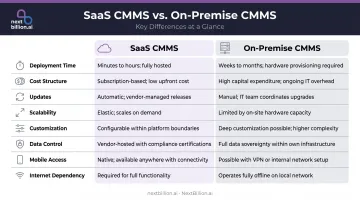
| Factor | SaaS CMMS | On-Premise CMMS |
|---|---|---|
| Deployment Time | Days to 2 weeks (vendor-published) | 3–6 months (server procurement, config, migration) |
| Cost Structure | Monthly subscription per user; low upfront | High capital expenditure; perpetual license + IT costs |
| Updates & Maintenance | Vendor-managed; automatic | Internal IT responsibility; may incur upgrade fees |
| Scalability | Add users or sites quickly | Requires hardware procurement and IT project planning |
| Customization | Configurable; limited backend changes | Deep customization; custom modules, workflows, integrations |
| Data Control | Vendor-hosted; SOC 2/ISO 27001 compliance available | Full internal control; supports strict data residency |
| Mobile/Remote Access | Native; browser and app from any device | Possible via VPN; adds complexity and cost |
| Internet Dependency | Required; some offline tiers available | Not required; operates on local network |
For CMMS specifically, two factors matter more than in generic software comparisons: mobile access and integration with field tools. Technicians don't sit at desks — they need work orders, asset history, and parts availability on their phones, sometimes in areas with spotty or no connectivity. The deployment model directly determines how well that works in practice.
That same deployment decision shapes your integration options. CMMS platforms increasingly need to connect with IoT sensors, telematics platforms, and scheduling tools. A SaaS CMMS typically exposes clean APIs and webhook endpoints that cloud-based field tools can call directly. On-premise systems support these integrations, but routing data across internal network boundaries adds architectural complexity.
What Is SaaS CMMS?
A SaaS CMMS is a cloud-hosted maintenance management platform delivered via subscription. The vendor manages the infrastructure, handles updates, and maintains uptime — users access everything through a browser or mobile app.
In operational terms, a CMMS handles:
- Work order creation, assignment, and tracking
- Preventive maintenance scheduling
- Asset history and lifecycle tracking
- Technician dispatch and job status updates
- Parts usage and inventory logging
SaaS delivery makes these functions accessible from any device, anywhere — a practical shift once you consider the advantages it creates for maintenance teams on the ground.
Advantages of SaaS CMMS
Deployment speed. According to eWorkOrders, cloud CMMS can be operational in 24 hours to 2 weeks, compared to 3–6 months for on-premise deployments requiring server procurement, network configuration, and data migration. For organizations that need operational visibility quickly, that gap matters.
Automatic updates. SaaS vendors push security patches and new features to all users simultaneously. Your team always runs the current version without scheduling upgrade windows or managing compatibility testing.
Mobile access for field technicians. This is where SaaS earns its keep in maintenance operations. Field technicians can:
- Pull up work orders on any mobile device
- Update job status and log parts usage from the job site
- Access full asset history before starting a repair
- Submit completion notes without returning to a workstation
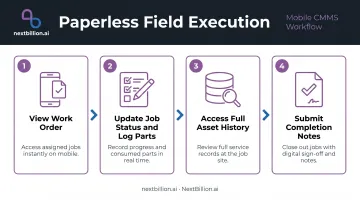
Eliminating paper-based workflows reduces transcription errors and closes the loop between dispatch and documentation.
Disadvantages of SaaS CMMS
Customization ceiling. SaaS platforms are built for broad use cases. Organizations with highly specific workflows, legacy system integrations, or industry-specific validation requirements may hit limits on what can be configured without touching backend code — off-limits in multi-tenant cloud environments. This is one of the recurring downsides cited when comparing SaaS to other deployment models: the vendor controls the roadmap, and features you need may never ship if they don't fit the broader customer base.
Internet dependency. A stable connection is non-negotiable for cloud CMMS to function. Some vendors offer offline mobile modes, but vendors gate offline mode by subscription tier:
- UpKeep Professional: caches up to 5 work orders offline
- UpKeep Enterprise: supports up to 100 cached work orders
Neither option equals full offline operation. For facilities in remote locations or environments with unreliable connectivity, this exposure can halt maintenance execution at critical moments.
What Is On-Premise CMMS?
On-premise CMMS is software installed and hosted on the organization's own servers, managed by internal IT. It typically comes with a perpetual license, and the organization retains full control over data, infrastructure, and software behavior.
This model has historically dominated in large industrial facilities, regulated industries (utilities, defense, oil and gas, healthcare), and environments where maintenance data cannot leave the building due to compliance mandates. It contrasts directly with SaaS delivery models seen in consumer and business software (the same subscription logic behind tools like streaming platforms or AI assistants), where the vendor — not the customer — owns the infrastructure.
Advantages of On-Premise CMMS
Deep customization and tight industrial integration. On-premise deployments let organizations build custom modules, tailor approval workflows, and integrate directly with SCADA systems, PLCs, BMS platforms, and ERP systems. eMaint documents CMMS integration with platforms including Ignition, SIMATIC WinCC, Siemens, Mitsubishi, and Schneider — integrations that work most cleanly when both systems are on the same controlled network.
Data sovereignty and compliance control. All maintenance records, asset histories, and technician data stay on internal servers — a hard requirement for organizations subject to:
- HIPAA: Requires administrative, physical, and technical safeguards for electronic protected health information
- FDA 21 CFR Part 11: Governs electronic records and signatures in validated environments
- ITAR: DDTC guidance requires controlled technical data stored in the cloud to be on U.S.-based servers, administered only by U.S. persons, with encryption and access controls — on-premise sidesteps this complexity entirely
None of these regulations categorically mandate on-premise deployment, but keeping data local makes audit evidence far simpler to assemble and defend.
No internet dependency. On-premise CMMS runs on the local network regardless of external connectivity. For remote facilities, offshore platforms, or environments where network outages would otherwise halt operations, this is a hard operational requirement, not a preference.
Disadvantages of On-Premise CMMS
That control comes at a cost. High total cost of ownership. The license fee is just one line item. A realistic on-premise CMMS TCO calculation should include:
- Server hardware and data center or rack space
- Network infrastructure, firewalls, and backup systems
- Internal IT staff time for installation, configuration, and ongoing management
- Software upgrade fees and the IT effort to implement them
- Security infrastructure and audit tooling
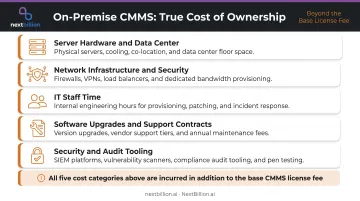
Fiix notes that on-premise teams often pay separately for upgrades and bug fixes — expenses SaaS vendors absorb into the subscription.
Slow to scale. Adding a new site, expanding user counts, or deploying a new module requires hardware procurement and an IT project. When operations need to grow quickly (acquiring a new facility, onboarding a large contractor workforce), that procurement timeline creates friction that SaaS deployments simply don't face.
SaaS vs. On-Premise CMMS: Which Is Right for Your Operations?
There's no universal answer here. The right deployment model depends on five factors: IT capacity, budget structure, compliance obligations, technician mobility, and integration requirements. Map those against your organization:
| Organizational Profile | Recommended Direction |
|---|---|
| Small IT team, multiple sites, fast rollout needed | SaaS |
| Technicians working across locations without consistent network access | SaaS with offline mobile support |
| Regulated environment (healthcare, defense, pharma) with strict data residency | On-premise or private-hosted cloud |
| SCADA/PLC-heavy plant requiring local network integration | On-premise |
| Large enterprise with mature IT and stable user count | On-premise may reduce long-term costs |
| Distributed field service teams needing real-time dispatch | SaaS, especially with route optimization integration |
The 5-Year Cost Calculation
SaaS appears cheaper at first glance. But growing organizations should build out a full 5-year TCO before deciding. Include these line items:
For SaaS: Monthly per-user fees × headcount growth, implementation packages (these can range from $500 to $5,000 depending on the vendor), integration development, and any tier upgrades as feature needs expand.
For On-Premise: Server hardware, data center costs, IT staffing, initial license, annual maintenance/support contracts, upgrade implementation effort, and security infrastructure refresh cycles.
For large, stable deployments with dedicated IT, on-premise can cost less over a five-year horizon. For growing teams adding users and sites, SaaS costs scale more predictably.
Field Mobility and the Field Operations Stack
For organizations where technicians move between sites, vehicles, or remote locations, mobile-first SaaS CMMS is an operational requirement. Receiving a work order, pulling asset history, logging completion, and updating parts usage from a phone — without a VPN — directly determines how efficiently a distributed maintenance team operates.
The stakes rise further when CMMS is part of a broader field operations stack. Cloud-based CMMS platforms expose APIs and webhooks that connect naturally with route optimization and dispatch tools. NextBillion.ai's Route Optimization API, for example, handles:
- Skill-based technician assignment
- Time-window management
- Real-time rescheduling for cancellations and new jobs
- Territory-based job allocation
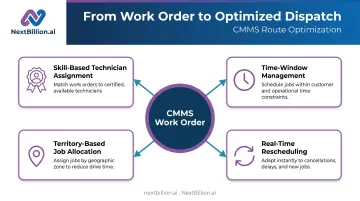
These capabilities pair directly with CMMS work order output. When both systems are cloud-based, data exchange is cleaner and the integration simpler to maintain. Service Autopilot by Xplor, serving over 30,000 vehicles and technicians, integrated NextBillion.ai's routing layer and within one month significantly reduced scheduling man-hours while enabling route updates multiple times daily.
The Hybrid Option
Some CMMS vendors now support hybrid architectures: cloud-hosted modules for mobile access and field visibility, with on-premise or private-hosted storage for sensitive compliance-critical data. This approach makes sense when an organization operates in a regulated industry but also runs distributed maintenance teams who need real-time access to work orders.
Ask vendors specifically about their architecture before assuming "hybrid" means true simultaneous deployment. In practice, it often means separate deployment options rather than a unified split model. Private cloud deployment (hosted in your own AWS, GCP, or Azure VPC) is a middle path worth evaluating: more control than multi-tenant SaaS, less operational overhead than bare-metal on-premise.
Conclusion
Neither SaaS nor on-premise CMMS is the right answer across all organizations. The deployment choice comes down to three practical priorities: IT capacity (does your team have the bandwidth to manage local infrastructure?), compliance requirements (does your data need to stay on-site?), and field mobility (are your technicians executing work away from a fixed network?).
For most distributed maintenance operations, SaaS is the practical default — faster to deploy, easier to maintain, and more accessible for technicians in the field. On-premise remains the right call where connectivity, data control, or industrial network integration requirements are non-negotiable.
Ultimately, the deployment model is just the foundation. A work order created in your CMMS still needs to reach the right technician, at the right location, on time. That last mile — routing, dispatch, and dynamic rescheduling when conditions change — is where tools like NextBillion.ai's Route Optimization and Driver Assignment APIs close the gap between a scheduled job and a completed one.
Frequently Asked Questions
What are the benefits of SaaS vs. on-premise CMMS deployment?
SaaS CMMS offers faster deployment (days vs. months), lower upfront costs, automatic updates, and native mobile accessibility for field technicians. On-premise provides full data control, deep customization, and offline reliability. The best choice depends on your compliance obligations, IT resources, and how distributed your maintenance team is.
What is a CMMS and which types of organizations use it?
A CMMS (Computerized Maintenance Management System) is software used to manage work orders, asset history, preventive maintenance schedules, and technician assignments. Common users include manufacturing plants, facilities management teams, fleet operators, field service companies, and industrial facilities in utilities, healthcare, and defense.
Is SaaS CMMS secure enough for enterprise maintenance operations?
Most SaaS CMMS vendors invest in enterprise-grade security — Fiix holds SOC 2 and ISO 27001 certifications, and Limble offers SOC II Type II compliance with a 99.99% uptime SLA. That said, security is a shared responsibility: vendors secure the infrastructure, but you still control user permissions, integrations, and data retention. Organizations with strict data residency or regulatory requirements (HIPAA, PHMSA, DOT recordkeeping) should evaluate vendor certifications and audit access controls carefully before committing to cloud deployment.
How much does SaaS CMMS cost compared to on-premise?
SaaS CMMS typically runs on a per-user/per-month subscription — MaintainX Essential is $20/user/month, UpKeep Essential is $24/user/month. On-premise requires significant capital expenditure for hardware, licensing, and IT staffing, plus ongoing costs for patches, backups, and server maintenance that SaaS vendors absorb. Long-term costs can favor on-premise for large, stable deployments with mature internal IT, while SaaS keeps budgets predictable for teams scaling headcount or locations.
Can field technicians access on-premise CMMS from mobile devices?
On-premise CMMS can support mobile access through VPN or remote access configurations, but this adds infrastructure complexity and cost. SaaS CMMS is designed with mobile-first access, so field technicians can log in and update work orders without any additional setup. For fleet and field service teams tracking technicians against FMCSA hours-of-service or routing schedules, this distinction matters: latency or connectivity gaps in VPN setups can delay work order updates and status changes in real time.
What is a hybrid CMMS deployment and when does it make sense?
Hybrid CMMS combines cloud-hosted modules for field accessibility with on-premise or private-hosted storage for sensitive, compliance-critical records. It suits organizations in regulated industries (healthcare, defense, pharmaceuticals) that also support distributed or mobile maintenance teams.
What are the downsides of using SaaS CMMS?
SaaS CMMS means recurring subscription costs instead of a one-time purchase, dependency on internet connectivity for full functionality, and less control over where data is hosted, which matters for organizations with strict compliance needs. You are also tied to the vendor's update cycle and integration roadmap, so deep customizations available on-premise may not be possible. Vendor lock-in and data export terms are worth reviewing before signing a contract.
Can I migrate from on-premise CMMS to SaaS without losing historical maintenance data?
Most SaaS CMMS providers support data migration for asset records, work order history, and preventive maintenance schedules, typically via CSV import or API integration. The process requires mapping your existing data fields to the new system's structure and validating records post-migration. Plan for a transition period where both systems may run in parallel, and confirm export options in advance so historical data remains portable if you switch vendors again.