The costs of getting this wrong are measurable. According to Aberdeen Group research, a single truck roll costs $200–$300 to operate, and calls not resolved on the first visit require an average of 1.6 additional dispatches. For a company handling 500 daily tasks at a 75% first-time fix rate, that adds up to roughly $12.6 million annually in avoidable dispatch costs.
ServiceNow FSM is widely deployed as an enterprise platform, but its scheduling and dispatch engine is frequently underutilized. Operations teams often default to manual workarounds because they don't fully understand how the system's optimization logic works — or where its boundaries are.
This guide breaks down the full dispatch and scheduling lifecycle inside ServiceNow FSM: from work order creation through intelligent assignment to real-time adjustments, and where external tools fill the gaps.
Key Takeaways
- ServiceNow FSM automates dispatch and scheduling using constraint-based optimization — not simple calendar booking
- The scheduling engine evaluates technician skills, location, availability, territory, and SLA priority in a single pass
- Dispatcher Workspace gives real-time visibility and drag-and-drop control without switching tools
- Mobile Agent app delivers prioritized schedules to field technicians, including job details and navigation
- Native routing covers most field operations well — dense multi-stop scenarios may need external route optimization via API
What Is ServiceNow FSM Dispatch and Scheduling?
These two terms get used interchangeably, but they're distinct functions:
- Dispatching is the act of assigning and routing a qualified technician to a specific work order
- Scheduling is the system logic that determines when and in what sequence those assignments happen
Both are closely linked within ServiceNow FSM — scheduling creates the plan, dispatching executes it. This is also where ServiceNow field service management differs from a standard CRM: CRM tracks customer interactions and case history, while FSM manages the operational work of assigning technicians, parts, and time windows to resolve those cases in the field.
Traditional field service relied on spreadsheets, shared calendars, and phone coordination. The result: schedule conflicts, technicians arriving without the right skills or parts, and no real-time visibility when things changed.
ServiceNow FSM replaces that with a unified, data-driven approach that connects work orders, technician profiles, asset records, inventory, and customer data in a single workflow.
ServiceNow FSM's scheduling engine is not a GPS navigation tool or a simple calendar app. It's a constraint-aware optimization engine embedded within a broader service management workflow — one that accounts for technician skills, territory, parts availability, and SLA windows before a single assignment is made.
How ServiceNow FSM Dispatch and Scheduling Works
The platform operates through a defined sequence — from the initial demand signal to confirmed technician assignment. Each stage affects whether a work order gets resolved efficiently on the first visit.
Work Order Initiation
Every scheduling cycle starts with a work order. ServiceNow FSM supports three initiation modes:
- Manual creation: a dispatcher or service agent creates the work order directly
- Automatic generation from a case or incident: a customer service record triggers a field work order
- Preventive maintenance schedules: pre-defined maintenance plans auto-generate work orders and notify technicians on a recurring basis
At initiation, the platform captures the inputs that feed the entire scheduling decision: customer location, required skill set, asset details, urgency level, and SLA window. Incomplete data at this stage creates downstream assignment errors — wrong technician, wrong parts, wrong time window.
Intelligent Scheduling and Assignment
This is where ServiceNow FSM's optimization logic runs. The scheduling engine evaluates all available technicians against the work order's requirements, scoring each candidate across multiple dimensions simultaneously:
- Skills and certifications match
- Current geographic location and territory
- Calendar availability and existing workload
- Estimated travel time to the job site
- SLA priority and response window
This is constraint-based optimization: the engine weighs every variable simultaneously rather than simply locating a free time slot.
ServiceNow FSM offers two primary scheduling approaches:
- Manual assignment: the dispatcher reviews candidates and makes the final call
- Dynamic scheduling: the system auto-assigns and sequences work, adapting to changing conditions without dispatcher intervention
The accuracy of that assignment directly affects first-time fix rates. Aberdeen Group found that 51% of repeat visits were caused by parts unavailability, and 25% by technicians lacking the necessary experience for the job.
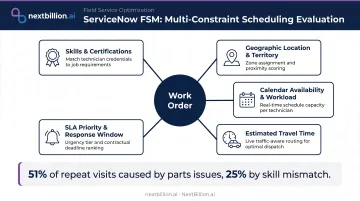
When the scheduling engine correctly matches skills and confirms parts availability before dispatch, unnecessary return visits drop.
Dispatcher Workspace and Real-Time Control
The Dispatcher Workspace is the control layer that keeps operations stable when conditions change. Dispatchers get a real-time view of:
- Technician locations on a live map
- Current schedule and workload per technician
- Task progress and status updates
From this single interface, dispatchers can drag-and-drop assignments, reprioritize urgent jobs, and fill schedule gaps without navigating to separate tools. When a technician is delayed, the platform flags the downstream impact on their remaining jobs and can suggest resequencing options — so dispatchers intervene selectively rather than managing every assignment manually. This same workspace supports on-call scheduling, letting dispatchers assign after-hours or standby coverage and reassign incoming urgent work to on-call technicians as conditions change.
Confirmed Dispatch and Technician Notification
Once scheduling completes, an optimized daily schedule pushes directly to each technician's mobile device via the ServiceNow Mobile Agent app. Each assignment includes:
- Job sequence for the day
- Customer details and site information
- Asset history and required parts
- Navigation guidance
A well-sequenced schedule reduces travel time, improves SLA compliance, and increases daily job completions per technician. The downstream impact compounds at scale: Arqiva, which manages over 1 million assets across 1,450 broadcast sites, reported a 130% productivity improvement after deploying ServiceNow FSM.
Core Capabilities That Make Scheduling and Dispatch Smarter
ServiceNow FSM's scheduling engine is supported by several platform capabilities that go beyond basic assignment logic.
Schedule Optimization
ServiceNow's Schedule Optimization engine runs against the full day's or week's workload — not just individual job assignments. According to ServiceNow's official documentation, Schedule Optimization helps:
- Create more predictable schedules
- Give preference to high-priority work
- Reduce travel time and overtime
- Fit more jobs into available working hours
- Meet SLA commitments across the technician fleet
The result is a schedule built around your entire workforce's capacity — not a series of individually optimized assignments that conflict when stacked together.
Skills and Certification Matching
Each technician profile stores skills, certifications, and equipment authorizations. The scheduling engine uses this data to prevent mismatched assignments. Dispatching an uncertified technician to a credentialed job creates escalations, re-dispatches, and customer dissatisfaction — problems that skills matching eliminates at the assignment stage.
SLA-Aware Prioritization
Work orders carry SLA windows, and the scheduling engine treats high-priority jobs as hard constraints that override default sequencing. For compliance-sensitive industries like utilities responding to outages or healthcare equipment services with contractual response windows, this ensures critical jobs are sequenced first. Geography alone does not determine priority.
Territory and Capacity Management
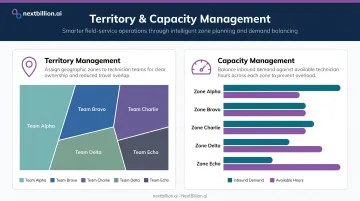
Territory planning lets dispatchers define geographic zones for technician teams, preventing cross-territory routing inefficiencies. Capacity management ensures that inbound demand doesn't exceed available technician hours. Both are configurable within the platform and shape how the scheduling engine distributes load — keeping technicians from being overbooked while ensuring no territory runs under capacity.
Contractor and Blended Workforce Management
ServiceNow FSM extends scheduling to external contractors and third-party vendors. Dispatchers manage a blended workforce — internal technicians and subcontractors — under a single scheduling view. This is particularly relevant for organizations with seasonal demand spikes or specialized work that requires third-party expertise.
Where ServiceNow FSM's Native Scheduling Has Limits — and How to Extend It
ServiceNow FSM's constraint-based scheduling engine is well-suited to the majority of field service operations. But there's one area where its native capabilities have documented boundaries: complex multi-stop route sequencing.
The Native Routing Gap
ServiceNow's native route optimization reorders technician tasks using geolocation or straight-line estimation. For travel time calculation, the platform relies on Google Maps APIs (including the Geocoding and Routes APIs) and straight-line estimation providers. This works well for typical field assignments.
That changes for technicians running 8–15 stops per day across dense urban corridors or large rural territories. At that volume, routing decisions need to account for:
- Truck-restricted roads and height/weight limitations on service vehicles
- Custom road attributes — temporary closures, private access roads, or off-road locations not accurately reflected in standard map data
- Real-time traffic resequencing that adjusts the full day's stop order dynamically as conditions change
- Large-scale fleet optimization across hundreds of technicians simultaneously
Standard map providers handle general routing well. They weren't designed for the operational complexity of commercial fleet dispatch at scale.
Integrating Dedicated Route Optimization via API
Organizations with high-density routing needs can extend ServiceNow FSM by integrating a dedicated route optimization engine via API — keeping all scheduling and dispatch workflows inside ServiceNow while replacing or augmenting the native routing layer.
NextBillion.ai's Route Optimization API integrates with ServiceNow FSM through standard REST APIs, pulling work order tasks directly from the platform and returning optimized route sequences back into the dispatcher's workflow. The integration supports 50+ routing constraints specifically relevant to field service operations:
- Skill-based job assignment with technician certification matching
- Time window management for customer appointments
- Vehicle-specific routing for service vans, including weight limits and access-restricted zones
- Shift hours, mandatory breaks, and labor compliance
- Custom road attributes and private road edits not available in standard map data
The Distance Matrix API supports computations up to 5,000 × 5,000 elements — far beyond the 25 × 25 limit common in standard providers — making it practical to optimize across large technician fleets simultaneously. Routes can also be resequenced mid-day as new jobs are added, cancellations occur, or traffic conditions change, with updates pushed back into the active schedule.
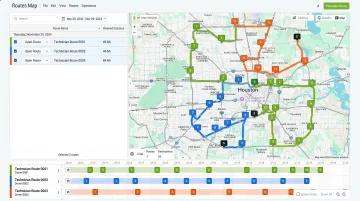
Field service operators have used this combination to measurably improve outcomes. Hawx Smart Pest Control — managing hundreds of technicians across 30+ offices in 16 states — cut scheduling time and gained the ability to update routes multiple times per day to accommodate same-day bookings.
The global FSM market is projected to reach $13.85 billion by 2033 at an 11.0% CAGR. As technician counts, geographic spread, and daily work order volumes grow, the question isn't whether native scheduling will hit its ceiling — it's when, and whether your integration strategy is ready for it.
Frequently Asked Questions
What is the difference between scheduling and dispatching in ServiceNow FSM?
Scheduling determines when and to whom a work order is assigned, using constraint logic across skills, availability, and SLA windows. Dispatching is the act of confirming and sending that assignment to the technician. Both functions are managed within ServiceNow FSM but represent different steps in the workflow.
What scheduling methods are available in ServiceNow FSM?
ServiceNow FSM supports manual assignment (dispatcher selects the technician directly) and dynamic scheduling (the system auto-assigns and sequences work without manual intervention). The Schedule Optimization engine adds fleet-level planning — balancing workload, minimizing travel, and prioritizing SLA-critical jobs across the full day. Dispatchers typically start with dynamic scheduling for routine volume and switch to manual assignment for exceptions, escalations, or jobs requiring a named technician for compliance or customer reasons.
How does ServiceNow FSM handle emergency or unplanned work orders?
Urgent work orders can be inserted into the active schedule in real time through the Dispatcher Workspace. The system flags conflicts created by the insertion and suggests resequencing options for affected technicians. Dispatchers can override or re-optimize impacted assignments immediately.
Can ServiceNow FSM optimize routes for field technicians?
ServiceNow FSM includes travel time estimation and task reordering using geolocation and standard map providers. Operations with high-density, multi-stop routes — particularly those with vehicle-specific restrictions — often layer in a dedicated route optimization API for more granular, constraint-aware sequencing. This matters for US fleets subject to FMCSA hours-of-service limits, where sequencing has to account for available drive time, not just distance, to avoid pushing technicians into violations.
How does ServiceNow FSM assign the right technician to a work order?
The scheduling engine scores available technicians against the work order's required skills, certifications, geographic proximity, current workload, availability windows, and SLA priority. The result is a multi-constraint match — the most qualified and available technician, not simply the nearest one.
What integrations support ServiceNow FSM dispatch and scheduling?
ServiceNow FSM integrates natively with ITSM, CSM, and asset management modules on the Now Platform. External tools — ERP, CRM, IoT systems, and route optimization APIs — connect via standard REST APIs. NextBillion.ai, for example, pulls work order data from ServiceNow through this framework and returns optimized schedules without requiring dispatchers to leave the platform.
How does ServiceNow FSM handle on-call scheduling?
ServiceNow FSM supports on-call and rotation-based scheduling by defining coverage windows and assigning technicians to shifts outside standard business hours. Work orders that come in during off-hours route to the on-call roster based on skill match and availability rules. This is commonly used for after-hours emergency response, where dispatchers need coverage guarantees without staffing a full daytime crew around the clock.
What's the difference between CRM and FSM?
CRM manages customer relationships, sales pipelines, and service requests from the customer-facing side. FSM manages the operational side — scheduling technicians, dispatching work orders, and tracking job completion in the field. In ServiceNow, a service request logged in CRM or CSM can trigger a work order in FSM, but the two modules solve different problems: relationship management versus field execution.