Introduction
Comparing ELT tools for hybrid cloud versus on-premise deployment comes down to four factors: regulatory environment, data sensitivity, infrastructure trajectory, and team capacity — and it is an architectural decision, not a feature checklist. Get it wrong and you face costly re-architecture 18 months later when your compliance team flags a data residency issue, or when egress bills hit numbers nobody budgeted for.
The tension is real: cloud ETL offers fast setup, elastic scaling, and minimal infrastructure overhead. On-premise ETL delivers complete data sovereignty, predictable costs at high volume, and the control that regulated industries require. The right answer depends on your environment.
What makes this decision harder is that many teams treat deployment model as an afterthought, evaluating ETL tools purely on connector count or transformation features. Deployment model shapes total cost of ownership, regulatory compliance posture, data latency, and IT overhead in ways that compound over years, not just the first billing cycle.
This guide breaks down how cloud and on-premise ETL differ across cost, scalability, security, and operational fit, with clear guidance on which model makes sense depending on your data environment.
Key Takeaways
- Cloud ETL fits teams with variable workloads, SaaS-heavy sources, and no dedicated infrastructure staff
- On-premise ETL is the right call when data cannot leave a specific network perimeter or jurisdiction
- Large enterprises increasingly run hybrid: cloud for SaaS analytics, on-premise for sensitive operational data
- Cloud ETL swaps hardware spend for recurring subscription and egress fees; on-premise shifts cost to infrastructure and staffing
- The right model comes down to four factors: regulatory environment, data sensitivity, infrastructure trajectory, and team capacity
Cloud vs. On-Premise ETL: Quick Comparison
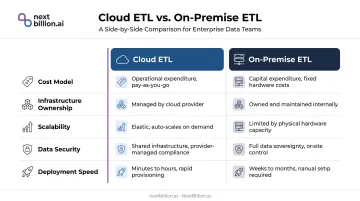
| Factor | Cloud ETL | On-Premise ETL |
|---|---|---|
| Cost model | Subscription or consumption-based; lower upfront, variable at scale | Higher capital expenditure upfront; more predictable long-term |
| Infrastructure ownership | Vendor manages compute, storage, updates, uptime | Organization owns and maintains all hardware and networking |
| Scalability | Elastic; handles demand spikes without manual provisioning | Constrained by hardware; scaling requires procurement cycles |
| Data security | Enterprise certifications (SOC 2, HIPAA, GDPR); data leaves network perimeter | Full data sovereignty; no external data movement |
| Deployment speed | Pipelines deployable in hours or days | Longer setup due to infrastructure provisioning and network configuration |
On pricing specifically: AWS Glue uses DPU-hour consumption billing — a job using 6 DPUs for 15 minutes at $0.44 per DPU-hour costs $0.66. That works well for intermittent workloads, but running that same job every 10 minutes around the clock adds up to roughly $95/month on that single pipeline alone — before accounting for any parallel jobs or data transfer costs. It's the kind of variable that tips the cloud-vs-on-premise math for high-throughput operations.
What Is Cloud ETL?
Cloud ETL refers to any deployment model where the extract, transform, and load pipeline runs on vendor-managed infrastructure — no in-house servers, no storage provisioning, no manual patching. Popular cloud ETL tools span fully managed SaaS platforms, cloud-native serverless services, and cloud-agnostic orchestration tools, and Fivetran is generally classified as an ELT tool since it loads raw data first and pushes transformation downstream into the warehouse.
Three Primary Subtypes
- Fully managed SaaS ETL (Fivetran, Airbyte Cloud): connectors and orchestration managed entirely by the vendor; minimal engineering overhead
- Cloud-native serverless ETL (AWS Glue, Google Dataflow): compute scales automatically with workload; pay-per-use pricing; requires more configuration than SaaS options
- Cloud-agnostic platforms (Azure Data Factory): run across multiple cloud providers; lower lock-in risk but more operational complexity
Each carries different cost structures. SaaS ETL typically charges per row, per connector, or per sync. Serverless platforms bill on compute consumption. Cloud-agnostic tools often combine licensing fees with consumption-based infrastructure costs.
Operational Benefits
- Automatic scaling for variable or unpredictable workloads
- Built-in high availability without custom disaster recovery planning
- Managed connector updates — no manual version maintenance
- Reduced burden on data engineering teams, freeing capacity for pipeline logic
Security Model
Most enterprise cloud ETL platforms offer serious security coverage. Fivetran's security page lists SOC 1, SOC 2, ISO 27001, PCI DSS Level 1, HITRUST, HIPAA BAA, customer-managed encryption keys, and private connectivity options including AWS PrivateLink, Azure Private Link, and Google Private Service Connect.
That said, organizations must verify data residency coverage independently. Vendor certifications confirm security practices — they don't automatically satisfy every jurisdiction's data localization requirements. Reviewing sub-processor lists is non-negotiable for GDPR-regulated data.
Cloud ETL Use Cases
Cloud ETL is the right call when:
- Data sources are primarily SaaS applications (Salesforce, HubSpot, Stripe) feeding into cloud warehouses like Snowflake or BigQuery
- Workloads are variable — scaling up during peak periods without manual provisioning
- Teams lack dedicated infrastructure engineers
Real-world scale: GlossGenius uses 12 Fivetran connectors to move 25 million rows daily from HubSpot, Stripe, PostgreSQL, and other sources into Snowflake. Snowflake itself runs 900+ Fivetran connections moving 400 million active rows monthly.
What Is On-Premise ETL?
On-premise ETL runs entirely within the organization's own data center or private network. The company controls the hardware, the software, and every data movement — nothing leaves the firewall unless explicitly configured to do so. Hybrid cloud deployment models sit between these two extremes, keeping regulated or latency-sensitive workloads on-premise while routing SaaS and analytics workloads to the cloud, with orchestration layers coordinating data movement between the two environments.
Core Variants
- Self-hosted open-source tools (Apache NiFi, Pentaho): flexible and cost-effective; require significant internal engineering capacity for setup and maintenance
- Enterprise on-premise software (IBM DataStage, Informatica PowerCenter): mature platforms with broad connector libraries; higher licensing costs
- Containerized on-premise deployments (Kubernetes-based): combines on-premise control with cloud-like operational flexibility; IBM Cloud Pak for Data runs on Red Hat OpenShift, and Pentaho supports Docker and Kubernetes natively
This containerized model also supports hybrid architectures. IBM DataStage Anywhere runs jobs on a remote engine in any on-premises location or data center; Qlik Talend Remote Engines keep data processing local while management stays in Talend Cloud.
Operational Trade-offs
On-premise isn't just a deployment choice — it's an operational commitment. The benefits are real:
- Complete data sovereignty and full audit trail control
- No dependency on vendor uptime or external service disruptions
- Predictable costs at high volume (no egress fees scaling with data movement)
But the costs are equally real:
- Dedicated IT resources for hardware maintenance, software upgrades, and capacity planning
- Longer procurement cycles when additional capacity is needed
- Total cost of ownership that's harder to calculate than the licensing fee suggests
When On-Premise Is Mandatory
Some organizations don't get to choose. On-premise ETL is the only viable option when:
- Data is classified government or defense information
- Patient health records must satisfy HIPAA data residency clauses (HHS confirms cloud is permissible with a valid BAA, but some contracts impose stricter residency constraints)
- Financial data falls under local sovereignty laws or PCI DSS requirements that restrict external data movement
- Operational technology environments require data to stay off public networks
On-Premise ETL Use Cases
Beyond compliance mandates, on-premise makes operational sense for:
- High-frequency transformations where cloud egress costs at scale become prohibitive
- Legacy ERP integrations with proprietary APIs that cannot safely expose data externally
- Real-time operational data — GPS coordinates, telematics, route data, driver location — that organizations need to keep within their own infrastructure
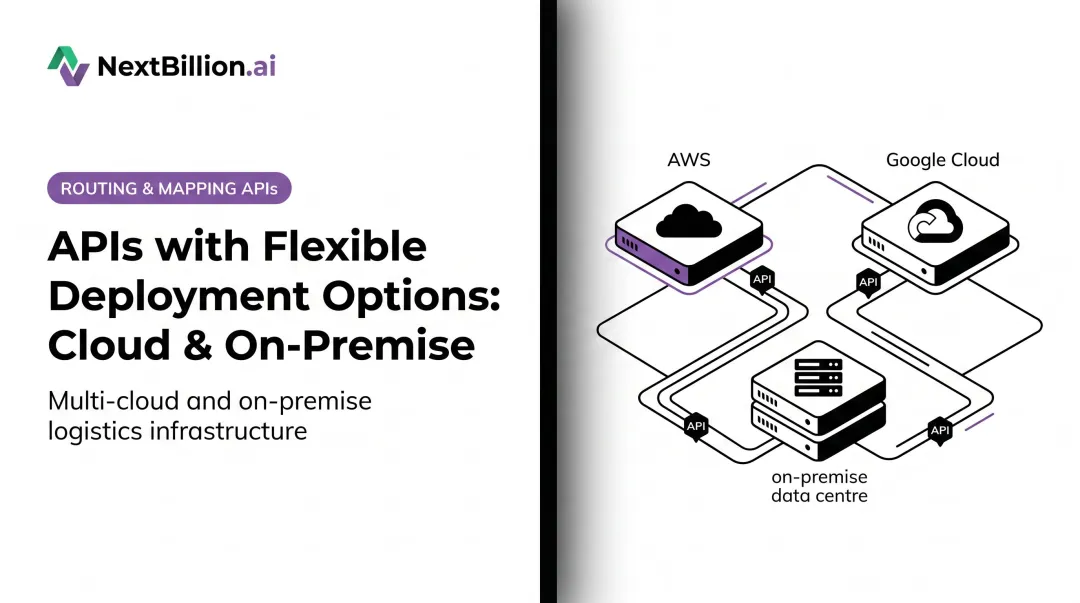
For logistics and fleet operations, the real-time data category is where architecture decisions get concrete. Platforms like NextBillion.ai's location intelligence stack can deploy within a customer's own Kubernetes environment — on AWS EKS, GCP GKE, Azure AKS, or bare-metal servers — keeping all routing queries, user data, and logs behind the firewall.
That architecture also changes the cost model. NextBillion.ai's on-premise deployment uses a fixed subscription covering unlimited API calls, and internal benchmarks show 20x higher throughput and 3x lower latency compared to standard cloud deployments.
Which Deployment Model Is Right for You?
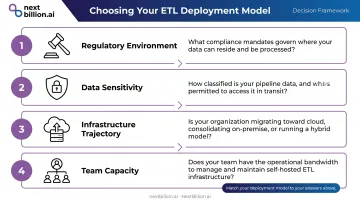
This decision hinges on four dimensions. Be honest about each one before committing.
The Four Decision Dimensions
- Regulatory environment — What compliance obligations govern your data? Are there data residency clauses in your contracts or local law?
- Data sensitivity — Does your pipeline process PII, PHI, telematics, or operationally sensitive information?
- Infrastructure trajectory — Are you cloud-first, legacy-committed, or actively migrating?
- Team capacity — Do you have the internal IT resources to own, maintain, and monitor on-premise infrastructure reliably?
Choose Cloud ETL If:
- Your team lacks dedicated infrastructure engineers
- Workloads are variable, seasonal, or growing fast
- Data sources are primarily SaaS applications
- Vendor certifications (SOC 2, HIPAA BAA) satisfy your compliance requirements
- Speed to value outweighs control
Choose On-Premise ETL If:
- Data cannot leave a specific jurisdiction or network perimeter
- You process sensitive operational data — telematics, health records, financial transactions — with strict audit trail requirements
- Existing infrastructure investments and engineering capacity are already in place
- Data volumes make cloud egress costs economically impractical at scale
- Your organization falls under defense, government, or stringent financial sovereignty rules
The Hybrid Middle Ground
Most large enterprises end up here: cloud ETL for SaaS analytics pipelines, on-premise for sensitive or high-volume operational data. Tools with cloud-agnostic architecture or Kubernetes support make this workable without two entirely separate stacks. Several platforms support this hybrid pattern natively:
- Azure Data Factory — self-hosted integration runtime connects on-premise sources to cloud pipelines
- IBM DataStage Anywhere — remote engine runs jobs on-premise while orchestration stays in the cloud
- Qlik Talend — Remote Engine decouples execution from the cloud control plane
TCO Reality Check
Before settling on a deployment model, model the 3-year total cost of ownership — the choice of cloud, on-premise, or hybrid looks very different once all cost legs are included, not just the headline licensing fee.
Cloud ETL costs:
- Subscription or consumption fees (per row, per connector, per DPU-hour)
- Data egress charges — often underestimated at scale
- Engineering time for pipeline development (lower) and maintenance (minimal)
On-premise ETL costs:
- Hardware procurement and refresh cycles
- Licensing fees for enterprise tools
- IT staffing for maintenance, upgrades, and incident response
- Opportunity cost: engineering hours spent on infrastructure, not pipelines
Many organizations underestimate on-premise TCO by 40–60% — and staffing is almost always the culprit. IT labor for maintenance, upgrades, and incident response rarely appears in initial budget estimates, but it consistently dominates actual spend over a three-year horizon.
Real-World Deployment Scenarios
Scenario 1: Cloud ETL for Logistics Analytics at Scale
Redwood Logistics uses Fivetran and Snowflake to consolidate operational data across their supply chain platform. Fivetran replicates on-premises SQL data into Snowflake using log-based change data capture, supporting operational, invoicing, TMS, rating, and pricing data pipelines. The managed SaaS approach gave their team fast time-to-value without infrastructure overhead. The same pattern works well for logistics operators consolidating data from multiple source systems into a central analytics layer.
Scenario 2: On-Premise for Enterprise Data Movement at Volume
IBM's own Chief Data Office used IBM DataStage on Cloud Pak for Data to modernize internal data pipelines. The result: loading 60 million records dropped from 3 days to 3 hours. The platform processed tables up to 426 million records and 186 GB, moving billions of rows error-free using change data capture and runtime column propagation. For enterprises with this data volume, on-premise or private cloud deployment keeps egress costs manageable and performance consistent.
Scenario 3: Hybrid Architecture for Fleet and Field Operations
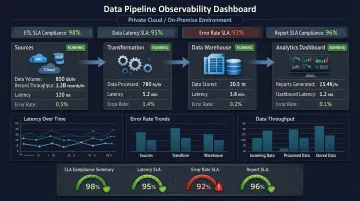
Fleet and field service organizations processing real-time GPS, routing, and delivery data face a specific problem: the data is operationally sensitive, high-frequency, and often subject to jurisdiction-specific compliance requirements, yet the business intelligence layer still benefits from cloud analytics tools.
The practical architecture: run location intelligence and routing processing within your own infrastructure, then connect to cloud-based BI tools for reporting and dashboards. NextBillion.ai's platform is purpose-built for this pattern, deployable on any Kubernetes cluster (AWS EKS, GCP GKE, Azure AKS, or bare-metal), with all routing queries and operational data staying behind the customer's firewall.
Organizations that commonly use this model include:
- Government agencies managing sensitive citizen and fleet data
- Healthcare logistics operators subject to HIPAA and data residency rules
- Financial services companies with strict cross-border data controls
Each uses on-premise location intelligence to meet compliance requirements while retaining enterprise-grade routing and optimization capabilities.
Conclusion
Neither cloud nor on-premise ETL wins universally. Cloud deployment wins on agility, scalability, and operational simplicity — particularly for teams without infrastructure capacity or with primarily SaaS data sources. On-premise wins on control, compliance, and cost predictability for high-volume or regulated workloads.
For logistics and fleet management teams, this choice has direct operational consequences. Real-time location data, driver routes, and telematics sit at the intersection of operational sensitivity and compliance risk. Whether that data belongs inside your own infrastructure or travels through managed cloud services shapes your compliance posture and long-term cost efficiency. Platforms like NextBillion.ai address this directly — supporting both on-premise Kubernetes deployments and cloud-agnostic configurations, with SOC 2 Type II and ISO/IEC 27001:2013 certifications to back either path.
Match the deployment model to your actual data environment — not to what the market currently favors.
Frequently Asked Questions
What enterprise ETL tools support hybrid cloud and on-premise deployments?
IBM DataStage Anywhere, Informatica IDMC (via Secure Agent), Qlik Talend Cloud (via Remote Engine), and Azure Data Factory (via self-hosted integration runtime) all support hybrid execution. Any tool with Kubernetes-based architecture can also run across on-premise and cloud environments without separate stacks.
What is the difference between hybrid cloud and on-premise deployments?
Hybrid combines private on-premise infrastructure with public cloud resources — typically using on-premise for sensitive data processing and cloud for analytics or reporting. Pure on-premise keeps all processing within the organization's own data center with no external data movement. For US fleet and logistics operators, hybrid setups often keep telematics and driver data on-premise for FMCSA and DOT recordkeeping while pushing route analytics to the cloud for scale.
What is the difference between ETL and ELT tools?
ETL transforms data before loading it into the destination — suited for complex transformation logic and regulated environments requiring pre-load data governance. ELT loads raw data first and transforms it inside the destination warehouse using its compute — the standard approach for cloud-native analytics today.
When should I choose on-premise ETL over cloud ETL?
Three situations drive the decision: strict data residency or sovereignty rules that block external movement; highly sensitive data (health records, financial transactions, telematics) that can't traverse public networks; and data volumes large enough that cloud egress costs outweigh the convenience. For fleet operations tied to HOS logs, IFTA reporting, or CDL driver records, on-premise processing can simplify audit trails since the raw data never leaves internal systems, though this must be weighed against the operational overhead of maintaining that infrastructure.
What are the hidden costs of on-premise ETL deployment?
Beyond licensing: hardware procurement and refresh cycles every 3-5 years, IT staffing for maintenance and incident response, software upgrade cycles that require engineering time, and the opportunity cost of infrastructure work that displaces pipeline development. These indirect costs routinely exceed the visible licensing fee.
Can cloud ETL tools meet enterprise security and compliance requirements?
Yes — leading platforms offer SOC 2 Type II, HIPAA BAAs, GDPR compliance, VPC peering, and encryption at rest and in transit. That said, vendor certifications don't automatically satisfy every jurisdiction's data localization rules, so verify data residency coverage, review sub-processor lists, and confirm certifications match your specific obligations before assuming compliance.
What are hybrid cloud deployment models and how do they work?
A hybrid cloud deployment model splits workloads between on-premise infrastructure and public cloud services, connected through a network layer that lets data and jobs move between them. Sensitive processing — such as driver location data or regulated records — stays on internal servers, while less sensitive workloads like reporting or route optimization compute run in the cloud. Orchestration tools coordinate scheduling and data movement across both environments, so teams get cloud scalability without giving up control over regulated data.
Is Fivetran an ETL tool?
Fivetran is an ELT tool, not a traditional ETL tool. It extracts data from sources and loads it into a destination warehouse largely unchanged, then relies on the warehouse's own compute (via SQL or a transformation layer like dbt) to handle transformations after loading. This differs from ETL tools, which transform data before it reaches the destination. Fivetran runs as a managed cloud service and does not offer an on-premise deployment option.