Introduction
Google Maps now reaches over 2 billion monthly users — which explains why it's still the default for most people who need directions. But default doesn't mean best-fit for every situation.
Three distinct pressures are pushing users and developers to look elsewhere. Developers face SKU-specific billing changes Google introduced in March 2025, replacing the prior monthly credit model. Privacy-conscious users remain wary after a 2022 settlement in which 40 attorneys general secured $391.5 million from Google over location-tracking practices.
Everyday users have their own frustrations: Google Maps is increasingly optimized for discovery and advertising, not clean navigation.
HERE WeGo is a free, full-featured consumer navigation app — it offers offline maps, privacy-friendly defaults, and clean turn-by-turn routing, and is often considered an alternative to Google Maps for everyday navigation. HERE WeGo sits at an instructive middle ground in this conversation. It's also frequently misapplied, particularly by logistics teams hoping it can substitute for a purpose-built fleet or route optimization solution. This guide covers what HERE WeGo actually does well and where those operational needs outgrow what it's designed to handle.
Key Takeaways
- HERE WeGo is free on iOS and Android — no account required for basic navigation
- Its offline maps cover entire countries or continents, not just manually drawn bounding boxes
- Public transit directions are available in 1,900+ cities across 50+ countries
- Best for: travelers, commuters, and privacy-conscious users reducing Google dependence
- Not suitable for fleet routing, multi-stop delivery optimization, or enterprise logistics; NextBillion.ai is purpose-built for those use cases
When Should You Use HERE WeGo Instead of Google Maps?
HERE WeGo is a consumer navigation app. The decision to use it over Google Maps comes down to what you actually need — not which app has more features.
Scenarios Where HERE WeGo Has a Real Advantage
- International travel with unreliable connectivity — download a full country map before you leave, navigate offline without burning data
- Multi-modal commuting — driving, cycling, walking, and transit routing live in one app; no mode-switching required
- Reducing Google data exposure — HERE WeGo works without account login and lets users opt out of the traffic contribution that sends location data to HERE
- Regions with weaker Google Maps POI coverage — HERE's road-attribute data can be stronger in markets where Google's local business data hasn't scaled
Scenarios Where HERE WeGo Is the Wrong Tool
- Delivery businesses routing vehicles across dozens of stops per day
- Fleet managers who need vehicle weight/dimension constraints, time windows, or driver shift compliance
- Developers building high-volume logistics APIs who need predictable cost at scale
- Dispatch operations requiring real-time driver assignment and mid-route reoptimization
If your use case falls into that second list, a consumer navigation app — whether HERE WeGo or Google Maps — isn't the right foundation to build on. Platforms like NextBillion.ai are purpose-built for exactly these commercial requirements, with 50+ optimization constraints, truck-aware routing, and per-vehicle pricing built in from the start.
HERE WeGo's Core Features: A Complete Walkthrough
Offline Maps
HERE WeGo lets users download complete map packages by region, country, or continent directly to their device. The app displays available storage during the download process, so you can plan around device limits before committing.
The key difference from Google Maps: Google requires you to manually draw a bounding box over the area you want to save. HERE organizes downloads by predefined geographic units — you pick Germany, not a rectangle that might clip at the border. Simpler to use, but it does consume more storage since you're downloading more than you might need.
Practical tip: Most users skip the offline download step on first launch and regret it when they lose connectivity mid-route. Do it over Wi-Fi before you travel.
Multi-Modal Navigation
HERE WeGo handles driving, walking, cycling, and public transit in a single interface — covering public transport in more than 1,900 cities worldwide. The app shows route comparisons across modes and includes transfer suggestions for transit journeys. For anyone who commutes across modes, that consolidation matters — apps like Waze cover driving only, which means a separate lookup every time you need transit.
Real-Time Traffic, Speed Alerts, and Parking
HERE's traffic layer draws on vehicle sensor data and probe data from other drivers. When you enable Traffic in settings, the app sends your vehicle location and direction to HERE, which aggregates it with data from other users to improve routing.
Keep these limitations in mind:
- Traffic accuracy varies by region — coverage depends on probe data density, and in rural areas or less-covered markets, it's noticeably weaker than Google Maps
- Speed camera warnings aren't available in all countries
- Sound alerts for speed limits are off by default — change this in settings before relying on it for daily driving
- Parking suggestions near your destination are available, both before a journey and during active guidance
Map Views and Interface
HERE WeGo offers 2D and 3D map views, plus satellite and terrain layers. The main screen includes a weather widget, and the app supports dark, light, and auto appearance modes.
CarPlay and Android Auto are both supported. According to HERE's official support documentation, you connect your phone, open WeGo, set a destination, and start navigation. Note that some in-car features are limited compared to the full phone interface.
Voice Guidance Options
- Language selection and street name announcements
- Visual reference mode — landmarks included in spoken directions ("turn left after the church")
- Experimental 3D spatial audio that positions turn instructions in your headphones or car speakers
Full navigation works without an account. Creating one adds saved places and location shortcuts.
How to Get Started with HERE WeGo
Download and Initial Setup
HERE WeGo is free on both iOS and Android. No account is needed to start navigating — the app prompts you to download a regional map on first launch. Creating an optional account adds synced saved places and shortcuts for frequently visited locations.
Downloading Offline Maps
Settings → Maps is where offline downloads live. Maps are organized by continent and country, making it easy to find what you need. From this menu you can also:
- Remove outdated downloads to free storage
- Restrict downloads to Wi-Fi only (recommended for large country packages)
- Check how much device storage is available before downloading
Download your maps before you need them, not when you're already somewhere with spotty signal.
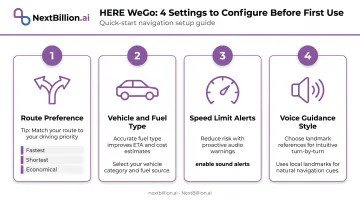
Key Settings to Configure Before First Use
A few configuration choices have an outsized effect on daily usability. Set these before your first real navigation session:
- Route preference — fastest, shortest, or most economical
- Vehicle/fuel type — affects fuel stop suggestions along longer routes
- Speed limit alerts — enable sound alerts; they're silent by default
- Voice guidance style — turn on visual references if you want landmark-based directions
Using HERE WeGo with CarPlay and Android Auto
Both integrations are confirmed and functional. The in-car interface provides navigation, turn-by-turn guidance, and basic destination search — though search functionality is more limited than the full phone app. Setup steps differ slightly between iOS and Android, so confirm the current process in HERE's official support docs before pairing.
HERE WeGo vs. Google Maps: Key Differences That Actually Matter
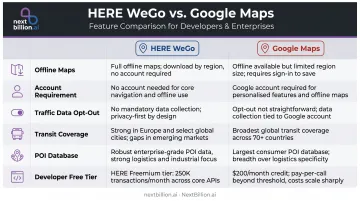
The differences between HERE WeGo and Google Maps go beyond features — they reflect different philosophies around data, offline access, and developer pricing. Here's how the two compare on dimensions that actually affect daily use and integration decisions.
| Feature | HERE WeGo | Google Maps |
|---|---|---|
| Offline maps | Country/continent packages | Manually drawn bounding box |
| Account required | No | Recommended for full features |
| Traffic data opt-out | Yes, user-controlled | Deeply tied to Google account |
| Transit coverage | 1,900+ cities | Broad but varies by region |
| POI database | Road-attribute strength | Strong local business listings |
| Developer free tier | 250,000 transactions/month | SKU-specific caps (varies by API) |
Offline Navigation Approach
Google's bounding box method gives more control over exactly what gets saved — but it requires planning, and edges of the downloaded region can leave gaps. HERE's country-level packages are simpler but less precise. You get more than you need in storage terms; you never get less than you need in coverage.
Privacy and Data Handling
HERE WeGo's main privacy advantage is structural: no Google account means the data generated doesn't feed into an advertising ecosystem. The traffic contribution model is opt-out — you can turn it off entirely. HERE WeGo also works for full navigation without ever creating an account.
One honest caveat: PrivacyGuides does not list HERE WeGo among its formally recommended privacy-respecting navigation apps. Their criteria require that location sharing be anonymized and no personally identifiable data be collected. HERE WeGo reduces exposure to Google's data collection model, but it hasn't been formally certified as a private navigation solution.
API and Developer Pricing
For developers evaluating HERE from a cost perspective: HERE's Base Plan offers a free tier of 250,000 transactions per month and 5,000 per day with no credit card required. Google Maps Platform moved to SKU-specific free usage caps in March 2025, with caps varying by API type — for example, 10,000 free events per month for Compute Routes Essentials.
HERE's free tier is higher on raw transaction volume, but both platforms use per-transaction pricing. For high-volume commercial operations, neither model stays cost-predictable at scale.
HERE WeGo Limitations and When Your Operations Need More
Consumer App, Not a Logistics Engine
HERE WeGo navigates individual drivers from point A to point B. It does not:
- Optimize sequences across 50+ stops per vehicle
- Apply weight limits, height restrictions, or hazmat routing constraints
- Enforce driver time windows or Hours of Service compliance
- Handle multi-vehicle dispatch across a fleet
- Calculate large-scale distance matrices for operational planning
Businesses that attempt to use HERE WeGo for last-mile delivery or field service dispatch will run into these walls quickly. Last-mile routing isn't just navigation — it requires master data on customer locations, product weights, vehicle capacities, and real-time exception handling. A consumer app doesn't have the architecture to hold any of that.
API Limitations for Enterprise Scale
HERE's free developer API is generous at 250,000 monthly transactions, but commercial tiers still operate on per-transaction billing. As routing call volume grows — across multiple vehicles, multiple optimization passes, distance matrix calculations — costs scale with every API hit.
For a fleet running hundreds of daily routes with reoptimization, this model becomes hard to budget. The unpredictability isn't unique to HERE; Google Maps Platform has the same structural issue.
When to Evaluate Purpose-Built Alternatives
When billing unpredictability becomes a planning problem, logistics operations, field service companies, and fleet managers need a different class of tool. NextBillion.ai is purpose-built for exactly that gap.
Here's how the two approaches compare in practice:
- Per-vehicle or per-order pricing instead of per-API-call — costs tied to your fleet size, not optimization frequency
- 50+ hard and soft routing constraints, including time windows, driver shift limits, vehicle dimensions, hazmat routing, and HOS compliance
- Distance matrix up to 5,000×5,000 elements, compared to Google Maps Platform's 25×25 limit
- Up to 10,000 stops per optimization request
- Native integrations with Samsara, Geotab, Motive, Salesforce, SAP, and Microsoft Dynamics 365
- Deployable on multi-tenant cloud, private VPC, or fully on-premise — SOC 2 Type II and ISO/IEC 27001:2013 certified
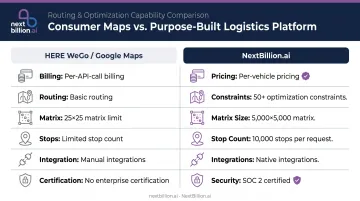
That pricing structure changes how operations teams plan. NextBillion.ai customers purchase annual licenses based on vehicle count or order volume. Optimization can run as many passes as needed — no surprise overage charges at the end of the month.
Frequently Asked Questions
Is HERE WeGo free to use?
Yes — the app is free on iOS and Android with no subscription required. The developer API also has a free tier offering 250,000 transactions per month and 5,000 per day without requiring a credit card.
Does HERE WeGo work without an internet connection?
Yes. Users can download full country or regional map packages for offline use. The app switches to offline mode automatically when connectivity is lost, provided a map package for that area has already been downloaded.
Is HERE WeGo more private than Google Maps?
HERE WeGo doesn't require an account and lets users opt out of location-sharing for traffic data. It avoids Google's advertising ecosystem entirely, though PrivacyGuides doesn't formally endorse it — treat it as a practical reduction in Google data exposure, not a certified privacy solution. For businesses handling sensitive location data, such as healthcare logistics under HIPAA, this distinction matters less than choosing an API provider with clear data-handling terms for enterprise use.
Does HERE WeGo support Apple CarPlay and Android Auto?
Both are supported. Set your destination in the app, connect your phone, and navigation displays on the in-car screen. Some search functions are more limited in the in-car interface than in the full phone app.
Can businesses use HERE WeGo for fleet or delivery route management?
No — HERE WeGo is designed for individual navigation and lacks multi-stop optimization, vehicle constraint settings, dispatch workflows, and the API throughput that fleet operations require. Purpose-built platforms are the right tool for those use cases. US fleets also need routing that accounts for FMCSA hours-of-service limits, truck-specific restrictions, and IFTA mileage reporting, none of which a consumer navigation app is built to handle.
How does HERE WeGo's map data compare to Google Maps in accuracy?
HERE's road and routing data is strong, built from an automotive-grade mapping platform used across major car manufacturers. Its points-of-interest database is less comprehensive than Google Maps, which benefits from Google Business Profile data. For road navigation, HERE is reliable; for local business discovery, Google Maps has more depth in most markets.
What happened to HERE Maps?
HERE Maps didn't shut down — it evolved. The consumer app was rebranded as HERE WeGo, while the underlying mapping and location technology continues under HERE Technologies, which sells location data and APIs to automakers and businesses. So if you're searching for HERE Maps and can't find it, HERE WeGo is the consumer app, and HERE's enterprise APIs are the business-facing product line.
Does Amazon use HERE Maps?
Amazon has used HERE's mapping and location data for parts of its logistics operations, alongside other providers, as part of a broader strategy of not relying on a single map vendor for delivery routing. This reflects a common pattern among large fleet and delivery operators: combining multiple location data sources rather than depending on one provider for route planning and last-mile delivery.