




Offline Routing & Navigation for Fleets

Offline Routing & Navigation for Fleets: How to Operate Without Connectivity

Published: June 8, 2026

The offline routing and navigation facility is a boon for the long-haul truckers, delivery carriers, and local transporters.

Fleet operators leveraging modern technological solutions assume constant connectivity throughout the delivery vehicle’s journey. But reality strikes hard when, while moving in rural areas, construction zones, or cross-border regions, the drivers observe network lag or zero connectivity.

While there are multiple reasons for connectivity breakout in the GPS systems, some logistics firms still rely on real-time connectivity for routing and navigation. The task assessment repeatedly reports missed stops, inefficient re-routing, delayed deliveries, and frustrated drivers. 

Even after being the world’s most advanced nation both scientifically and technologically, the United States still struggles to serve consistent internet from end to end. The rural routes in the Midwest, interstate corridors, and mining regions are some of the most portions experiencing non-existent connectivity in worst-case scenarios.

It is 100% true that navigational disturbances incur major impact on the delivery assignments, and routing tools that serve in offline mode give an edge to the situation. 

The article uncovers the facts about how connectivity issues trouble route optimization for delivery vehicles. And can platforms like Nextbillion.ai provide a robust and reliable solution to handle offline routing and navigation for enterprise-scale operations?

struggle with network connectivity for delivery drivers

Why is Offline Navigation Critical for Transportation?

Gone are the days of delivery drivers keeping a large road map to analyze their position on the geography and figuring out the correct route to the destination. Technology has erased the past, and now the vehicles or drivers have embedded devices for live navigation through digital maps.

Vehicle tracking and route navigation are essential technologies for logistics and transportation businesses. But the interdependence on internet services makes them vulnerable to generating consistent output. 

The logistics landscape is expanding globally to diminish international boundaries. Transportation is penetrating unprecedentedly into the rural zones and outskirts that are routed through long and vacant transit roads.

The vast and complex directions on the digital map create confusion in choosing the right path to the destination. A route planner does the job of generating the efficient, safe, and compliant path. But the real test of these tools begins when the vehicle enters an outer area or places that have serious internet network issues. Because the real-time data eventually pauses, that halts the navigation and routing instructions.

Ideal conditions may not persist throughout the journey. Routing solutions should be reliable enough to anticipate availability of resources, like connectivity loss, and serve alternatives to surpass the problem.

Modern platforms like NextBillion understand the vulnerability of internet networks and how essential it is to ensure a backup solution in case of network failure during adverse conditions. Offline routing capability adds a fail-safe layer to the route planner by facilitating the dispatchers to add necessary data, such as delivery locations, fuel stations, etc., on the map.

Most critical issues that offline routing resolves;

  • Internet connectivity is a huge problem, and even with powerful satellites and signal towers all over, the network can still deceive your driver at any point.

  • Offline maps help drivers to safely move on the assigned route even during “no connectivity.” 

  • The drivers can still locate specific landmarks and emergency spots in the area.

  • A notable advantage of offline maps (which we can elaborate on further in this article) is reduced data charges, which improves overall cost efficiency. 

  • Static or offline navigation consumes less battery power, and thus, it is quite helpful on long routes.

Quick tips to hire delivery drivers.

Causes of Network Interference that Trigger Offline Routing and Navigation

Jamming

Deliberate tools to regulate satellite signals 

Infrastructure

Building materials and constructions that disrupt network

Spoofing

False signals that show incorrect signals

Weather 

Severe rainfall, and snowfall impact signal strength

Physical Blockage

Natural terrain that prevent signal reception

Outdated System

Damaged cables, fiber-optics, hardware failure, power supply issues


Where does the connectivity and navigation issues show up?

Developed nations like America face connectivity issues due to the environmental and infrastructural challenges. It is often the feasibility and lower resource utilization that deter the policymakers from strengthening the networks in less demanding regions. 

Network-affected areas or potential causes for connectivity troubles can be based on the physical characteristics of the location, geographically dead zones, and artificial signal interference. 

  • Mountainous regions often block signals from satellites. Despite tower installations, fiber optics, and other solutions, these massive structures made of rock substance act as a wall, creating shadow zones for these signals.

  • Environmental conditions in adverse states, such as heavy rains, snow, solar flares, and geomagnetic storms, can also create a problem with connectivity. 

  • Urban areas with tall skyscrapers create blockage in line-of-sight for satellite signal reception.

  • Rural areas have a lack of fiber cables and towers for signal reception and thus have low connectivity.

  • Remote areas and cross-border regions also pave the way for network troubles for navigation vehicles. These areas are scarcely populated and less focused for network enhancement activities.

  • Military zones lawfully jam the commercial networks in the close proximity of the restricted areas.

US-specific challenges: Some reported locations of network failure

The United States is a vast nation with varied environmental conditions, infrastructural differences in rural/urban establishments, and strictly regulated zones. 

Here is a brief description of some areas across the country where logistics drivers and commoners have experienced the worst as no internet connectivity for a notable duration. The purpose is to highlight the necessity of an offline routing and navigation facility for transporters.

  • Western region and the Rocky Mountains:

  • Trail Ridge Road or US 34, Colorado, moves within the national park range through alpine tundra, and cell signals do not exist here.

  • Going-to-the-Sun Road, Montana, is a 50-mile stretch in Glacier National Park towards the Continental Divide. Connectivity is loose as you enter the area. 

  • Beartooth Highway or US 212, Wyoming, is a beautiful drive towards Yellowstone but suffers cellular and data signals.

  • San Juan Skyway or Million Dollar Highway in Colorado takes you through high rock walls and steep canyons, which characteristically block the network.

  • Eastern region and the Appalachian Mountains: 

  • Blue Ridge Parkway is a 469-mile road where fog and tree cover completely bars the GPS signal.

  • Skyline Drive, Virginia, runs through Shenandoah National Park, connects to the Blue Ridge, and faces similar troubles of connectivity along the mountains.

  • I-26, Tennessee/North Carolina, is not spared. The Sams Gap in the Appalachians has proven low-connectivity issues.

  • Western National Parks: Tioga Pass 120, Yosemite NP, has shown high fluctuation in connectivity with few good exceptions, like Mammoth Hot Springs.

  • The coastline at Big Sur 1, California, is not good for beaches or for cellular networks.

  • Byway 12, Utah, from Bryce Canyon to Capitol Reef, has a natural barrier of red rocks for capturing signals.

  • The Dalton Highway, Alaska, is largely affected by network connectivity issues with “dead zones” in the major portions.

  • The National Radio Quiet Zone is officially restricted in areas across West Virginia and Maryland. Travelers through US-33 are strongly dependent on the offline navigation maps due to no network zones.

  • The deep red rocks in the Southwest Canyons trouble the cellular networks at I-40 or US-191.

  • The skyscrapers in New York, Chicago, and Los Angeles are often termed “urban canyons” for blocking GPS signals and fussing with the last-mile deliveries. 

  • The scenario at the Port of Laredo, TX, is completely different. The peak crossing time of logistics trucks creates network congestion for cellular networks.

  • Atlanta interchanges are a nightmare for freights navigating for precise guidance. The dense traffic and multi-level interchanges cause GPS lag.

offline routing

Popular connectivity risk areas in the USA

Location type

Route

Issue

High plains

I-80, Wyoming

Vast distance between towers

Northern Border

US-2, Montana

Remote terrain, no signal for 70 hours

Dense Metro

Manhattan, NYC

Signal blockage from skyscrapers

Dessert Corridor

I-40, Arizona

Canyon walls blocking GPS

Industry Hotspots Driving Offline Navigation

Offline navigation systems are now a critical component of the supply chain system. Companies from different segments understand the feasibility of the tool and aptly integrate the appropriate tool with the telematics. There’s a growing need for navigation systems that don’t rely on the internet, especially in industries and regions where connectivity is unreliable. 

Logistics Management

Logistics support is required for all sorts of goods and services. Trucks moving across the American continent have to serve every corner and move through different regions. In such cases, it becomes essential for the drivers to have an offline route navigation facility. This ensures service continuity and accurate movement of delivery vehicles even during connectivity loss in some areas.

Oil, Gas, and Renewables (Energy Belts)

The oil wells and pipelines are usually located in remote areas like the Eagle Ford Shale or Permian Basin. Such places have weak cellular networks and therefore require offline navigation to assist field crew, asset inspections, and emergency response.

Mining and Natural Resources

Mining regions in Nevada, Alaska, or Appalachia are privately owned remote lands with unmapped roads and harsh environmental conditions. Offline maps are necessary for heavy vehicle navigation, workers’ safety, and area exploration.

Rural Areas & Last-Mile Delivery

The Midwest region (Kansas, Nebraska,) mountain states, or southern parts have fewer signal towers, causing low connectivity. E-commerce giants like Amazon and Walmart are expanding towards these places and find it difficult to locate their customers in completing last-mile deliveries. Preloaded maps ensure consistent task completion.

Agriculture & Agri-Logistics

Farmlands have critical requirements for offline route mapping to manage crop transportation, tractors, harvesters, etc. Connectivity is usually low in such wide regions.

Forestry & Environmental Services

Dense forest regions in Washington, Idaho, and other places are hard to stabilize signal connectivity in. Along with logistics vehicles, it also troubles timber transport, fire management, and land survey.

Emergency Services

FEMA and state emergency services have faced network vulnerabilities in California, Florida, and other wildfire or hurricane-prone regions. Evacuation, logistics distribution, and field coordination are highly dependent on offline routing and navigation.

Industrial Expansion of Logistics Operations

Sector

Expansion

Requirements

Retail/E-commerce

Last-mile, returns, micro-fulfilment centers

Same-day/quick delivery 

Healthcare

Cold-chain logistics, home healthcare, medical demands

Temperature-controlled transport, time-critical

Manufacturing

Machinery, chemicals, heavy industry

Just-in-time inventory, raw & finished goods

Food & beverage, FMCG

Online grocery, meal delivery

High frequency & volume, perishables, same day

Automotive

EVs, batteries, and parts logistics (tier 1, 2, 3 suppliers)

Multi-tier supply chains, specialized handling

Energy 

Oil & gas field operations, renewable energy projects

Remote low-connectivity regions

Technology

Semiconductors, consumer electronics, components

Safety, air freight logistics, high-value transport 

Defence 

Domestic manufacturing

Secure supply chain

Construction 

Federal infrastructure, real estate, industrial development

Heavy equipment transit, bulk (steel, cement, etc.)

3PLs

Fast-growing service layer

Efficiency, scalability

The Business Impact of Connectivity Failure

Technology is not just about development and innovation; it is deeply integrated with all sorts of service industries. Internet connectivity is among the core components of every business segment that keeps the system active and deliverable.

Organizations in the logistics and transport segment understand the need for live tracking, real-time updates, constant navigation, and communication. 

While network signals can deceive in critical situations, a reliable offline routing and navigation tool, like NextBillion, can ensure the transit mission stays on its track. 

It is essential to understand the consequences of network failure on transportation, where offline route navigation can reduce the adversity of the scenario.

Navigation troubles: Low connectivity can pause map navigation, and drivers can miss the turns or stoppages or unknowingly take the non-compliant road.

Driver’s stress: Straining the memory and roadside signage to stay on the designated route can frustrate the drivers, raising safety concerns. The driver’s shift timings may overshoot with unsuccessful task completion  

Disrupting delivery sequence: Courier, grocery, or pharma delivery generates profit margin through cost-efficient delivery sequences and route planning. Connectivity failure with no offline map support will ruin the route plan, and delivery agents may select any drop point randomly.

Fleet tracking issues: The dispatch managers lose control of the vehicles and the delivery progress. Offline navigation increases the probability of task execution according to the plan with minor alterations.

Inaccurate ETAs: Network failure does not update the ETAs, and deliveries can get delayed unexpectedly. But offline maps can at least keep the vehicle on the track to reach the location almost according to the pre-estimated time.

Unsatisfied customers: Missed or untimed delivery schedules and wrong ETAs can irritate the customer and shift their trust towards the competitor.

Enhanced fuel charges: Vehicles detouring from the planned path may make the drivers move extra mile, and with chunks of orders,

What Does Offline Routing and Navigation Actually Mean?

Routing is generating the most suitable/efficient path from the origin to the endpoint and covering essential stoppages in proper sequence. Navigation  is the directional guidance on the route plan.

Consistent internet connection is imperative for activating route plans and navigation. But to deal with the adverse situation of faulty networks, advanced technology systems have introduced offline routing and navigation. It works even when there is no signal in an area and drives you through the pre-decided path with synced-in delivery locations. 

Here the offline routing and navigation must not be confused with “just offline maps” that add vector map data locally to review roads and GPS position. Nor is it “just cached directions” with a pre-computed route with instructions. 

A well-suited tool allows re-routing for the drivers using local data and logic in the offline mode, and once the network resumes, the cloud server can reconcile the plan.

Read why holiday calendars matter in multi-region route planning.

Core components of offline routing and navigation

There are some critical components of the offline routing and navigation system. Proper consideration of these factors ensures successful results of the tool.
  • Offline maps and tile caching: It has complete details about road networks, turns, bridges, tolls, restrictions, addresses, and a searchable index of places. The specific region’s map is to be downloaded on the driver’s device in advance before starting the journey.

  • On-device routing engine: If the network goes off, the tool holds the capacity to compute optimal paths between two points, consider vehicle profiles and restrictions, and also apply rerouting logic. These offline engines make it different from simple offline maps. The offline maps are customized for local route computation. It is backed with offline road graph, algorithms like Dijkstra or A*, heuristics, constraints, etc. 

advanced-ai-route-optimization

  • Turn-by-turn navigation: The navigation layer enhances the user experience by creating visual and voice instructions over raw path geometry and snaps your exact GPS position on the road with movement prediction for smooth transit.

  • Route deviation and local awareness: The dispatchers can provide critical information locally on the driver’s device, with supporting tools for logging arrivals, departures, or documents when the network fluctuates. It ensures that during connectivity issues, the drivers still have access to the stoppage details, schedules, and time windows with distance, speed limits, and restrictions.

  • Data synchronization: The offline routing and navigation is always synchronized with the cloud, and progress data gets updated on the main system or TMS the moment your device connects to the network. 

We’ll discuss them in detail to understand the ability of NextBillion APIs in delivering route navigation without connectivity.


Nextbillion Route Optimization API for Offline Routing and Navigation

Components

Products and usage logic

Offline Maps/ Tile caching

Vector tile API, Basemap, App Storage  

On-device Routing Engine

Directions API, Navigation API

Turn-by-Turn Navigation 

Navigation API & SDK

Route Deviation 

Route plans, Snap-to-Roads API, Route Report

Data Synchronization

Navigation output, Rerouting

Offline Maps and Tile Caching: How Does It Work?

Offline maps serve the purpose of guiding the drivers on the designated route even when they lose network connectivity. The specific route maps are pre-downloaded on the local device and contain all the essential details, such as, roads, labels, images, etc. 

Tile Caching: The tile-caching procedure plays an important role in keeping the maps informative and purpose-driven. It stores the image tiles in two common formats, and caching keeps them in the memory to avoid repetitive downloads.

  • Raster tiles: Location images are snapped together at pixel levels to expand with enhanced details on zooming.
  • Vector tiles: They capture wider information about roads, polygons, POIs, text, etc. in a compact vector data format.

Active vs. passive tile caching


Tile caching is predesigned in one of the two typical patterns.

  • Active tile caching: It is a pre-caching method. The tool downloads all the tiles for a concentrated region to serve the zoom range. The tile pack or SQLite/MBTiles are the offline local storage for these area-based tiles and get activated on the navigation map the moment connectivity issues arise.

  • Passive tile caching: It is an automatic caching method. The tool keeps the extracted tile (image) in the local cache in a specific zoom range, like 8-16, and expands when the driver re-clicks or zooms in at the same place. The algorithm removes the old tiles when the space gets filled. 

Difference Between Active & Passive Tile Caching

Parameters

Active

Passive

Objective

Pre-caching

Automatic caching

Downloads 

All the tiles in a bounded region

Tiles zoomed-in by users

Storage

SQLite/MBTiles (tile pack)

Local cache (memory)


What is the process behind offline maps and tile caching?

Tiles or imagery is synced with the offline maps in a sequence of steps. It begins with task assessment, which is followed by route optimization and journey planning.

  1. The dispatcher assesses the route and activates the geographical boundary on the map while defining the zoom range.

  2. The routing tool computes the coordinates of the area for zoom levels.

  3. Each tile response shared on the storage system, whether database, disk, or tile store (for example, /tiles/(z)/(x)/(y) for raster or vector tiles).

  4. The tiles are organized and stored based on their coordinates, zoom level, and metadata (expiry, etag, style version, etc.).

  5. The frameworks are decisive for grouping tiles in tile packs or regions based on single units to channel download/delete/update per region functions.

  6. The offline map fetches the required tiles from the local storage depending upon their availability for a particular area and draws them directly. When the network connects, the map falls back to the live update.

  7. The cache tiles are kept for a specific time period. In entire offline adaptations, the tiles are either manually deleted or get replaced with new updates. In hybrid systems, the eviction policy is followed for regular cleanup of old or rarely used tiles.

With offline maps and a tile caching mechanism, the driver’s app uploads faster with a smoother experience when zooming an area because tiles do not buffer.

Turn-by-Turn Navigation Without Connectivity: Is It Possible?

Navigation instructions are important for the logistics and transportation industries, as the organization cannot rely solely on the driver’s interpretation of the route plans. Consistent route guidance ensures that the drivers won’t get stuck in no-network zones. 

The advanced routing tools like NextBillion are empowered with a device-based compact navigation engine that provides turn-by-turn guidance when internet connectivity is unreliable. Here the GPS quickly restores the driver’s position on the offline map and keeps them on track. Although the live traffic feed is bound to get compromised in offline mode.  

Processing of offline navigation engine

There are four main components that work behind the navigation engine when there is low or zero connectivity.

4 Main Components of Offline Navigation Engine

  • Positioning: GPS chips → Satellite signals → sensors
  • Map & Road Model: Region data → pre-downloaded on device
  • Local Routing: On-device Routing algorithm → road graph → re-routing
  • Turn-by-Turn Guidance: Raw paths → maneuvers → instructions

  1. The delivery drivers use a dedicated navigation device integrated into the vehicle or otherwise stay connected through their mobile phones. The GPS chip inside these devices receives the satellite signals to fetch the exact coordinates on the map, and this does not require network connectivity. There are sensors like accelerometers, gyroscopes, and magnetometers for a better experience on the interface even while in the tunnels and urban canyons.

  2. In specific regions where the network is wavering, the driver’s app connects with the offline map data, which is pre-downloaded region-wise on the local device. It prominently includes roads, intersections, speed limits, restrictions, and POIs.

  3. Algorithms, like Dijkstra or A*, and heuristics compute the data locally to generate the best feasible route from the present location to the sequence of stoppages. It is done on the basis of historical data knowledge on the local system.

  4. Now the navigation engine creates directional or route paths with voice or visual prompts on the interface. 

Read how routing algorithms actually decide. 

What are the challenges with an offline navigation engine?

While it appears to be a direct and instant transformation from online to offline mode and vice versa. But the process is quite complex and requires addressing multiple constraints that may disturb the instruction or accuracy levels.

  • On one hand, it is imperative to keep updating the offline maps for the latest developments in road networks and regulations. It enhances the routing experience. But on the flip side, the systems have to deal with heavy file-size downloads and storage space, for which many tools prefer regional or delta updates.

  • Offline navigation relies on historical data with no information about recent incidents or congestion, and therefore, the routing instructions may not be entirely suitable. AI-powered routing tools are quite helpful in such cases, as they possess greater understanding about the region, which is based on rich data analysis.

  • Urban canyons, tunnels, and other structural bodies often deflect the GPS network, causing the navigation engine to depend more on sensors and heuristics. 

  • You need to wisely choose a routing solution that can work over multiple attributes to find the most feasible transit option.

  •  The routing apps must be significantly designed to adapt to a range of devices with varying CPU, memory, or battery levels. Especially the tile packs that consume large amounts of space. These factors can impact the UX features and route optimization  time.

  • Smooth switching between offline and online mode is critical. The app data must reconcile conveniently with the cloud server once the vehicle once the network is restored on the device.

Beyond Navigation: Offline Routing for Multi-stop Deliveries

The offline navigation system creates turn-by-turn instructions for the delivery drivers. But the tool’s potential is far more than just computing navigation to the endpoint. 

Not just the long-haul trucks transporting cross-border logistics that face connectivity issues at various regions. Even the multi-stop delivery services, such as food delivery, online grocery stores, or e-commerce B2C orders, had to deal with network troubles. The delivery locations are usually at the residential complexes or corporate zones that deal with network issues due to the common urban canyon or huge buildings and metal structures.

Also read about freight forwarding and logistics software and the best tools in 2026.

How is offline routing beneficial for multi-stop deliveries: key features

Offline routing is conceptually an integral component of multi-stop delivery services. The transportation tasks are computed through automated routing tools that configure the route plans to efficiently serve maximum orders in a feasible cluster of delivery locations. 

With a consistent network during the journey, the drivers get the live feed on the traffic incident and can re-route at any moment to avoid the crowd. They can add stoppages for pickup, change priorities, update order completion, etc., and based on the information, the route plans can be edited.

The offline routing serves the same critical function to the application. Here the entire route plan with time windows, order sequence, priorities, etc. is stored on the device. The driver navigates on the preset path, which stays active even in the offline mode. 

But as soon as they need to change the route, for any reason, and reach an out-of-network coverage area, the offline routing mode gets activated. The drivers can still optimize their route to get the direction for their next delivery location and capture progress about arrival and delivery on their device. These details quickly sync with the cloud data as soon as the network gets connected.

Sync Strategy: When Routing (Driver’s) App Resumes Network Signal

If low or zero connectivity switches route navigation to an offline mode, then what would happen when the driver reaches a proper network connectivity zone after some time? Do the live updates and task progress confuse the system? Or does the data overlap from the cloud server and direct the driver to finish the deliveries that were already completed via offline navigation?

Well, neither of these happens! Instead, when the app starts receiving a signal and connects with the cloud, it quickly shares the work progress and current position of the delivery agent. The system adapts to the offline updates and carefully uploads the live traffic, data, and routes. A routing tool with a proper synchronization strategy can seamlessly merge the offline data to the server, keeping the navigation consistent and accurate.

What actually happens after the routing tool gets reconnected?

There is a sequence of automated steps performed by the system once it starts receiving a signal.

  1. The driver’s app continuously searches for a network signal, and as soon as a stable connection is found, it automatically starts the sync job in the background.

  2. All the movements and task-related activity are shared from the local database to the server by an API call

  3. The plan edits made mid-journey by the central dispatcher, such as new pickups, cancellations, priorities, etc., are updated.

  4. Data conflicts (completed/non-completed tasks) are resolved using timestamps, version numbers, and priority rules.

  5. The new updates from the local device get successfully synced on the system, and the app displays the route in a real-time mode.

Types of Offline Data Sync in Routing Tools 

Attended orders

Completed, failed, rescheduled, timestamps, PODs

Route deviations

Time of change, distance covered, road details, reason for alteration, impact on fuel, travel time

Driver behavior

Speed, harsh turns, brakes, crash events, eco-driving, etc.

Location traces

Coordinates of critical events 


How does offline data sync impact logistics and transportation?


Sync strategy by the routing tool can deeply impact the delivery task and overall business performance. A compromised or low-quality data sync can affect the profit, parcel security, and trust between the parties involved. 

Drawbacks of incomplete data sync after offline navigation and routing. 

  • Wrong delivery completion count.

  • Incorrect ETAs computation.

  • A complete disturbance in the route plan and re-routing also fail.

  • Manually entering information, which is time-consuming and frustrating.

Benefits of accurate sync strategy in offline routing and navigation.

  • A proper sync ensures the work completed by drivers gets saved and recognized in the central system.

  • No extra workload of manually entering the data on the panel.

  • The work-now-sync-later tactic keeps the delivery team at ease with no stress of getting the work recognized later. 

  • Transparency in the system sends accurate notifications that build trust among the customers.

Route Deviation in Offline Mode

Delivery drivers of logistics or other transport segments always have the liberty to deviate from the planned route whenever they detect an issue moving on the same route. There is a consistent process of rerouting in real-time, which either suggests or adapts deviations in the route plan taken for any particular reason.

But what happens when the connectivity is lost? Can the local routing engine work in offline mode to handle route deviations?

Yes, of course! Advanced routing tools like NextBillion provide SDK files to manage route deviation on local maps whenever the device encounters low or zero connectivity. 

When a delivery van deviates from the set path and is out of the network coverage area, the tool fetches its GPS coordinates and navigates the driver through the next possible direction to reach the destination.

NextBillion supports real-time deviation alerts, which strengthens the routing compliance. Read what they are and why every fleet needs them.

What is the process to manage route deviation in offline mode?

Route deviation has multiple consequences on the delivery task. It may increase the total travel distance, time, ETA & ETD, or fuel costs or get charged for regulatory fines or tolls in case there are restrictions. Such details get recorded on local storage and synced once connectivity is regained.

The driver needs a robust app to detect and handle the route deviations once the network resumes. It is a continuous process throughout the journey because the probability of losing connectivity is high in any region, whether it is long-haul trucking or local food and grocery delivery.

The route plan is saved locally on the driver’s app, which keeps monitoring the GPS updates to ensure the position, whether it is within the path or deviated from it. While it ignores the short detours, longer ones are tagged with timestamps and distance. The tool computes a connecting path to the planned stoppage sequence, and if not possible, it finds an alternate route to attend to the delivery tasks in a new feasible sequence.

NextBillion API Solutions for Offline Routing and Navigation

NextBillion is a core technology company offering an AI-powered route optimization solution with a full stack of routing and navigation tools for enterprises. These are specifically designed for large and complex use cases such as high-volume dispatch, last-mile deliveries, or B2B routing. 
NextBillion route optimization api

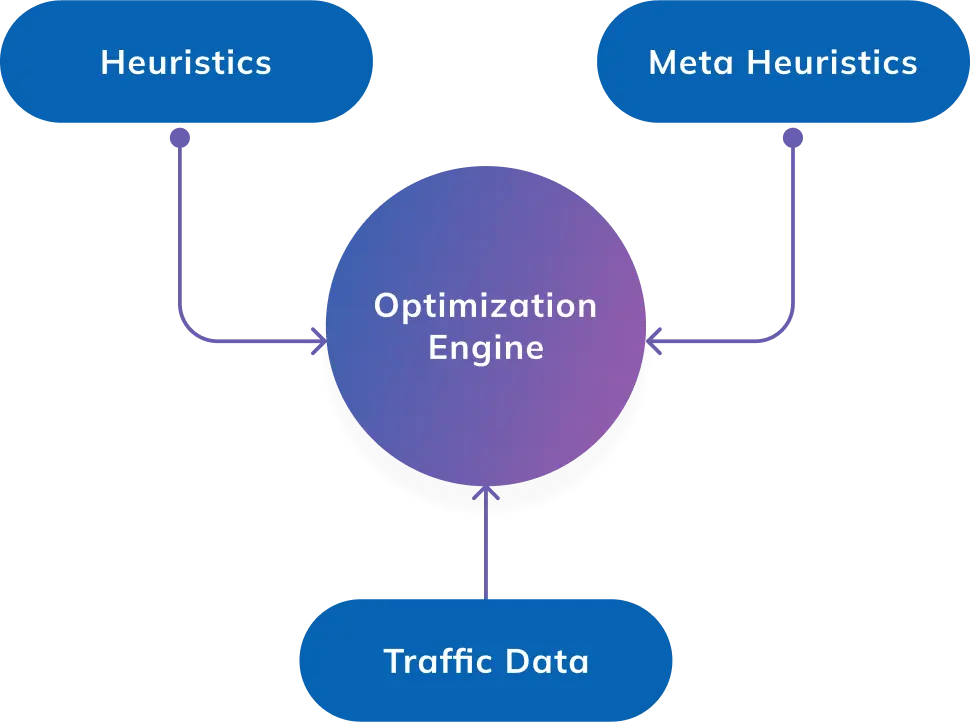
The optimization engine is backed by advanced algorithms that utilize AI with heuristics, metaheuristics, and traffic data to quickly analyze the route possibilities. With the capacity to handle 50+ constraints, NextBillion’s AI route optimization ensures the highest accuracy levels in analyzing the transit requirements, strategically deploying the API resources, and efficiently designing the plan.

Here is a precise list of NextBillion’s routing support tools and their feasibility in generating optimized navigation in offline mode or when connectivity is fluctuating.

Route Optimization API: It has a powerful algorithm to make deep analyses and is backed by AI technology to make quick decisions, specifically in multi-stop deliveries where drivers get confused in choosing delivery sequences and considering different constraints. If the driver loses connection and takes a wrong turn, once they get reconnected, the rerouting process takes seconds to suggest the best possible direction for completing all the orders.

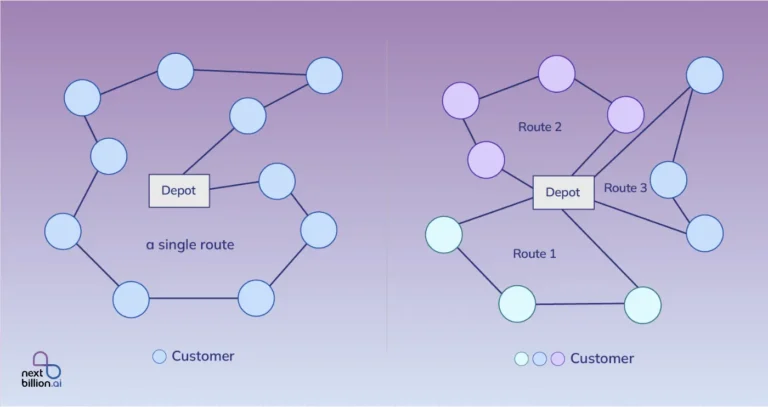
Clustering API: With the clustering API, you can make small groups of delivery locations that are closer to each other, for example, in a closed society or area. Drivers alloted to each cluster can have the delivery plan downloaded on their device, and if the network goes off, they can still navigate on the preset route. Small clusters make small route plans, which are easier to store

Directions API: Considering live traffic and other conditions, the directions API provides the best route between two places on the map. These planned polylines can help you find a suitable path between stoppages via a local engine.

Distance Matrix API: It fetches ETA on the many to many basis and thus computes the most accurate route of the task. To avoid offline stuck, the dispatchers can generate different route options as alternate plans, and drivers can utilize those in downloaded form to know the feasible sequence of order fulfilment.

Snap to Road API: It keeps track of all the past journeys and provides a data-backed comparison of different journeys, while also uses them to create an efficient route. Dispatchers share detailed analysis of different road segments to help drivers make better decisions 

Isochrone API: It computes the delivery points that are at equal distance from a particular location and can be helpful in designing route plans for known low-network regions. 

Navigation API & SDK: It serves multiple purposes, like turn-by-turn navigation, rerouting, off-route detection, route guidance, etc. The API designs the route navigation on the map, and the SDK file renders them from cache memory during low or zero networks. While the live traffic conditions cannot be optimized without a server connection, this tool still serves sufficiently via precomputed directions.
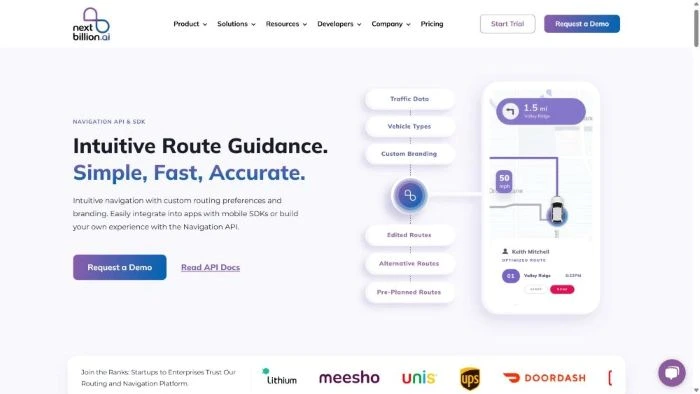
navigation api and sdk by nextbillion

Route Report API: It provides a precise report of the completed tasks and contains information about the distance traveled, turns, duration, speed, road segments, etc. You can compare the routes taken during offline mode or generate offline route plans for areas with network issues and where drivers may get misguided without a proper plan.

Geofence API: It can create a virtual boundary on the digital map to control the movement of the vehicles in a known region. With critical route reports about specific regions with network issues, you can create a virtual fence for the drivers to alert them if they tend to deflect from the route at these points.

Route Reconstruction API: It can recreate the actual route taken by the vehicle and calculate the total distance and time taken between specific points. Dispatchers can use it to fetch the details about the portion traveled by the vehicle during the offline mode.

Documents API: You can attach critical documents, like proof of delivery, permits, or design form templates for the drivers. These can be pre-downloaded on the device and can be shown even without network.

Maps API: You can use the vector tiles, raster tiles, and static images to enhance the digital map interface for the users. Add essential details like road names, places, etc. with location-based images that are arranged in tile sets to form a grid structure. These embedded static maps appear without connectivity issues, and you can add images of U-turns, bridges, or name the landmarks, restricted zones, etc. It is quite a suitable solution for offline routing and navigation.

Road Segment API: It can extract important details about the roads, highways, or expressways. You can check for speed limits, weight restrictions, and other information to mark them in the offline map.

Road Editor API: You can add specific instructions, like “Speed below 20 m/hr,” “Gas station ahead,” etc., on each road network. Offline maps become more interactive and useful. 

Weather API: It is an additional constraint for routing solutions to generate more feasible routes, specifically for trucks on long-haul deliveries. Extreme weather conditions can ruin the network signals. Forecasting rainstorms or other natural calamities keeps you aware and storing offline navigation maps for the weather-affected regions.

Places API: It is capable of extracting the exact location on the map from an incomplete address. The dispatch managers can look up places around a specific point, find coordinates, get postal codes, search for POIs, and also get auto-suggestions that complete the semi-known locations. This makes it essential in preparing for offline routing and navigation because when the server connection is unstable, the drivers would not be able to look for places in detail.

Conclusion

An offline routing and navigation facility is essential for delivery services. The road network is jumbled; flyovers and tunnels make it difficult for transporters to move without guidance. A drowning network loses live updates and makes the task tougher. But route management through offline maps, GPS positioning, and point-to-point navigation ensures safe, compliant, and successful deliveries with satisfied customers. 

We at NextBillion.ai consistently analyze the use cases in different segments of global/domestic logistics and transport businesses. Our developers create powerful and in-depth technology solutions that deliver reliable results. The tool ensures that the delivery vehicles travel no extra miles, finish the trip in a calculated timeframe, and avoid traffic congestion.

FAQs

Whether it is America or any other part of the world, signals have dead zones or struggle to connect around rural highways, tunnels, ports, industrial yards, and other network-hampering regions. Offline maps with route navigation facilities ensure business continuity in network-affected areas and minimize delays, unnecessary traveling, and broken SLAs.

No, offline maps are a structured combination of imagery or tiles that can display the GPS position of the vehicle on the map and follow the movement. But offline navigation is the route guidance of the vehicle on the map, which is usually optimized and planned or directed through the server and stored for implementation through the local device engine during zero or low connectivity.

Routing tools, like NextBillion, work through cloud connectivity for route planning and optimization where the delivery locations, time windows, and other constraints are analyzed. Dispatch managers share the route plan with the driver through online mode, and the driver can download the same using the driver’s app. They get the complete stoppage list with optimized route geometry.

ETA is estimated time of arrival, which is computed from multiple factors. But live traffic updates are crucial for generating accurate ETAs. It’s impossible to get live traffic updates without connectivity. So in offline mode, the ETAs are based on static and historical data, such as speed profiles in specific road segments, route geometry, road conditions, regular traffic conditions, etc.

The navigation API works around factors like vehicle data, which includes category, load type, fuel, etc. Then there are pre-planned routes and ERP data for orders and delivery points. In offline mode the navigation app collects all the events in the local memory, and once the network is resumed, the progress or buffered data gets synced to the telematics. So the dashboard, KPIs, and schedules are regularly maintained.

About Author

Nitesh Malviya

Nitesh Malviya is a research-oriented professional with a background in Computer Science & Engineering. He served for 7 years as a software consultant and wrote passively in the tech niche before becoming a full-time technical writer.

Ready to get started?

Table of Contents