


Route Optimization API
Optimize routing, task allocation and dispatch
Distance Matrix API
Calculate accurate ETAs, distances and directions
Directions API
Compute routes between two locations
Navigation API & SDK
Turn by Turn Instructions for Drivers & Technicians
Route Optimization Software
Plan optimized routes with 50+ Constraints
Product Demos
See NextBillion.ai APIs & SDKs In action
Location Reasoning AI
Help your AI agents answer location-based questions
AI Route Optimization
Learns from Your Fleet’s Past Performance
Platform Overview
Learn about how Nextbillion.ai's platform is designed
On-Premise Deployments
Take Full Control of Your Maps and Routing
About Us
Our story, vision
and mission
Contact Us
Reach out to us for any product- or media-related queries
Write to us at

Table of Contents
AI applications are no longer useful only because they can generate text. The most valuable AI systems can read company documents, query databases, search the web, update records, send messages, and carry out multi-step workflows. The challenge is connecting an AI model securely and consistently to all of those systems. That is the problem MCP servers solve.
An MCP server is a program that exposes tools, data, and workflows to AI applications through the Model Context Protocol (MCP), an open standard for connecting large language model (LLM) applications to external systems. Instead of building a separate custom integration for every model, app, database, and API, developers can expose capabilities once through an MCP server and make them available to compatible AI clients.
This article explains what MCP servers do, how they work, why AI applications need them, and where they deliver the most practical value.
An MCP server is a service that gives an AI application controlled access to external capabilities. Those capabilities may include files, databases, APIs, SaaS platforms, internal tools, documentation, calendars, code repositories, or business systems.
The term MCP stands for Model Context Protocol. MCP is an open protocol that standardizes how AI applications share context with LLMs, expose tools, and build composable workflows.
A simple way to understand it is to think of MCP as a “USB-C port for AI applications.” Just as USB-C provides one standardized connection for many devices, MCP provides one standardized way to connect AI applications to many external systems.
Language models are powerful, but they are isolated by default. A model does not inherently know the contents of a company’s private knowledge base, the current status of a customer order, the schema of a production database, or the latest tickets in a support queue.
MCP servers give AI applications a standardized way to bridge that gap.
An LLM can reason about information only when it has access to relevant information. MCP servers expose resources such as documents, database schemas, API responses, files, and internal records that can be supplied to the model as context.
For example, an enterprise assistant connected to a document MCP server can search internal policies, retrieve the relevant policy text, and answer a question with current company information rather than generic knowledge.
Reading data is useful, but many workflows require action. MCP tools allow AI applications to perform operations such as calling APIs, querying databases, modifying files, creating calendar events, sending messages, or triggering business processes.
A customer-support assistant, for example, might use MCP tools to look up an order, check delivery status, and create a return request. The model does not need to be trained on every company API; it needs access to well-defined tools.
Before MCP, connecting an AI assistant to multiple systems often meant building and maintaining many point-to-point integrations. Anthropic introduced MCP to replace fragmented integrations with a single open protocol for connecting AI systems to data sources and business tools.
Instead of maintaining a separate connector for every AI application and every backend service, a team can build an MCP server once and connect it to multiple MCP-compatible clients.
MCP uses structured, schema-based interfaces. Tools define their inputs and outputs using JSON Schema, which helps AI applications validate requests and understand what a tool requires before calling it.
This structure matters in production. A vague prompt such as “book a meeting” can produce unpredictable behavior if the AI has no defined interface. A well-designed MCP tool such as create_calendar_event can require clearly typed fields such as title, start_time, end_time, and attendees.
Modern AI applications often need more than one system. A travel planner may need flights, hotels, calendars, weather, and email. A software agent may need code repositories, issue trackers, documentation, and deployment tools.
MCP is designed for this kind of composition. Multiple MCP servers can work together through a unified interface, allowing an AI application to combine specialized capabilities into a complete workflow.
MCP follows a client-server architecture. The main participants are the MCP host, MCP client, and MCP server.
The MCP host is the AI application the user interacts with. Examples include an AI chat assistant, an IDE with an AI coding agent, a customer-support copilot, or a custom enterprise workflow application.
The host coordinates the AI experience, manages conversations, decides how to use model output, and enforces user permissions.
The MCP client is a component inside the host application. It maintains the connection to an MCP server and handles communication between the host and that server.
If an AI application connects to three MCP servers: one for files, one for a database, and one for Slack, it typically creates one MCP client connection for each server.
The MCP server is the program that exposes capabilities to the client. It may run locally on the user’s machine or remotely on a company’s infrastructure or a SaaS provider’s platform.
For example, a local filesystem MCP server may run on a developer’s laptop, while a remote CRM MCP server may run in the cloud and expose controlled access to customer records.
MCP uses JSON-RPC 2.0 messages for communication between clients and servers. The protocol defines requests, responses, notifications, capability discovery, and error handling.
At a high level, the interaction usually works like this:
This loop is what turns a language model from a text generator into an agent that can interact with external systems.
MCP servers expose functionality through three main building blocks: tools, resources, and prompts.
Building Block | What It Does | Who Controls It | Example |
Tools | Functions the AI model can call to perform actions | Model, subject to application controls | Search flights, create a ticket, send a message |
Resources | Read-only data sources that provide context | Application | Read a document, access a database schema, retrieve a calendar |
Prompts | Reusable instruction templates for common workflows | User | “Plan a vacation,” “Summarize meetings,” “Draft an email” |
MCP servers can run locally or remotely. The right choice depends on where the data lives, who needs access, and what security requirements apply.
A local MCP server runs on the same machine as the AI application. It commonly uses the STDIO transport, which communicates through standard input and output streams.
Local servers are useful when an AI assistant needs access to local files, local Git repositories, developer tools, or other resources that should not leave the user’s device.
A remote MCP server runs on external infrastructure and exposes an HTTP endpoint. It commonly uses the Streamable HTTP transport, which supports HTTP POST requests and optional Server-Sent Events for streaming.
Remote servers are better suited to shared business systems, cloud databases, SaaS products, and enterprise AI applications used by many people.
A tool call is the clearest way to see an MCP server in action.
Imagine a user asks an AI assistant:
“What is the status of order 48291, and create a support ticket if it is delayed?”
The AI application may be connected to two MCP servers:
The workflow could look like this:
MCP does not force the model to act without oversight. Applications can display available tools, require approval before execution, set permissions, and log tool activity.
MCP servers are useful wherever an AI application needs trusted access to systems, data, or workflows. Below are practical categories and examples:
Companies often have knowledge spread across wikis, shared drives, policy documents, PDFs, support articles, and internal databases. An MCP server can expose search and retrieval capabilities so an AI assistant can find the right information.
A knowledge MCP server might expose:
OpenAI’s documentation describes a common pattern for MCP servers used with research and company-knowledge workflows: a search tool returns relevant results, while a fetch tool retrieves the full contents of a selected result. Including a canonical URL can also make results eligible for citation metadata in supported clients.
Development teams can use MCP servers to connect AI coding agents to repositories, issue trackers, documentation, monitoring tools, and deployment systems.
For example, a coding agent might use MCP servers to:
GitHub describes MCP as a way to extend Copilot by integrating it with other systems, including repositories, third-party tools, and cloud-based workflows.
Support teams deal with repetitive questions and multi-system lookups. MCP servers can connect an AI support assistant to order systems, CRMs, ticketing platforms, knowledge bases, and refund tools.
A support MCP server might expose tools such as:
The AI can gather context first, then take action only when the workflow requires it. Write actions should be carefully permissioned and reviewed because they can change real business data.
Sales teams can use MCP servers to connect AI assistants to CRM platforms, email, calendars, enrichment services, and reporting systems.
Possible tools include:
Instead of switching between systems, a sales representative can ask an AI assistant to prepare an account brief, identify open opportunities, and schedule the next follow-up.
In logistics, fleet management, and supply-chain operations, MCP servers can connect AI assistants to telematics platforms, route-planning systems, maintenance records, fuel data, warehouse systems, and delivery-management tools.
Examples include:
An operations assistant could answer questions such as:
The MCP server provides the structured connection to operational data, while the AI application interprets the data and recommends or executes actions.
Finance teams can use MCP servers to connect AI applications to accounting systems, ERP platforms, expense tools, and business-intelligence dashboards.
Useful tools might include:
An analyst could ask, “Why did marketing spend increase last quarter?” and the AI could retrieve relevant reports, compare budget categories, and summarize likely drivers.
IT teams can use MCP servers to connect AI agents to identity systems, ticketing tools, cloud platforms, monitoring systems, and security tools.
Examples include:
These workflows benefit from strict permissions, audit trails, and human approval, especially when the AI can modify access or infrastructure.
MCP servers do not replace APIs. In most cases, an MCP server sits in front of an API or internal service and translates its capabilities into an AI-friendly interface.
Aspect | Traditional API | MCP Server |
Primary consumer | Application developer | AI application or agent |
Interface | REST, GraphQL, gRPC, SDK, etc. | Standardized MCP tools, resources, and prompts |
Discovery | Developer reads documentation | AI client can discover available capabilities |
Usage | Developer writes integration code | Model selects and calls exposed tools |
Best for | General software integration | AI-driven access to systems and workflows |
An API remains the underlying way to access a service. The MCP server adds a standardized layer that tells an AI application what capabilities exist, how to call them, and what data they return.
The exact implementation depends on the programming language and framework, but most MCP servers follow the same design process:
Start with a concrete user job, not a broad ambition to “connect AI to everything.”
For example:
A narrow workflow makes it easier to define the right tools and permissions.
List what the AI needs to read and what it needs to do.
For a delivery-support assistant:
Read:
Act:
Separate capabilities by type:
For every tool, define:
Structured schemas make the server easier for both AI models and developers to use.
Decide who can use each tool and what data they can access.
For remote MCP servers, MCP supports HTTP-based authentication and authorization patterns, and providers commonly use OAuth, bearer tokens, API keys, or custom headers depending on the deployment.
Implement approval flows for sensitive actions, rate limits, audit logs, validation, and error handling. The MCP specification recommends clear consent and authorization flows, access controls, and documentation of security implications.
Test the server with realistic user requests, including edge cases:
The MCP project provides development tools such as the MCP Inspector and reference server implementations to help developers test and learn.
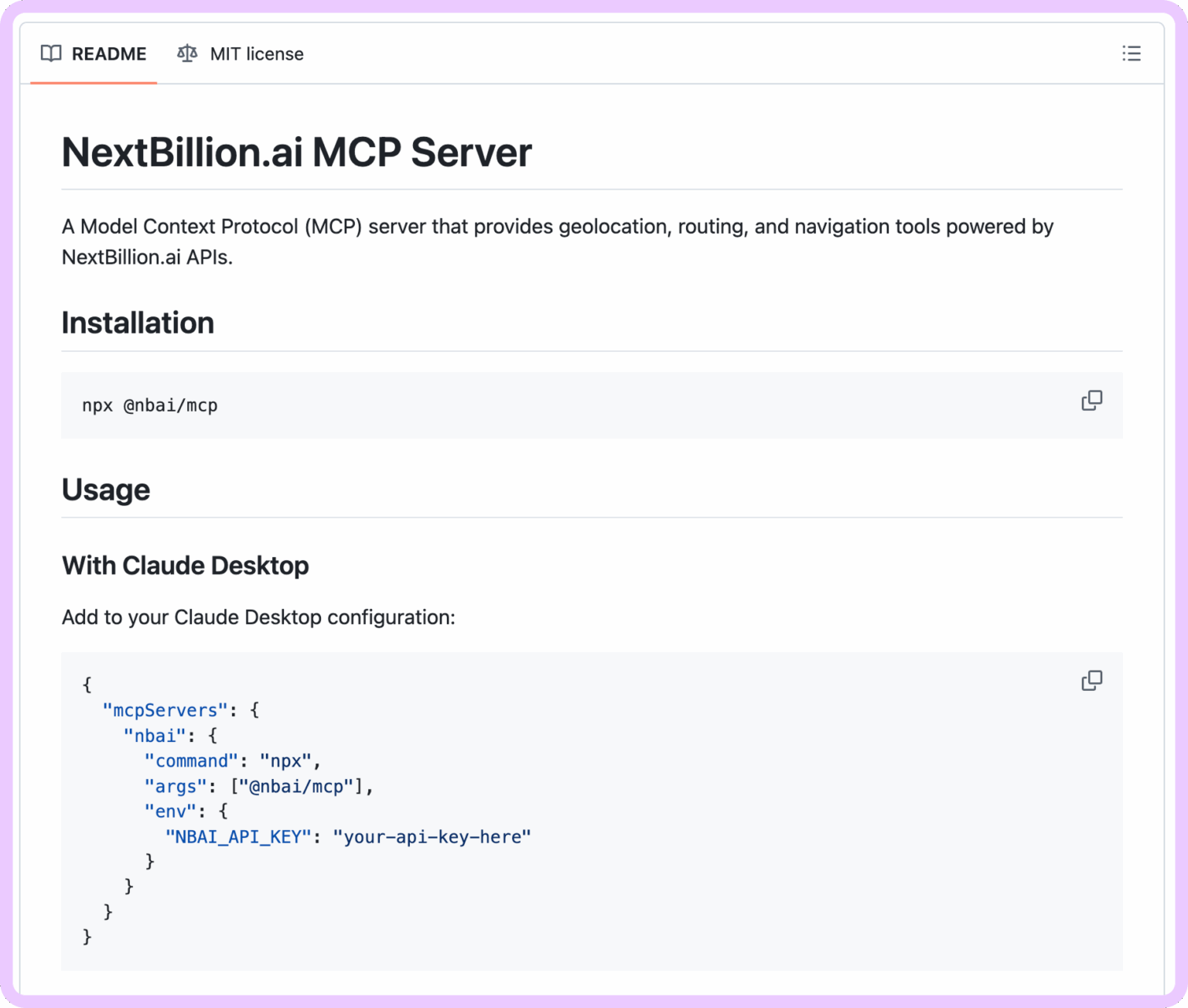
MCP servers become easier to understand when you see how they connect AI agents to specialized capabilities. NextBillion.ai MCP is a strong example because it gives AI applications access to location intelligence: the ability to understand addresses, routes, travel times, service areas, and geographic constraints.
NextBillion.ai describes its MCP as a way to connect AI agents with location APIs through MCP-compatible clients. Instead of manually integrating separate APIs, developers can expose location capabilities as machine-readable tools that an AI agent can discover and combine within a workflow.
NextBillion.ai MCP extends an AI application with tools for geocoding, reverse geocoding, place search, routing, distance matrices, isochrones, and static maps. These tools allow an AI assistant to reason not only about what a user wants, but also about where and how that request can be executed in the real world.
NextBillion.ai MCP Capability | What It Enables an AI Agent To Do |
Geocoding | Convert addresses or place descriptions into coordinates. |
Reverse geocoding | Convert coordinates into readable addresses or locations. |
Autocomplete and autosuggest | Interpret incomplete or misspelled location queries. |
Places and POI search | Find nearby businesses, landmarks, facilities, or stops along a route. |
Routing and directions | Calculate road-based routes and travel directions. |
Distance matrix | Compare travel times and distances across multiple origins and destinations. |
Isochrones | Identify areas reachable within a defined travel time or distance. |
Static maps | Visualize locations, routes, and geographic results. |
A general-purpose AI model can understand a request such as, “Which warehouse can deliver this order fastest?” But it cannot answer accurately without location tools. It needs to geocode addresses, calculate road distances and travel times, evaluate reachable areas, and compare route options.
This is the difference between language reasoning and location reasoning. The language model interprets the request; the location tools determine whether the proposed action is geographically and operationally practical.
For example, an AI agent could process this request:
“Find warehouses within a 30-minute drive of this location and calculate the fastest route to each.”
Using NextBillion.ai MCP, the agent can geocode the origin, identify candidate warehouses, generate a 30-minute isochrone, compare travel times with a distance matrix, calculate routes, and visualize the result on a map.
NextBillion.ai MCP runs locally as a standard input/output, or stdio, server through npx. Once configured in an MCP-compatible client, the client launches the server and makes the available location tools accessible to the AI agent.
A typical setup requires:
The server exposes tools such as geocode_forward, geocode_reverse, place_search, search_along_route, directions, distance_matrix, isochrone, and static_route_map.
NextBillion.ai MCP is especially relevant for logistics, delivery, fleet management, mobility, and field-service applications. These domains require AI to understand real-world constraints such as travel time, traffic, vehicle restrictions, delivery windows, service areas, and driver availability.
Practical examples include:
Imagine a fleet-management assistant connected to both an internal telematics MCP server and NextBillion.ai MCP.
A dispatcher could ask:
“Which driver can reach this urgent pickup within 20 minutes, and what is the fastest route?”
The workflow could combine:
This demonstrates the real value of MCP: the AI does not simply describe a possible answer. It uses structured tools to calculate a practical, location-aware answer.
NextBillion.ai shows how MCP can turn a specialized API platform into an AI-ready capability layer. Its MCP server exposes location APIs as tools, allowing agents to chain geocoding, place discovery, routing, travel-time calculations, and maps into a single conversational workflow.
For developers, this reduces the need to manually stitch together multiple APIs or build custom connectors for every AI workflow. For operations teams, it enables AI assistants that can support routing, dispatching, delivery planning, and field-service decisions with real geographic context.
MCP servers give AI applications secure, standardized access to the tools, data, and systems where real work happens. They reduce custom integrations, improve reliability through structured schemas, and support multi-step workflows across enterprise systems.
For logistics and fleet operations, NextBillion.ai MCP shows how location intelligence can make AI agents more practical. By exposing geocoding, routing, distance matrices, isochrones, and maps as MCP tools, it enables AI assistants to support delivery planning, driver assignment, dispatching, and route decisions with real-world context.
As AI moves from answering questions to completing operational tasks, MCP servers will be key to building AI applications that are useful, governed, and production-ready.
Prabhavathi is a technical writer based in India. She has diverse experience in documentation, spanning more than 10 years with the ability to transform complex concepts into clear, concise, and user-friendly documentation.