


Route Optimization API
Optimize routing, task allocation and dispatch
Distance Matrix API
Calculate accurate ETAs, distances and directions
Directions API
Compute routes between two locations
Navigation API & SDK
Turn by Turn Instructions for Drivers & Technicians
Route Optimization Software
Plan optimized routes with 50+ Constraints
Product Demos
See NextBillion.ai APIs & SDKs In action
AI Route Optimization
Learns from Your Fleet’s Past Performance
Platform Overview
Learn about how Nextbillion.ai's platform is designed
Road Editor App
Private Routing Preferences For Custom Routing
On-Premise Deployments
Take Full Control of Your Maps and Routing
About Us
Our story, vision
and mission
Contact Us
Reach out to us for any product- or media-related queries
Write to us at

Table of Contents
A failed delivery is never really about the one stop that failed.
It’s about everything that stop was supposed to make room for. Route disruption alone affect the total cost of a redelivery, since a missed stop doesn’t just sit there quietly; it pushes into the timing of every stop that comes after it. And the gap in how well operations handle this varies enormously: teams with proactive, real-time flagging see customer support contact rates around 15% after a failed attempt, while operations without strong visibility tooling see that rate climb past 40%.
So what does ‘strong visibility tooling’ actually look like in practice, and how does it change what a dispatcher can do in the moment? Let’s find out:

A delivery exception is any point where a planned delivery stops going the way it was scheduled. It could be a failed attempt, a wrong address, a blocked access point, or a delay long enough to miss the promised window. It’s a deliberately broad category, because the right response depends entirely on which type of exception has actually occurred.
Here’s a quick overview of the common categories:
A failed stop looks small in isolation. Run the math across a full day, though, and the picture changes. A 10% exception rate on 200 daily deliveries works out to 20 redeliveries a day, more than 400 a month, each one competing for a driver’s time against paying stops that were already on the schedule.
Before anything can be fixed, it has to be noticed, and noticing it quickly is most of the battle. Dispatch mapping software relies on a handful of live signals to catch a problem within seconds rather than waiting for a driver to call it in at the end of the shift.
Detection has to happen in real time, not at the end of the day. A failed-attempt code from a driver’s app, a geofence alert showing a truck stopped somewhere it shouldn’t be, an ETA that’s drifted well past the promised window — these are the signals a live system watches continuously, rather than pulling them from a batch report hours after the fact, once the customer has already called to ask where their order is.
Not every exception needs the same response, and treating them all identically is its own kind of inefficiency. A short weather delay might only need an updated ETA sent to the customer. A failed attempt at a residential address might need a same-day retry slotted into a driver’s remaining capacity. A blocked loading dock might need the stop reassigned entirely to someone else on the road. Good dispatch mapping software applies rules built around exactly this kind of decision tree, so the response actually matches the size of the problem.
Once a response is decided, the fix should happen without a dispatcher manually rebuilding the rest of the day’s plan from scratch. The affected stop gets slotted back in, either later in the same driver’s route or onto a different driver with the capacity to take it, and every stop scheduled after it gets an updated ETA automatically, without anyone needing to recalculate it by hand. The whole sequence, from detection to a revised plan, typically happens in well under a minute once the underlying data is accurate.
A driver arrives at a warehouse to find the loading dock closed for an unscheduled inspection. Under a manual process, that driver waits, calls dispatch, and dispatch spends the next fifteen minutes working out where else the stop can fit. With dispatch mapping software watching the route, the system flags the stalled stop within a minute or two of the truck going idle, checks which nearby drivers have both the capacity and a reasonable detour to cover it, and reassigns the delivery before the original driver has even finished the phone call.
The most useful part of exception handling often isn’t the fix itself — it’s what happens to that data afterward. A stop that generates a failed attempt twice in one month is telling the system something worth acting on: a tighter time window, a note about access, a different default assumption for that address going forward. Fleets that only fix the exception in the moment solve the same problem repeatedly. Fleets that feed exception outcomes back into planning tend to see their exception rate actually decline over time, rather than holding steady month after month.
A useful way to think about response design is to map each exception type to the action it should trigger automatically:
Exception Type | Typical Cause | Automated Response |
Failed delivery attempt | Recipient unavailable | Flag for same-day retry or next available window |
Address or access issue | Incomplete or incorrect address | Hold for confirmation, notify customer |
Weather or traffic delay | External conditions | Recalculate ETA, alert downstream stops |
Vehicle breakdown | Mechanical failure | Reassign remaining stops to nearby drivers |
Damaged or rejected goods | Product issue at the doorstep | Route back to depot or next drop-off point |
Restricted site access | Gate or dock closed | Resequence route, retry later or reassign |
Catching a problem is only useful if something happens next. The right next step depends heavily on which kind of exception just occurred, and how much time is actually left in the day to do something about it. A dispatcher, or the system acting on their behalf, is really choosing between a small number of paths.
Exception Type | Fastest Resolution Path | Why the Timing Matters |
Failed attempt, driver still nearby | Reassign the stop for a same-day retry before the vehicle leaves the area | Avoids a full redelivery cost that can run several times higher |
Address unreachable | Flag for correction or redirect to a pickup point | Prevents a second failed attempt at the same bad address |
Driver delay cascading forward | Re-sequence the remaining stops across the fleet | Protects delivery windows for stops later in the day |
Customer reschedule mid-route | Drop the stop from today’s route and reinsert it into a future one | Avoids a wasted trip to an address that won’t accept delivery today |
The categories above look tidy on a page. In an actual operation, each one plays out differently depending on the type of delivery involved. The scenarios below show how the same underlying capability, a live map that can reassign work on the fly, adapts to very different situations.

A recipient isn’t home for a scheduled grocery delivery, and the order includes items that can’t sit in a hot vehicle for hours. A live map showing which nearby driver has room in their route lets dispatch reassign the stop for a quick second attempt, instead of letting it ride to the end of the day when the groceries are no longer usable.

A customer declines a delivery because of visible damage to the packaging. This isn’t a reschedule; it’s a return that needs inspection and a different handling path entirely. Flagging it immediately, rather than discovering it in an end-of-day report, gets the return process started hours earlier and keeps the vehicle’s remaining capacity accurate for the rest of the route.
No one answers for a delivery that legally requires a signature. Holding the item for pickup or scheduling a tightly timed second attempt both work, but the right call depends on how urgent the medication is and how far the next opportunity to redeliver actually is. That’s a decision that needs current route data, not a guess made after the fact.
A driver arrives to find a receiving dock closed outside its stated hours. Rather than the driver waiting or guessing at a workaround, a live map that shows the dock’s receiving window lets dispatch reschedule the stop within the correct window immediately, instead of finding out about the mismatch after the vehicle has already wasted the trip.
The pieces described above are easier to see working together by following a single exception from the moment it happens to the moment it’s closed out, rather than looking at detection, resolution, and communication as separate topics.
A driver pulls up to a residential address for a delivery that requires a signature. No one answers. The driver taps an exception flag in the mobile app, noting “no answer,” and within seconds that flag reaches the dispatch map, tagged to the exact address and the vehicle’s current position.
The system checks two things almost immediately: how much of the day the assigned driver has left, and which other vehicles nearby have room to spare. A second van finishing deliveries two streets away has enough capacity to swing back later that afternoon, so the stop gets reassigned for a 4:30 PM retry. The original driver continues on without losing more time at the doorstep.
An automatic message reaches the customer: the delivery was attempted, no one was available, and a new window is set for later today. No phone call gets generated, because the update reached the customer before they had a reason to make one.
The exception is logged with enough detail, address, time, and cause, to be useful later. If that same address produces a second no-answer exception within a few months, it becomes a candidate for a longer service-time estimate or a reminder text ahead of the next attempt.
The financial cost of a failed delivery gets most of the attention, but the relationship cost often runs deeper. A reported 84% of consumers say they won’t return to a brand after a poor delivery experience, which turns a single missed stop into a much larger, longer-term problem than the redelivery fee alone suggests.
Most teams track one number here: how many redeliveries happened this week. That’s a start, but it doesn’t say much about whether the process around those redeliveries is actually improving. A handful of other measurements tend to matter more once a fleet is serious about closing this gap.
Two fleets can log the same number of exceptions in a week and still be in very different positions. One resolves each flag within minutes, keeping the rest of the day’s routes intact. The other lets exceptions sit for hours before anyone acts, which is where a single bad stop turns into a bad afternoon. Volume alone doesn’t capture that difference, which is exactly why it’s worth measuring separately.
Fixing today’s exception is necessary, but it’s not the end of the job. An exception that gets resolved and then forgotten tends to repeat itself, often at the same address, the same time of day, or the same loading dock. The data generated by resolving it has real value if it feeds back into how future routes get planned.
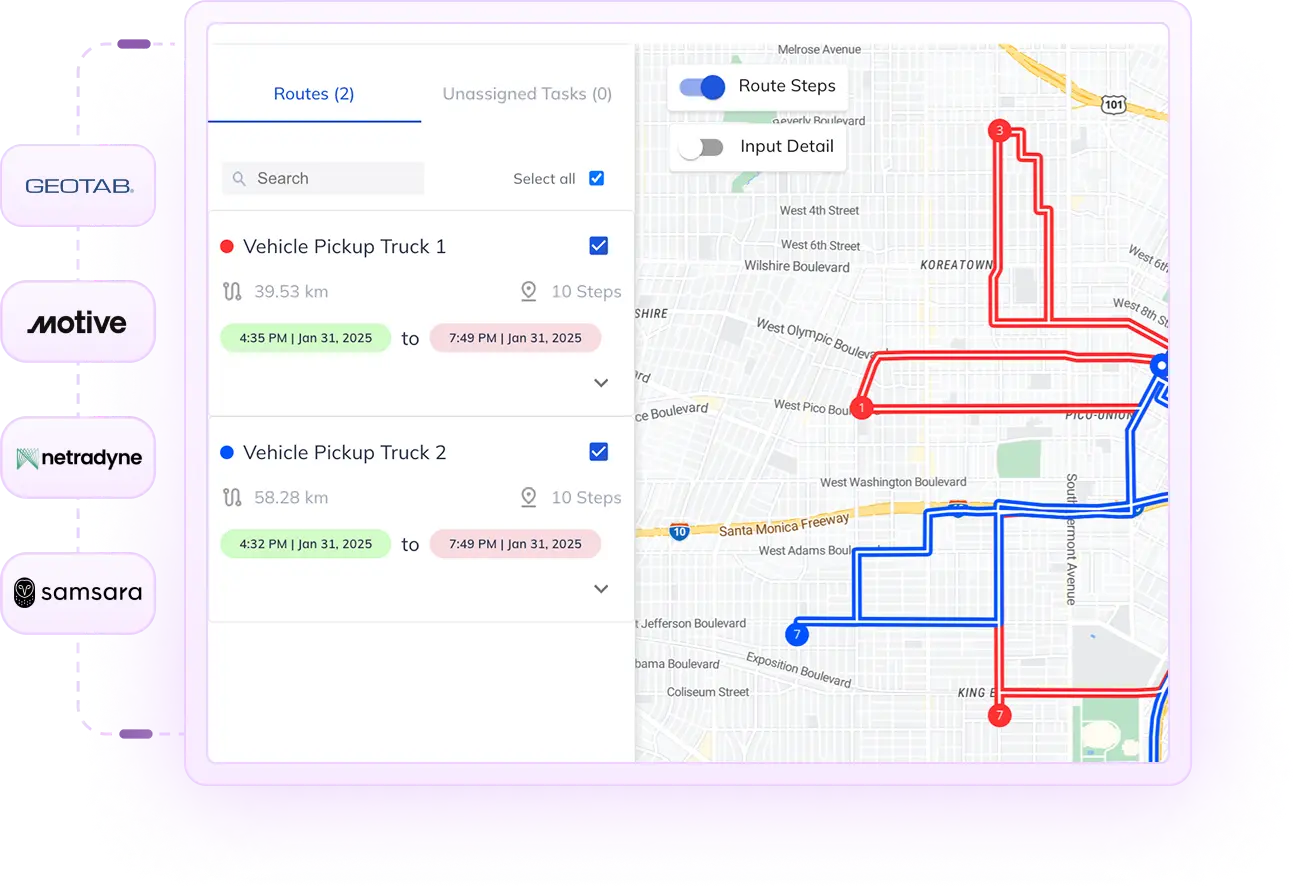
Flagging an exception is the easier half of this problem. Deciding what to do about it, in the middle of a route that’s already moving, with other stops and other drivers involved, is the harder one. Most dispatch platforms are strong on the detection side and thin on what happens immediately afterward. That gap is where NextBillion.ai’s routing APIs are built to operate.
Once an exception is flagged, the remaining route, and potentially other vehicles nearby, can be recalculated automatically, so a dispatcher is presented with a workable option rather than a blank map and a problem to solve from scratch.
A failed stop doesn’t have to stay tied to the vehicle that failed it. Routing logic can check every nearby vehicle’s remaining capacity and schedule, so a same-day retry goes to whichever driver can absorb it with the least disruption to their own stops.
Sometimes the right fix is a quick retry. Other times, a delay is significant enough that the entire remaining route needs re-sequencing to protect other delivery windows. That decision can be modeled and executed automatically rather than left to whoever happens to be on the phone when the exception comes in.
These APIs are built to plug into whatever system is already generating the exception alert, whether that’s a driver app, a telematics platform, or a customer service tool, rather than requiring a fleet to replace its existing exception-detection setup to get the benefit of faster resolution.
Plenty of fleets already have some form of exception handling in place, and still see the same problems repeat month after month. The gap usually isn’t a missing tool. It’s a handful of habits or blind spots that quietly undercut whatever tool is already there.
Every fleet runs into delivery exceptions somewhere on the map today, whether that’s a locked gate, a missed signature, or a dock that closed early. The difference between an operation that absorbs that smoothly and one that loses the afternoon comes down to speed: how fast the problem gets flagged, and how many real options a dispatcher has the moment it does. A live, connected map turns a failed stop from something discovered hours later into a decision made in the same minute it happens. That shift, from finding out late to acting immediately, is where most of the real savings in exception handling live.
Any scheduled delivery that can’t be completed as planned, including failed attempts, address problems, access restrictions, and delays.
No. It can’t stop a customer from being unavailable, but it can catch and resolve exceptions far faster once they happen.
Ideally within seconds of the expected event, through GPS, app tags, or missing scans, rather than at the end of a shift.
No. It works alongside them, feeding the timing and reason for an exception into whatever system sends the customer update.
No. Even a small fleet benefits from catching a failed stop in real time instead of finding out about it secondhand.
Address validation prevents exceptions before a route starts. Exception handling deals with the ones that happen anyway, mid-route.
Speed. The gap between a flag and a resolved plan matters more to total cost than the exception itself.
Bhavisha Bhatia is a Computer Science graduate with a passion for writing technical blogs that make complex technical concepts engaging and easy to understand. She is intrigued by the technological developments shaping the course of the world and the beautiful nature around us.