


Route Optimization API
Optimize routing, task allocation and dispatch
Distance Matrix API
Calculate accurate ETAs, distances and directions
Directions API
Compute routes between two locations
Navigation API & SDK
Turn by Turn Instructions for Drivers & Technicians
Route Optimization Software
Plan optimized routes with 50+ Constraints
Product Demos
See NextBillion.ai APIs & SDKs In action
AI Route Optimization
Learns from Your Fleet’s Past Performance
Platform Overview
Learn about how Nextbillion.ai's platform is designed
Road Editor App
Private Routing Preferences For Custom Routing
On-Premise Deployments
Take Full Control of Your Maps and Routing
About Us
Our story, vision
and mission
Contact Us
Reach out to us for any product- or media-related queries
Write to us at

Table of Contents
What if the biggest inefficiencies in your field operations aren’t caused by delays on the road, but by how you verify that a visit even happened? Over the years, businesses have used manual stop confirmations to monitor field activity, but this method has become the source of the same ills it is supposed to avoid, such as errors, delays, compliance gaps, and unwarranted costs. As a more modern solution, geofencing allows the verification of visits to be automated and offer real-time and location-specific insights without overloading field teams.
To assist you in comparing the two approaches, a sharp, multi-faceted comparison of Geofencing and Manual Stop Confirmations is provided below, so that you will be able to determine which method best suits your operations. Read the entire blog to understand the total disintegration.
Did you know?
Top fleets report achieving 95% delivery accuracy after implementing geofencing verification in their field service operations.
A Manual Stop Confirmation is a field service procedure in which employees are required to manually log or document the completion of a scheduled stop, such as a pickup, drop-off, or completion of a service task, often with the use of a device or paper log.
This is a significant step to verify that a service request or delivery instruction has been completed at a port, warehouse or customer location. This provides accountability and status updates in real-time to the central operations team.
A confirmation serves as Proof of Service or Proof of Delivery (POD) that documents at what time and at which location the task has been accomplished. This manual confirmation ensures appropriate billing accuracy, dispute resolution and creates an auditable record of the shipment’s journey.
Manual Stop Confirmations regularly operate in a multi-step process involving the driver, a mobile device, and the central transport management system (TMS).
When a driver arrives at a pre-scheduled stop (i.e. port container yard, customer warehouse, distribution centre, etc.), they will manually begin the confirmation process. This is normally accomplished with the driver logging into a mobile application or a specifically designed handheld device. From there, they will typically select the stop from their route manifest in their app and change the status from ‘Pending’ to ‘Arrived’ for that stop.
The main manual step requires the driver to check the completed task. This might include:
Once the necessary information is filled out manually (such as time, GPS location, signature, and photos) and submitted on the mobile device, the system sends the data to the central TMS. This automatically changes the status of the stop to ‘Finished’ or ‘Delivered/Shipped’. This real-time update provides immediate visibility to dispatchers, operations managers, and customers, completing the auditable record.
Manual stop confirmations, and particularly those done in a new digital format, such as in e-POD, have a few added benefits to the field service and the shipping industries.
A manual confirmation process, especially with a specialised device, could be offline. The data (timestamps, photos, signatures) is saved locally on the device and sent automatically as soon as the driver goes to an area with connectivity. This guarantees the accuracy of the stop even in distant ports, underground storage or in deep canyons of a large city where the signal is weak.
Manual process enables a deliberate security examination. Rather than a simple automated GPS ping, a requirement to enter a code manually, scan a secure document or have a facility manager issue an authorised digital signature introduces an additional procedural control. This confirms the place and the person who does the drop-off or pickup, which is very important when it comes to high-value cargo or sensitive sites.
A driver or technician provides valuable context that a machine cannot provide. When confirming a stop manually, a driver can use an open-text field or a drop-down menu for qualitative feedback to record conditions such as:
These qualitative details add depth and context for root-cause analysis and also help inform how to provide better service in the future.
Manual confirmations offer the flexibility required in unique or complicated jobs. In case of a stop with many drop-off points, any unexpected regulatory checks, or a strange series of activities, the human operator may make the decision to organise the confirmation steps accordingly, to make sure that all the critical variables remain logged even though the standard script is not followed.
Although modern electronic proof-of-delivery (e-POD) systems often become intricate, a simple one (paper records, or simple data-logging devices) costs less initially than a fully automated, integrated telemetry and sensor system. This enables basic stop confirmation to be available to smaller shipping companies or to experiment with new routes without investing in full-scale automation at that cost.
The greatest benefit of the “manual” is the chance of applying human judgment and critical thinking. Humans can evaluate an anomaly, such as an incorrect address, emergency, or conflict with a recipient, and make a corresponding decision on the spot. That decision and the reason behind it are then recorded by the manual confirmation and justify actions in unique situations.
The requirement of human intervention in “Manual” Stop Confirmations creates a number of limitations that can have a serious impact on efficiency, data quality and cash flow within field service operations.
The confirmation process depends on a driver or technician entering data manually, which makes it prone to human error. Simple mistakes, such as switching numbers, misunderstanding handwritten notes, or not checking a necessary box, can result in inaccurate records. These errors can create massive problems later on, affecting inventory systems, leading to incorrect customer billing, and causing compliance issues.
The confirmation data is not real-time until the manual entry has been completed successfully and fully transmitted. When a driver delays entering the information at the end of the shift, or if the network connection is too slow, operations managers miss the real-time, accurate updates on the status. This loss of visibility implies that the dispatchers are unable to respond swiftly to unexpected delays, recalculate routes to the next stops, or give correct Estimated Times of Arrival (ETAs) to waiting customers.
Manual processes are highly restrictive to scaling, as a logistics business expands. When the volume of shipments grows, the labour force used to enter the data, verify it, and manage paperwork must also increase accordingly, which enormously increases overhead and operational expenses. Moreover, manual entry is repetitive, thus creating high employee turnover and boredom, which further impedes long-term efficiency and process consistency.
Manual confirmation is still physical paperwork in most legacy systems. This brings about a nightmare of storage and retrieval as it takes up special space, time, and resources to file, archive, and locate a particular document years later during audits or legal investigations. Physical paperwork increases the chances of loss, damage, or misplacement, thereby undermining the critical evidence of service records.
Even when digitised, manual data entry is not rigorously standardised. Various field agents might have slightly different terms, abbreviations or ways of recording exceptions, resulting in poor data quality. This complicates the ability to execute meaningful and large-scale data analytics, performance comparisons between various teams, and leverage the historical data to model future route optimisation.
Geofencing-API Based Stop Detection is a type of location-intelligence method which involves the automatic detection of the arrival or departure of a vehicle or field worker at a certain location by establishing virtual geographic boundaries, or geofences, around the location. These geofences are virtual boundaries that are drawn around operational areas of significance like customer outlets, warehouses, service points, and checkpoints. Whenever a GPS-enabled device, like a vehicle tracker or a mobile app used by technicians, crosses one of these boundaries, the system records an exact, time-stamped entry or exit point immediately.
Geofencing is a complete automation of stop verification, unlike manual check-ins, which are prone to delays or inaccuracies due to human intervention. When the device passes a predefined geofence, the system records the correct “Arrival Time” as soon as it has done so. As the device gets out of the same geofence, a corresponding “Departure Time” is registered. These two events combined form an uninterrupted, passive, and tamper-free record of on-site activity, such as total dwell time.
At a larger scale of operation, Geofencing-Based Stop Detection converts visit verification to a system-driven objective process. Connecting digital boundaries to certain points on planned routes, the organizations may monitor compliance with schedules, authenticate service-level guarantees, and generate automatic workflows within their TMS, FMS, or field service systems. This makes sure that compliance tracking, status reporting, and route execution occur in a reliable, real-time manner without having to put any manual effort into the field teams.
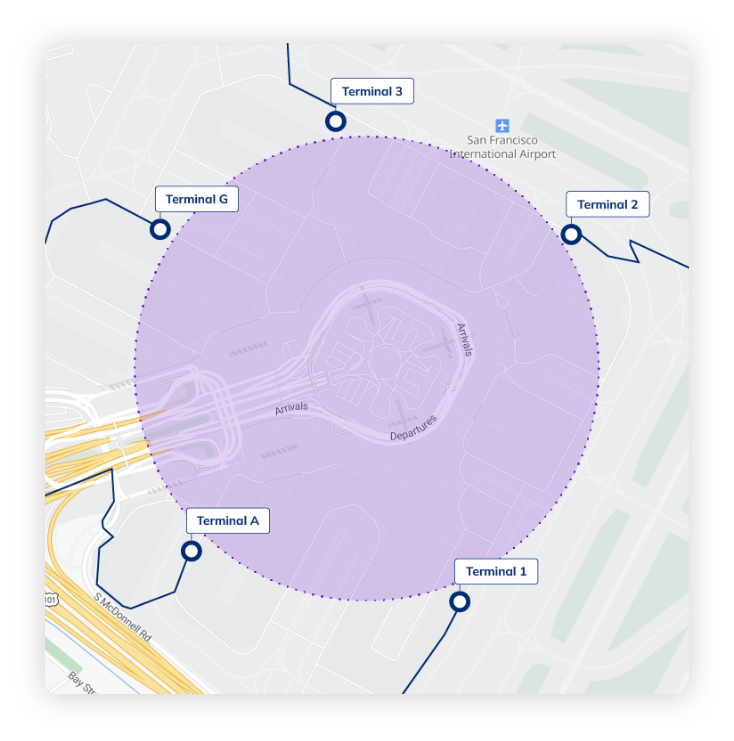
Geofencing-Based Stop Detection works by continuously monitoring the real-time movement of a GPS-enabled device and determining when it crosses predefined virtual boundaries. Through a coordinated interplay of geofence configuration, location data processing, spatial computation, and workflow automation, the system can accurately identify when a vehicle or field worker arrives at or departs from a specific site. This creates a fully automated and objective method of validating stops without any human intervention./
The process starts with the creation of the operational zones that need to be monitored within a centralized Fleet Management System (FMS) or a specialised geofencing platform in which administrators establish the areas of operation. This arrangement is to choose points on a computer map and create virtual borders around them. Such boundaries may be in the form of:
All geofences are registered in the system database with a distinct ID and a collection of rules, including required stay time (dwell time), acceptable deviation, or what internal activities need to take place when the geofence is entered or left. These guidelines define how the system is to take future GPS events.
The object being tracked, be it a vehicle that is fitted with a GNSS-enabled tracker or a mobile device used by a technician, periodically records its:
This information is coded and relayed with cellular or Wi-Fi connection to the main geofence monitoring engine. The communication is usually in the form of a low-latency REST API or such endpoint, which makes sure that the system is updated with near-real-time location information.
After the geofence engine has been fed the location data, it matches every incoming coordinate with the boundaries of all active geofences.
In the case of circular geofences, the distance is calculated by the Haversine formula that computes the great-circle distance (d) between the current coordinates of the device and the center of the geofence. When d is smaller or equal to R, then the device is within the geofence.
In more complicated polygonal forms, the engine uses computational geometry techniques like Ray Casting or Winding Number algorithm to find out whether the point is inside the digital boundary.
The system constantly monitors the changes in the state:
These transitions, together with dwell-time rules, are the basis of automated stop detection.
Upon detection of a valid boundary-crossing event by the computation of the geofence, an automated workflow is induced by the system. This includes:
This bridges the gap between movement on the raw GPS and action on the operational, and geofence events are made useful business indicators.
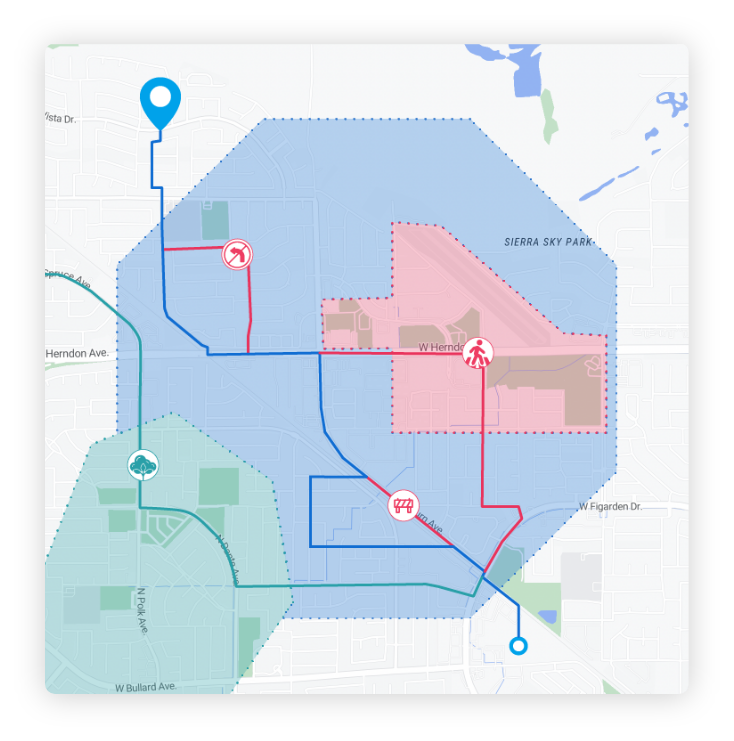
Below are the top advantages explained through conceptually rich, high-impact insights.
Geofencing gets rid of the need to have a human factor in operation because it automatically records arrivals and departures when a GPS-enabled device passes a virtual boundary. This makes the process of stop verification a fallible, manual process into a system-based, reliable event. The outcome is an accurate, non-tampered documentation of service time, dwell time, and on-site presence, and zero behavioral change must be achieved by field teams.
Since geofence events are activated in real-time, managers can have an immediate view of activity on the field. Live arrival notifications, departure notifications, and geo-events enable organizations to reroute dynamically and provide customers with correct ETAs and react to delays before they become critical. This visibility level improves coordination significantly in the dispatch, customer service, and fleet control.
Once geofences are configured, they scale infinitely. Whether a business operates 50 sites or 50,000, geofencing manages them without increasing workload. All GPS pings are handled in a consistent way by the system, and it is possible to manage large networks of fields, dense retail beats, extensive delivery areas, and remote areas of operation without the human factor or any extra administrative procedures.
The geofence events produce structured information with coordinates, timestamps, fence IDs, and event types. This standardization is critical to the creation of actionable analytics on the variability of service time, dwell, productivity trends, route efficiency, and SLA compliance. Machine learning models, operational forecasting, and continuous improvement initiatives rely on clean, consistent data.
Because a stop is validated only if a device physically enters the geofence, geofencing prevents fraudulent check-ins such as buddy punching, location spoofing, or remote confirmations. This makes sure that internal controls, customer commitments, regulatory requirements, and audit processes are adhered to, especially in sensitive areas such as BFSI, logistics, and pharma distribution.
Manual confirmations involve data entry, paper work, auditing, and reconciliation. Geofencing eradicates these processes by creating automated indexed digital records. This decreases the administrative effort and allows the staff to spend more time on value-added activity rather than on record keeping, managing paperwork, or resolving disputes.
Geofencing is a smart overlay on top of the tools that are already in place, TMS, FMS, driver apps, CRM, or custom field platforms. Geofence events are directly integrated into workflows, e.g. job status updates, route triggers, SLA alerts, or automated alerts. This plug and play feature ensures that it adopts easily without the need to substitute existing systems.
Geofencing-Based Stop Detection addresses the core weaknesses of manual confirmations by shifting the process from human-dependent to system-led, ensuring accuracy, scalability, and consistency.
Manual confirmation is dependent on the driver and his or her diligence, memory, and accuracy. Geofencing removes this weakness by recording the time of arrival and departure automatically when a device passes through a virtual boundary. This eliminates the possibility of typing in the wrong times, leaving out check-ins, forging entries, or writing inaccurate handwritten notes.
Since geofencing is an instantaneous process of GPS events, the operations teams are updated as soon as a stop is reached or completed. Geofence-triggered events allow, unlike manual logs which may be reported hours after, they allow:
This increased visibility results in improved communication with the customers and quicker decision-making in operations.
Geofencing eliminates data entry, verification, and auditing. Manual processes cannot be sustained in large operations with hundreds or thousands of stops. Stop detection is an automated process that removes the following costs:
This allows the logistics team to scale routes and halting volumes without scaling the number of people.
All events triggered by geofences include:
This consistency guarantees that all stops, whether it is a driver, route, or geography, will generate the same structured data. Quality data enhances analytics in:
This is the foundation of strategic planning and a continuous improvement of operations.
Aspect Category | Manual Stop Confirmations | Geofencing-Based Stop Detection |
Verification & Accuracy | Manual check-ins; prone to errors, falsification, and inconsistencies | Automatic GPS-based detection; objective, precise, tamper-proof |
Speed & Real-Time Visibility | Updates only when users submit info; often delayed | Instant arrival/departure logs when geofence is crossed |
Operational Efficiency | Requires driver effort; slows workflows | Zero manual action; fully passive and automated |
Data Quality & Consistency | Varies across individuals; non-standard entries | Uniform, structured, clean data across all stops |
Scalability | Effort grows with volume; more staff required | Scales effortlessly to thousands of stops with no added effort |
Compliance & Accountability | Susceptible to fake check-ins or skipped entries | Device must physically enter boundary; prevents fraud |
Administrative Overhead | Requires paperwork, audits, reconciliation | Automated logs stored and searchable instantly |
Context & Exception Handling | Allows notes, photos, signatures for complex jobs | Automatic visit logs; optional manual context capture |
Connectivity Dependence | Works offline but requires syncing | Works with periodic pings; tolerant to low connectivity |
Setup & Maintenance | Simple initial setup; high ongoing workload | Requires initial geofence setup; minimal ongoing effort |
Suitability | Indoor sites, high-security zones, complex tasks needing human judgment | High-volume logistics, FMCG beats, BFSI collections, route compliance |
Industry | Why Visit Verification Matters | Manual Confirmation Risk | Geofencing Advantage |
FMCG Beat Operations | Plan adherence, stock checks | Fake “visited retailer” claims | Automated presence verification |
SLA delivery completion | Wrong address check-ins | Ensures doorstep accuracy | |
BFSI Collections | Legal compliance in doorstep collections | Missed or fake attempts | Validated attempts logged |
Retail Execution (Modern Trade) | Campaign proof & compliance | Photo uploads without presence | Proof only when onsite |
After-Sales Service | Warranty validation | Marking job completed remotely | Genuine visit tracking |
Moving to automated geofencing rather than manual visit checking is not just a technical enhancement but a revolution in the way field work gathers the truth, guarantees compliance, and is economical in scale. The majority of organisations continue using paper logs, manual check-ins via apps, or updates that are reported by technicians. Such approaches provide unequal information, add to the workload, and slow decision-making.
NextBillion.ai resolves this by offering a Geofence API layer, which is a modular layer that is easily integrated into your existing TMS, FMS, driver app, CRM, or custom backend. Rather than requesting field teams to confirm a stop, the system will automatically confirm visits as soon as a device on a driver or a technician crosses a virtual boundary, no behavioural modification is needed on the part of the workforce.
Geofencing features of NextBillion.ai are based on the high-performance location stack which supports NextBillion.ai routing, map data management, distance matrix, and optimisation APIs. This is to make sure that geofences are correct, scalable, and closely connected to operational processes like route assignment, task validation, and SLA monitoring.
The following are the fundamentals of this transition:
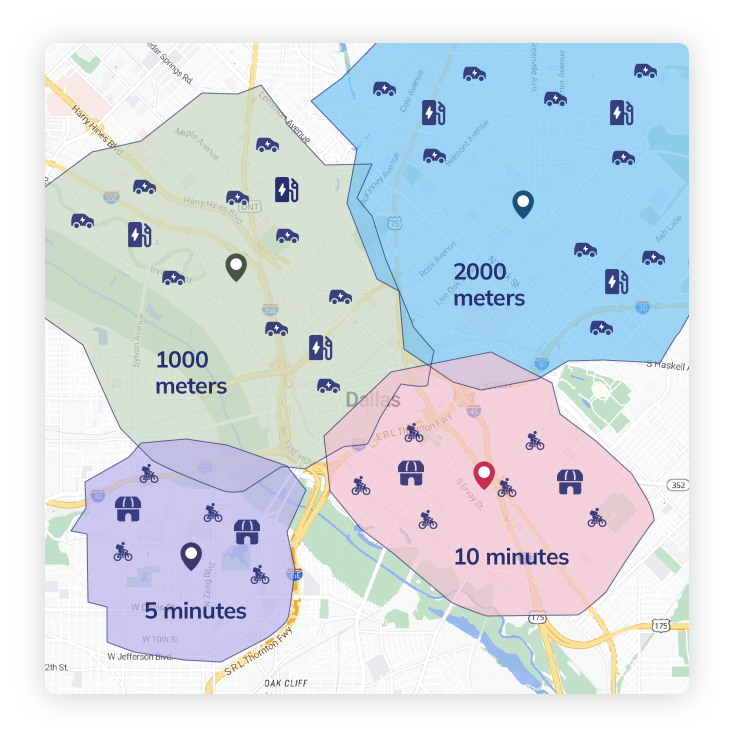
NextBillion.ai enables organisations to create geofences that are accurate to the operation areas in the real world. Using the API, you can create:
Each geofence has its own ID and metadata fields and coordinates. This allows teams to establish visit-checking limits of customer outlets, distribution centres, inspection sites, kiosks, retail stores, and so on.
The API is used to support the entire lifecycle:
Thousands of geofences are easily maintained since routes are changed, sites are added, or new service territories are introduced.
The system has a rapid, dependable point-in-polygon and point-in-circle computer. You can immediately check a device which reports a GPS coordinate:
This allows automatic arrival/departure detection and allows periodic GPS pings as well as event triggers.
Although NextBillion.ai does not offer a native dispatch application, its Geofence API can be used to automate workflows in your existing systems, including:
The API is the logic layer, you bind it to your internal processes.
Tags enable you to arrange geofences by:
This facilitates rapid access, processing, and scalability, particularly in operations involving hundreds of repetitive service points.
Adopting geofencing does not require replacing your tools. You only integrate a new API layer.
Create an account on NextBillion.ai and create an API key to verify Geofence API requests.
Using your route, customer, or asset master data, call the Geofence API to:
Connect location streams, normally from:
Your backend transmits coordinates to the Geofence API or resorts to your geofence look up logic based on NextBillion APIs.
Every GPS ping can be checked against your geofences:
This replaces manual check-ins with automatic verification.
Use geofence entry or exit results to:
The business logic belongs to your system, and the Geofence API is the source of the correct spatial validation.
You can:
This will guarantee reliability and quality data.
NextBillion.ai does not offer a dispatch engine, but you can use its geofencing logic:
This makes your automation elastic and within the control of your organisation.
Integrating technology such as geofencing and GPS tracking into your field service operations is 100% dependent on context and the nature of your business in the real world. Make a decision that is logical to you, your team and your customers. In general:
Experience automated, accurate stop verification with geofencing built directly into your routes and driver app. Save time, eliminate errors, and boost operational efficiency from day one. Book your demo today.
Bhavisha Bhatia is a Computer Science graduate with a passion for writing technical blogs that make complex technical concepts engaging and easy to understand. She is intrigued by the technological developments shaping the course of the world and the beautiful nature around us.